🧠 AI Quiz
Think you really understand Artificial Intelligence?
Test yourself and see how well you know the world of AI.
Answer AI-related questions, compete with other users, and prove that
you’re among the best when it comes to AI knowledge.
Reach the top of our leaderboard.


















Gemini AI Photo Editor
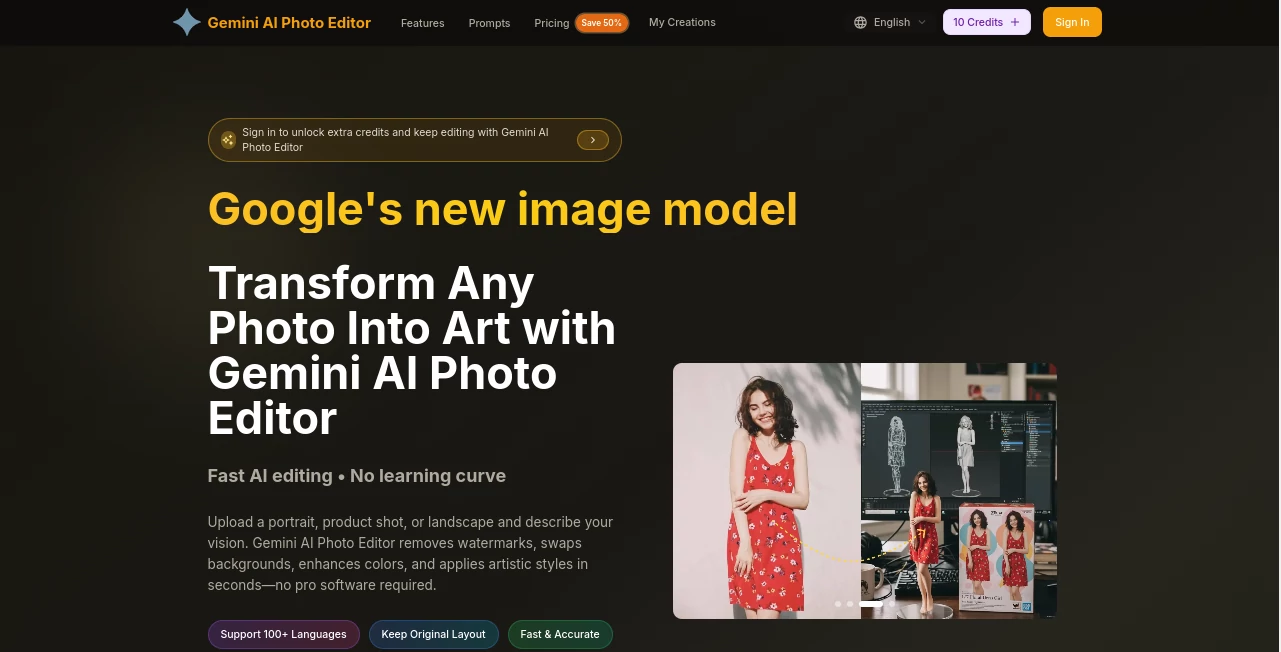
What is Gemini AI Photo Editor?
There’s a quiet thrill in opening a photo that’s almost there but not quite, then watching it transform in seconds into something that looks like it came from a seasoned retoucher. This editor captures that feeling perfectly—every adjustment feels thoughtful, never overdone, and the results carry a natural polish that makes you want to revisit old shots just to see what’s possible now. It’s the kind of tool that quietly changes how you see your own images.
Introduction
Most people don’t have hours to spend in layers and masks, yet they still want photos that look intentional and clean. This platform meets that need head-on: it combines powerful AI enhancements with controls that feel intuitive rather than intimidating. I’ve gone back to family portraits that were slightly underexposed or had awkward lighting, and within a minute or two they looked like they belonged in a frame. What stands out most is how consistently it preserves personality—skin tones stay believable, eyes keep their spark, backgrounds don’t turn cartoonish. It’s less about “fixing” and more about revealing what was already beautiful.
Key Features
User Interface
The layout is calm and focused. You drop your photo in the center, tools appear on the right in a logical order, and every slider or toggle gives instant feedback without lag. There’s no toolbar overload or hidden sub-menus; even someone who rarely edits can figure out the flow in under thirty seconds. I appreciate how the preview stays large and responsive even on smaller screens—makes late-night touch-ups feel effortless.
Accuracy & Performance
The engine behind it is remarkably precise. Skin retouching smooths without erasing texture, object removal fills gaps intelligently (no weird smears), and color corrections adapt to lighting conditions rather than applying blanket filters. Processing is fast—most enhancements finish in under five seconds—and the quality holds up even when you zoom in to pixel level. In real use, I’ve seen portraits go from “good enough” to “wow” without looking retouched.
Capabilities
It covers the essentials beautifully: one-click enhancements, portrait-specific retouching (eyes, teeth, skin), background blur or replacement, object removal, color grading, upscaling, and even generative fill for small missing areas. The strength lies in balance—nothing ever feels exaggerated unless you push it there on purpose. Upscaling is particularly impressive; low-res social media shots come out sharp and detailed without noise or artifacts.
Security & Privacy
Photos are processed securely and deleted from servers shortly after editing. There’s no account required for basic use, which adds a layer of comfort when you’re working with personal images. It’s the kind of quiet respect for user data that matters more than flashy promises.
Use Cases
Photographers use it to batch-correct client proofs quickly while keeping skin tones natural. Social media creators turn smartphone snaps into polished posts in under a minute. Small business owners refresh product photos—remove dust, brighten backgrounds—without hiring a retoucher. Parents enhance family pictures for prints or holiday cards, preserving genuine expressions instead of over-filtering them. It fits anywhere you want better-looking photos without losing authenticity.
Pros and Cons
Pros:
- Results look natural even when you push hard—rare in AI editors.
- Fast, responsive, and works smoothly on both desktop and mobile.
- Generous free tier lets you actually finish real projects.
- Smart enough to understand context (skin vs fabric vs sky).
Cons:
- Some very complex scenes (heavy occlusion, extreme lighting) may need manual help.
- Free version includes a small watermark on exports.
Pricing Plans
The free tier is surprisingly usable: full access to core tools, no forced sign-up, just a discreet watermark on downloads. Paid plans remove the watermark, unlock higher resolution exports, priority processing, and unlimited batch edits. Pricing stays reasonable—monthly or annual options—and feels fair given the quality jump you get. It’s one of those rare tools where upgrading actually feels worth it rather than punitive.
How to Use Geminiai Photo Editor
Drag your photo into the center area or click to browse. Wait a second for the AI to analyze it, then browse the suggested enhancements on the right. Click the ones you like (auto-enhance, portrait retouch, background blur, etc.)—they stack non-destructively. Fine-tune sliders if needed, preview at full size, and export when happy. For removal or fill tasks, brush over the area and let the AI handle the rest. Whole process usually takes under two minutes for a single strong edit.
Comparison with Similar Tools
Many AI editors lean heavily on dramatic filters or cartoonish effects—this one prioritizes realism and subtlety instead. Where others over-smooth skin or create obvious halos around cutouts, the blending and lighting here stay convincing. It’s not trying to be everything to everyone; it’s focused on making real photos look their best, and that restraint makes the output more trustworthy for professional or personal use.
Conclusion
Good photos deserve to look their best without losing their soul. This editor gets that. It quietly elevates ordinary images into something worth printing, sharing, or framing—without turning people into plastic dolls or skies into oil paintings. If you’ve ever wished your phone shots could look more intentional, this is one of the most satisfying answers out there right now. Try it once. You’ll probably go back to your camera roll and start smiling at pictures you used to skip over.
Frequently Asked Questions (FAQ)
Do I need to create an account?
No—start editing right away. Sign-up is optional and only needed for saving projects or removing watermarks.
What’s the maximum resolution?
Free exports go up to 4K with watermark; paid unlocks higher-res and no branding.
Can it fix very old/low-quality photos?
Yes—upscaling and denoising work surprisingly well on grainy or faded images.
Does it work well on portraits of all skin tones?
It handles diverse tones thoughtfully—no unnatural graying or over-lightening.
Is the watermark removable?
Yes—on any paid plan, exports are completely clean.
AI Photo & Image Generator , Photo & Image Editor , AI Photo Enhancer , AI Image to Image .
These classifications represent its core capabilities and areas of application. For related tools, explore the linked categories above.
Gemini AI Photo Editor details
Pricing
- Free
Apps
- Web Tools
Categories

Gemini AI Photo Editor Alternatives Product

square face …
Change-BG

PostPlus AI

ShinePhoto

AI Ease AI P…

Upscale image

Z image AI

Sovibe AI

GTA AI