
🧠 AI Quiz
Think you really understand Artificial Intelligence?
Test yourself and see how well you know the world of AI.
Answer AI-related questions, compete with other users, and prove that
you’re among the best when it comes to AI knowledge.
Reach the top of our leaderboard.


















GPT Image 1.5

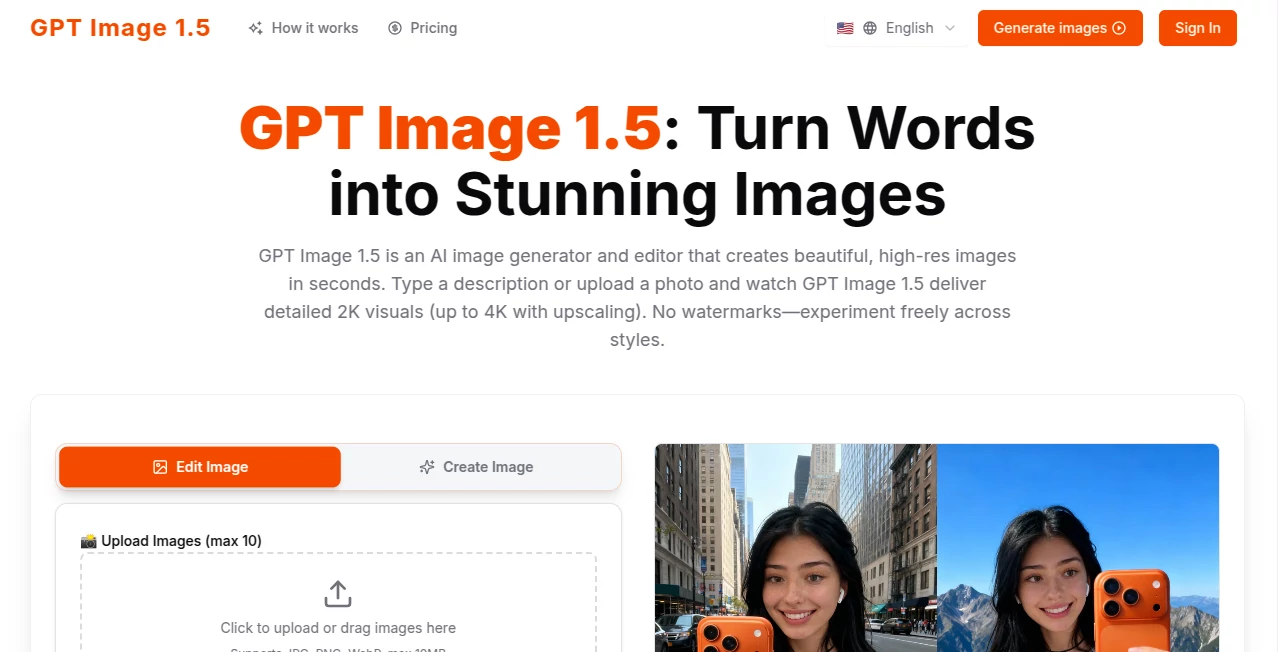
What is GPT Image 1.5?
There's something downright thrilling about typing a wild idea and seeing a crisp, detailed picture pop up almost instantly—no fuss, no watermarks, just pure visual magic. This tool nails that rush, churning out high-res beauties from simple descriptions or uploaded snaps, often with that extra polish that makes you pause and admire. A buddy of mine, who's always sketching concepts for his freelance gigs, swears it's cut his turnaround time in half, letting him experiment wildly without the usual regrets over blurry or off-mark results.
Introduction
At a time when visuals rule the feed, having a reliable way to whip up custom images on demand feels like a superpower. This platform delivers just that, blending text-to-image generation with smart editing that keeps things consistent and pro-looking. Upload a photo for tweaks—like swapping outfits or scenes— or start from scratch with a prompt, and it handles the heavy lifting with impressive fidelity. Free to dive in without signing up hurdles, it's drawn a crowd of designers, marketers, and casual creators who appreciate the no-nonsense approach and the freedom to iterate until it clicks. What stands out is how it remembers references across runs, replicating faces or objects faithfully, turning one-off ideas into cohesive sets that feel thoughtfully crafted.
Key Features
User Interface
It keeps things delightfully simple: a big prompt box up top, spots for uploading references, and clear buttons to fire off generations without digging through menus. Results stack neatly below, easy to download or refine, and the whole vibe is responsive whether you're on desktop or poking at it from your phone. My first session felt like chatting with a talented artist who gets it right away—no overwhelming options, just enough controls to guide without stifling the fun.
Accuracy & Performance
Edits stick close to your instructions, preserving faces, lighting, and vibes while nailing specifics like makeup shifts or background swaps. Generations fly out in seconds, hitting 2K detail standard with optional 4K boosts that sharpen without artifacts. It's that balance of speed and precision that impresses—rarely veering off into weird territory, even with packed prompts involving multiple elements.
Capabilities
Mix multiple references for blended outputs, apply moods or styles freely, and watch it replicate characters or objects across variations with eerie consistency. Supports common formats up to a generous size limit, making it versatile for everything from quick mocks to polished finals. The real charm lies in conversational tweaks—build on previous results seamlessly, layering changes that accumulate intelligently.
Security & Privacy
Your uploads and creations get processed with care, no lingering data grabs or shares without clear consent, fitting snugly for professional flows where discretion matters. It's reassuring for teams handling client assets or personal projects, offering that quiet confidence to create boldly.
Use Cases
E-commerce folks refresh product shots endlessly, swapping seasons or settings to keep listings fresh without new photoshoots. Marketers prototype campaign visuals, testing headlines embedded in scenes that render text flawlessly. Designers maintain character consistency across storyboards, reusing faces for series that feel unified. Content creators churn mood boards or social graphics, blending references for unique twists that stand out in crowded feeds.
Pros and Cons
Pros:
- Lightning-quick outputs that encourage endless experimentation.
- Top-notch consistency for references, saving redo headaches.
- Clean, watermark-free results even on exploratory runs.
- Barrier-free start that welcomes casual and committed users alike.
Cons:
- File size caps might nudge bigger projects toward splits.
- Occasional need for prompt tweaks on super-nuanced asks.
Pricing Plans
A solid free tier lets you jump right in and generate without commitments, ideal for testing ideas or lighter needs. Paid options unlock higher volumes, faster queues, and perhaps upscaling perks, structured to scale with your ambition—check the site for current details, as they keep things flexible and fair.
How to Use GPT Image 1.5
Land on the page, type your vision or upload a starting photo, add any references for consistency, and submit—watch variants appear almost immediately. Grab favorites, refine with follow-up prompts that build on them, and download in high res. It's addictive in the best way; one evening I started with a casual portrait tweak and ended up with a whole series of styled variations, each better than the last.
Comparison with Similar Tools
While many generators churn basics reliably, this one edges ahead with superior editing fidelity and reference memory, making iterative work feel smoother and more professional. It's less about sheer volume of styles and more about nailing your specific intent, often with cleaner text integration and composition holds that others muddle. For anyone prioritizing precision over flash, it's the thoughtful choice that delivers where it counts.
Conclusion
This tool quietly redefines what's possible with a prompt and a photo, offering that rare mix of speed, smarts, and reliability that turns fleeting ideas into lasting visuals. It's empowering for creators at any level, stripping away barriers so the focus stays on the art itself. Give it a spin with something personal—you might just find your new favorite way to bring thoughts to life.
Frequently Asked Questions (FAQ)
Do I need to sign up to start?
Nope—dive straight in for immediate generations, signup optional for saving history.
What resolutions are available?
Detailed 2K standard, with upscaling paths to crisp 4K.
How many references can I use?
Multiple, blended intelligently for consistent outputs across runs.
Are there watermarks?
None at all—full freedom to use as you like.
Supported file types?
JPG, PNG, WebP, keeping uploads straightforward.
AI Text to Image , AI Photo & Image Generator , Photo & Image Editor , AI Art Generator .
These classifications represent its core capabilities and areas of application. For related tools, explore the linked categories above.
GPT Image 1.5 details
This tool is no longer available on submitaitools.org; find alternatives on Alternative to GPT Image 1.5.
Pricing
- Free
Apps
- Web Tools
Categories

GPT Image 1.5 Alternatives Product

Gpt Image 1.5
GPT Image 1.5
Nano Figure

Nano Banana …

ChatGPT Imag…

Qwen Image

Paper Animat…

Ultra Face S…

Pixelied
