🧠 AI Quiz
Think you really understand Artificial Intelligence?
Test yourself and see how well you know the world of AI.
Answer AI-related questions, compete with other users, and prove that
you’re among the best when it comes to AI knowledge.
Reach the top of our leaderboard.


















Greetings Island - AI invitation generator

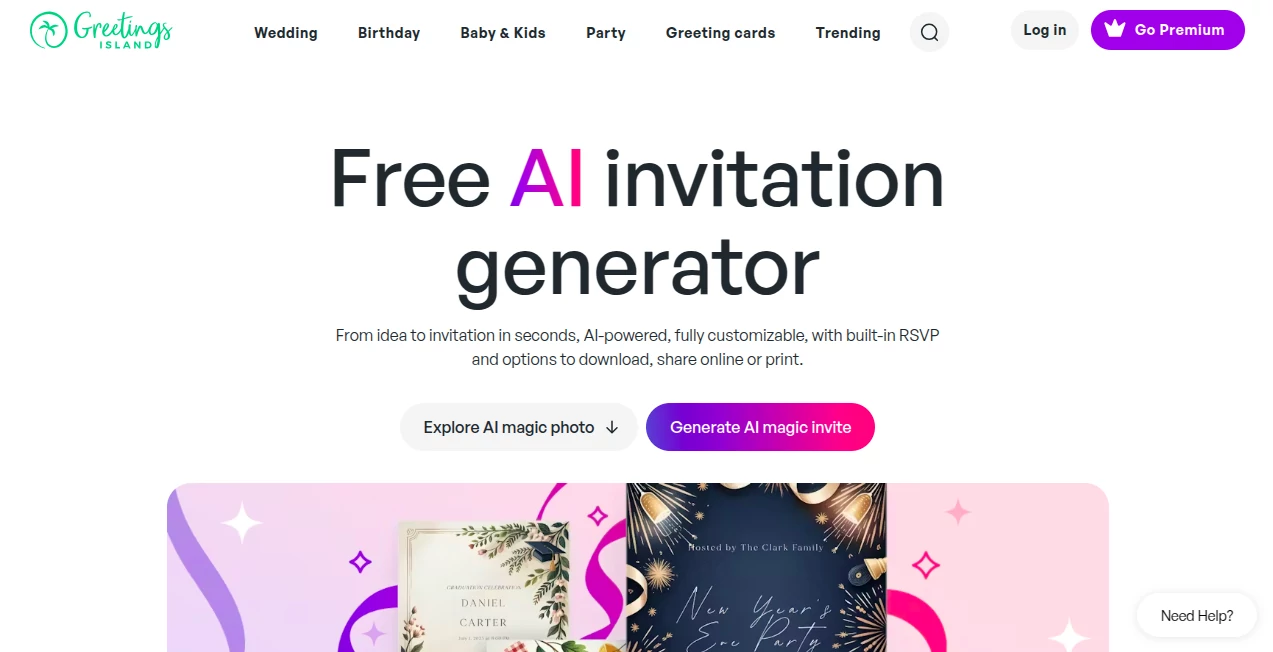
What is Greetings Island - AI invitation generator?
AI Invitation Generator opens the door to effortless event planning, where a handful of words about your gathering spins into a polished card ready to send out. This handy feature pulls together the excitement of a celebration into something shareable and sharp, saving hosts the rush of starting from a blank slate. Those who've used it often share how it captures the feel of their big day just right, turning simple notes into notices that guests can't ignore.
Introduction
AI Invitation Generator came along as part of a broader push to make special moments easier to announce, drawing from the everyday challenges of folks juggling details while dreaming up designs. It caught on quick with party throwers who wanted something beyond basic templates, praising the way it listens to their stories and shapes them into something personal. Over time, it's become a quiet staple for everything from quiet family dinners to grand get-togethers, with users passing along tips on how to nudge it toward that perfect touch. What draws people back is the blend of speed and sincerity, making announcements feel handpicked rather than hurried, and keeping the focus on the joy ahead.
Key Features
User Interface
The setup greets you with a welcoming prompt box that invites your event rundown in everyday words, alongside easy picks for looks and shades to guide the outcome. Once it shapes up, a straightforward editor lets you shift pieces around, swap typefaces, or sprinkle in extras like icons or snapshots, all without layers of menus getting in the way. It's the sort of flow that feels natural after a glance, like jotting a quick message that comes back dressed up and ready to go.
Accuracy & Performance
Lay out your gathering's gist—who, when, where, and the mood—and it pulls together a layout that echoes those notes closely, often nailing the balance between fun and formal on the first try. The whole thing wraps up in moments, even with fuller descriptions, handing over something solid you can build on right away. Hosts appreciate how it holds steady to the details you drop in, dodging the loose ends that can leave you tweaking endlessly.
Capabilities
It handles the full sweep from casual cookouts to tied-the-knot notices, weaving in spots for replies, wish lists, or directions with a single nudge. Toss in a personal picture, and it folds that into the frame for a warmer welcome, while the editing room lets you layer on more for that custom curl. Beyond the basics, it supports a range of gatherings, from little one's firsts to work wins, always leaving room to refine as the plans firm up.
Security & Privacy
Your shared stories and snapshots stay close to the chest, handled fresh for the task at hand and not passed along for other uses, giving you that easy trust to pour in the personal bits. It keeps things straightforward on the safeguard side, focusing on getting your creation out without the extra worries about where the details drift off to.
Use Cases
New parents sketch out a shower spread with soft hues and sweet nods to the bump, pulling in a family shot to make it feel like home from the start. Wedding planners outline the big ask with elegant swirls and spots for the yes-or-no, linking straight to the map for out-of-towners. Office leads whip up a team huddle card with bold colors and quick-add details for the agenda, keeping everyone looped without the last-minute scramble. Even holiday hosts dash off a merry note with festive touches, adding a reply link to tally who's bringing the pie.
Pros and Cons
Pros:
- Turns rambling rundowns into ready pieces without the wait.
- Hands over full reins to tweak till it feels just yours.
- Folds in handy extras like replies or routes in a snap.
- Stays light on the pocket for most merry-making needs.
Cons:
- Relies on clear cues to hit the mark; fuzzy ones might need a redo.
- Steps up to paid for the full spread of sends and saves.
- Best on straightforward scenes—wild themes call for extra nudges.
Pricing Plans
You can jump in without a dime for the core crafting, spinning out designs to play with at no upfront cost. For those wanting to whisk them away or widen the reach, a step-up option brings in more turns and unlocks the full send-out suite, with bundles that fit steady celebrators. The entry stays open and easy, letting you test the waters before tipping toward the extras.
How to Use AI Invitation Generator
Start by spilling the beans on your bash—who's hosting, the when and where, the what's-what, and any fun flourishes like colors or critters. Let it mull that over for a beat, then peek at the preview and poke around in the polisher to shift texts or toss in treasures. When it sings, grab it for the gram, the printer, or the post, and if you added a reply spot, watch the winks roll in as the crowd chimes back.
Comparison with Similar Tools
Unlike chatty helpers that hand back stiff pictures hard to fiddle with, AI Invitation Generator serves up something you can reshape on the spot, bridging the gap to real-world rolls without extra hops. Against template troves that box you in, it starts from your story for a fresher fit, though those might stack more ready-mades for the rush-hour host. It shines for those craving a personal punch over plug-and-play picks.
Conclusion
AI Invitation Generator wraps the whirlwind of welcoming into a whisper of work, handing over heartfelt headers that hit home. It turns the task of telling into a treat, proving that a smart nudge can make announcements as warm as the events they herald. As gatherings keep calling us together, this one's a steadfast sidekick, ready to raise the curtain on moments worth marking.
Frequently Asked Questions (FAQ)
Can it handle any kind of get-together?
From tying knots to tiny tots, it molds to most merry moods with the right rundown.
Is there a cost to kick things off?
Nah, the starting spin is free, though extras like endless exports edge toward easy fees.
How much wiggle room for changes?
Plenty—swap scripts, shuffle shapes, or sprinkle stickers to suit your style.
Can I weave in ways for guests to weigh in?
Yep, drop in reply spots or route links with a quick click to keep tabs tidy.
What about keeping my notes under wraps?
Your tales and treasures stay snug, used just for the craft and not carted elsewhere.
AI Creative Writing , AI Design Generator , AI Fun Tools .
These classifications represent its core capabilities and areas of application. For related tools, explore the linked categories above.
Greetings Island - AI invitation generator details
This tool is no longer available on submitaitools.org; find alternatives on Alternative to Greetings Island - AI invitation generator.
Pricing
- Free
Apps
- Web Tools
Categories

Greetings Island - AI invitation generator Alternatives Product

Kitchendary

bananaai.app

AI Dream Ana…

PrompTessor

Nano Banana 2
Fuser Studio

Nano Banana …
Kirkify Al

chibi art