
🧠 AI Quiz
Think you really understand Artificial Intelligence?
Test yourself and see how well you know the world of AI.
Answer AI-related questions, compete with other users, and prove that
you’re among the best when it comes to AI knowledge.
Reach the top of our leaderboard.


















HandbookHub

What is HandbookHub?
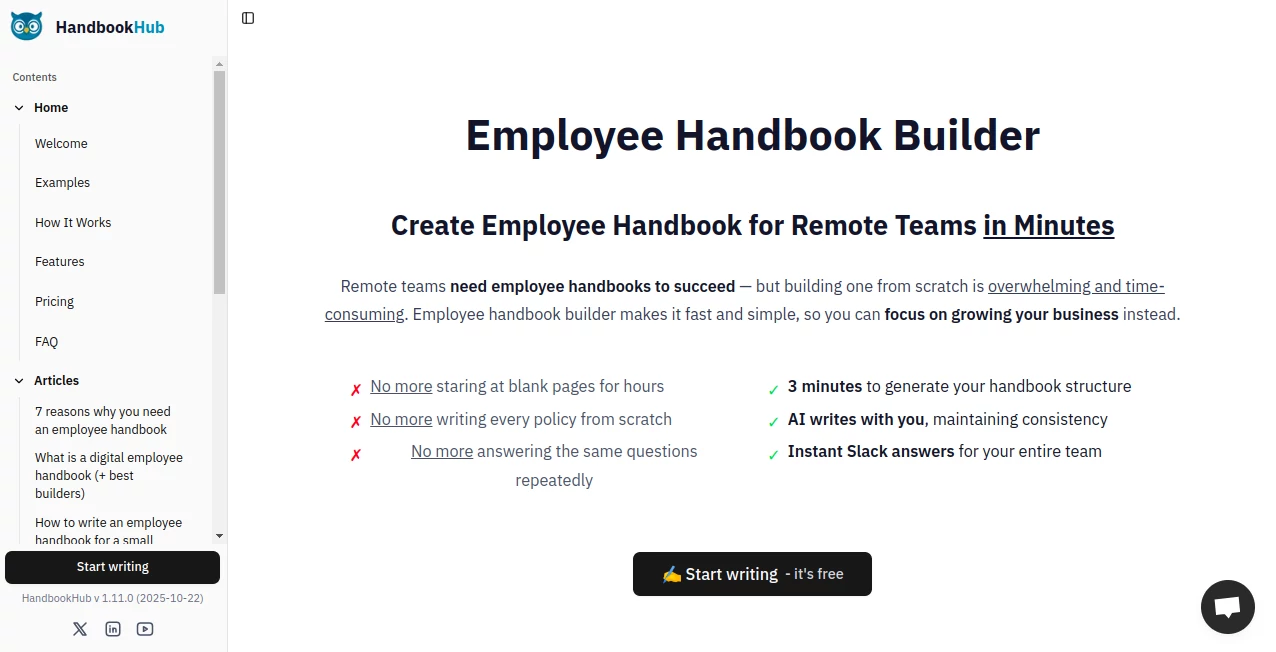
HandbookHub steps in as a smart sidekick for growing teams, whipping up clear guides that lay out the rules and rhythms of work life without the usual paperwork pile-up. This handy spot lets managers sketch out company vibes and policies through a quick chat, then fills in the blanks with thoughtful drafts that feel right at home. Leaders who've tapped it often nod to how it cuts the chaos, turning scattered notes into a single spot everyone can turn to when questions bubble up.
Introduction
HandbookHub took shape from the real-world rubs of remote setups, where founders saw too many chats clogged with the same "how does this work?" loops. They pieced it together as a way to bottle best practices into something fresh and fast, drawing nods from outfits that keep things open like Basecamp or GitLab. It landed quietly but spread through word-of-mouth in manager circles, with stories of handbooks that went from blank page to team-ready in a lunch break. What draws folks back is that gentle nudge toward consistency, ensuring every section sings the same tune without feeling forced or flat.
Key Features
User Interface
The main view unfolds like a shared notebook, with a sidebar outlining sections that you can expand or shuffle with a drag. A chat-like box invites your company rundown, and as you type, suggestions pop in soft, keeping the flow natural without overwhelming the screen. Tabs for edits and shares sit tidy at the top, and the whole thing scales smooth on laptops or phones, making it easy to poke in from a coffee run or a late-night tweak.
Accuracy & Performance
It listens close to your setup, pulling in details like team size or work style to craft bits that fit snug, often nailing the tone on the first go. Drafts land quick—under three minutes for a full frame—without hiccups, even as you layer in custom twists. Managers point out how it keeps things even across pages, dodging those mismatched phrases that trip up readers and make revisions a chore.
Capabilities
From outlining perks and processes to weaving in culture notes, it builds a full spread that's ready to roll, with hooks to chat apps for on-the-spot lookups. You can fine-tune with built-in helpers that suggest fixes or fill gaps, and it ties into team tools for seamless shares. The real stretch comes in ongoing tweaks, where changes ripple through without redoing the whole thing, keeping your guide alive as the team grows.
Security & Privacy
Access stays locked to who needs it, with simple roles that let leads tweak and others just peek, all wrapped in standard safeguards that keep sensitive spots safe. It handles the basics quietly, clearing temps after sessions and giving you the reins on what gets shared outside. That straightforward shield lets small crews breathe easy, knowing their inner workings won't spill without a nod.
Use Cases
Startup heads use it to map out first hires' welcome packs, blending remote tips with quick policy sketches to set a steady start. HR folks in spread-out shops refresh yearly rundowns, pulling in fresh rules without starting over. Team leads drop it into daily chats for instant answers on time off or tools, cutting the back-and-forth that eats hours. Even solo operators craft client briefs that mirror their style, turning one-offs into repeatable roadmaps.
Pros and Cons
Pros:
- Sparks a solid frame fast, freeing time for the meaty bits.
- Keeps voice steady across the board, no jarring shifts.
- Ties right into chat flows for real-time reaches.
- Grows with you, from lone wolves to full packs.
Cons:
- Free runs cap the word count, teasing bigger builds.
- Best with clear starting points—fuzzy details need extra nudges.
- Advanced shares lock behind the paid door.
Pricing Plans
The entry point sits free, covering a basic build with enough words for small setups and one teammate peek. For fuller sails, the main plan lands at forty-nine bucks monthly, unlocking endless drafts, bigger crews, and extras like history tracks and quick help. It skips the card upfront, letting you test the waters wide, with yearly dips to soften the spend if you stick around.
How to Use HandbookHub
Sign in with a quick email, then spill your company snapshot into the starter chat—size, style, quirks and all. Watch the outline bloom, then dive in to shape sections with the helper's hints or your own hand. Hook it to your group chat for easy pulls, assign peeks to the team, and grab a clean print when it's polished. Swing back as things shift, refreshing bits to keep it current without the full rewrite.
Comparison with Similar Tools
Where some setups demand templates that feel stiff, HandbookHub bends with your words, though those might stack more stock options for cookie-cutter crews. Against full doc hubs, it zeros in on the guide game, skipping the sprawl but perhaps missing broad file folds. It shines for quick, tailored team tales, edging out the generalists with that focused flair.
Conclusion
HandbookHub wraps the hassle of house rules into a neat, nimble package, letting leaders craft clarity that sticks without stealing the spotlight. It turns the must-do into something that sparks pride, fostering teams that hum smoother from day one. As work worlds keep widening, this quiet builder stands ready, turning scattered setups into stories worth sharing.
Frequently Asked Questions (FAQ)
How quick does the first draft land?
Under three minutes for the bones, then layer in as you like.
Can I tweak the drafts freely?
Yes, it's your canvas—edit away or let the helper fill holes.
Does it play nice with chat apps?
Spot on, with pulls for questions right in the flow.
What's the free side cover?
Basics for one guide and a touch of help, no strings.
How about keeping things private?
Roles lock it down, with edits for leads and reads for the rest.
AI Knowledge Base , AI Team Collaboration , AI SOP , AI Documents Assistant .
These classifications represent its core capabilities and areas of application. For related tools, explore the linked categories above.
HandbookHub details
This tool is no longer available on submitaitools.org; find alternatives on Alternative to HandbookHub.
Pricing
- Free
Apps
- Web Tools
Categories

HandbookHub Alternatives Product

Clay Read

Slackactivity

MacroMicro

Helploom

Candidate Sc…

Jamy.ai | Au…

AI OCR

LocalRAG!

Miro
