
🧠 AI Quiz
Think you really understand Artificial Intelligence?
Test yourself and see how well you know the world of AI.
Answer AI-related questions, compete with other users, and prove that
you’re among the best when it comes to AI knowledge.
Reach the top of our leaderboard.


















HeadshotBook

What is HeadshotBook?
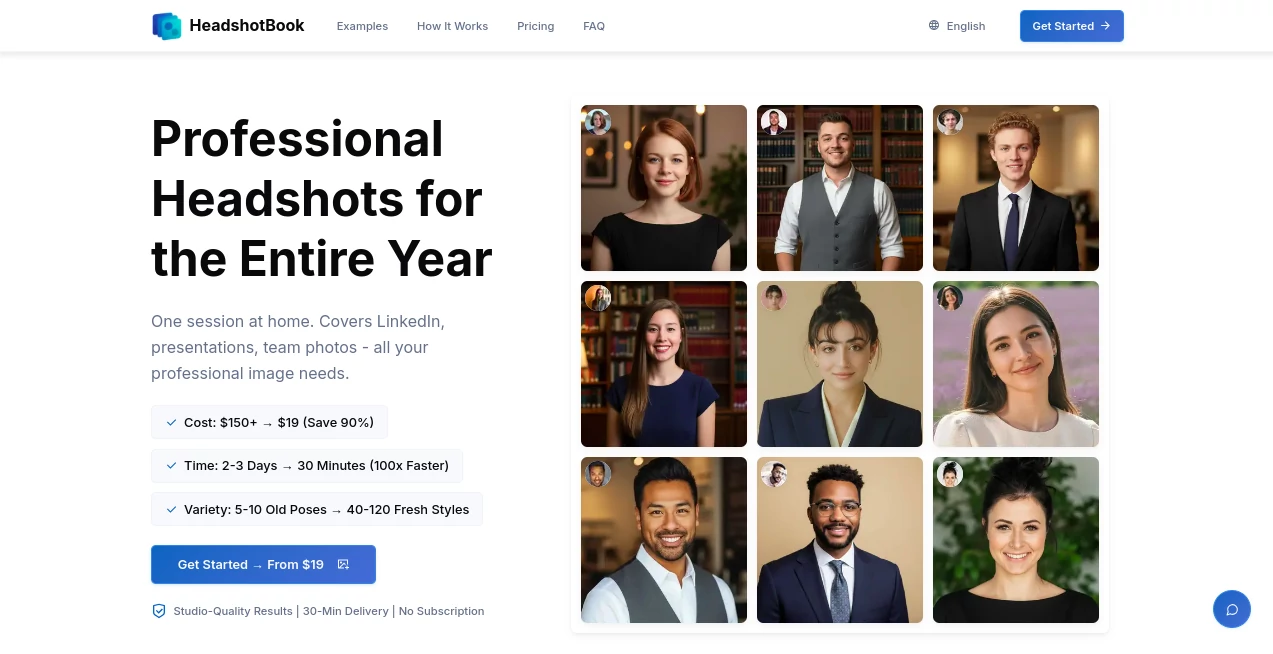
HeadshotBook steps in as a handy shortcut for anyone needing sharp, pro-level profile pictures without the hassle of booking a photographer or posing under bright lights. Just snap a few casual shots on your phone, pick a vibe, and let the system do the rest, handing back a batch of polished images ready for your resume or social feeds. It's caught on quick with job hunters and networkers who appreciate ditching the stiff sessions for something that fits their schedule and wallet, often sharing how it gave their online presence that extra polish without the usual fuss.
Introduction
HeadshotBook came about when a few folks in the creative and business worlds got tired of shelling out big bucks for headshots that felt cookie-cutter and time-consuming to set up. They pieced together this online spot to make the process as easy as scrolling through your camera roll, and it took off among professionals looking to refresh their look without the ordeal. Now, it's a go-to for those moments when you need to look your best online, whether landing a new gig or updating your company page. Users keep coming back, swapping tips on how it turned a goofy mirror selfie into something boardroom-ready, proving that a little tech can go a long way in capturing your best side.
Key Features
User Interface
The setup feels welcoming right from the start, with a simple upload area that grabs your photos in seconds and a preview wheel where you can swap styles on the fly, seeing how you'd look against different backdrops or outfits. Everything's laid out in big, tappable icons—no tiny menus or confusing steps—and it works smooth on your phone or laptop, making the whole thing feel like browsing a style catalog rather than wrestling with an app.
Accuracy & Performance
It sizes up your uploads quick to flag if the lighting's off, then spits out images that hold true to your features, with details like hair and expressions coming through crisp and natural. Turnaround's a breeze, wrapping up in as little as half an hour for the speedy options, so you get a full set without hanging around. Folks who've run it through the paces say the results stack up against real studio work, especially when you start with decent shots, keeping things reliable without the random glitches.
Capabilities
From a handful of everyday snaps, it brews up dozens of variations across outfits and settings, tossing in extras like sharper versions for those times you need to zoom in close. You can steer it toward specific looks, like corporate clean or creative flair, and it handles the tweaks to fit various spots, from profile pics to full team spreads. It's built for breadth, giving you enough choices to match any mood without repeating the upload dance.
Security & Privacy
Your pictures get locked down tight from the moment they land, stored short-term and scrubbed clean once you're done, with no chance of them feeding into other projects or popping up elsewhere. You hold the keys to delete or download, keeping things in your hands, and the whole setup follows the rules that put your mind at ease about sharing your face online.
Use Cases
Job seekers grab a fresh set to top their applications, picking suits that scream "hire me" without the suit-up stress. Entrepreneurs update their site headshots to match the brand's fresh direction, blending in team vibes for a united front. Presenters pull quick portraits for slides that pop, while social sharers stock up on options that shift with the seasons, all from one easy afternoon at home.
Pros and Cons
Pros:
- Wraps things up fast, often in under an hour, beating the wait for appointments.
- Packs in plenty of picks from just a few snaps, way more than a single shoot yields.
- Light on the budget compared to hiring help, with bundles that add value.
- Stays put at home, no travel or awkward small talk required.
Cons:
- Needs solid starting photos; dim ones might need a retake.
- Longer waits on the entry level, though still quicker than old ways.
- Less hands-on for super-specific poses compared to a live session.
Pricing Plans
The entry point sits at a one-and-done nineteen bucks for forty images across four looks, with a couple hours' turnaround and a few sharper bonuses thrown in. Bump to twenty-nine for double the count and styles, plus quicker delivery and support that feels personal. At forty-nine, you get the full spread of over a hundred shots in a dozen flavors, express speed, and packs tailored for networking sites, all backed by a no-questions return window to test the fit.
How to Use HeadshotBook
Start by picking a quiet spot with good light, snap four or five clear selfies from different angles, and load them up—it'll check the quality on the spot. Browse the style thumbnails to flag your favorites, sit back for the magic to happen, then snag the downloads in whatever resolution suits. From there, slot them into your profiles or prints, and you're set to make that first impression count.
Comparison with Similar Tools
Against the old-school route of studio visits, it skips the scheduling shuffle and steep tabs, though those might offer more custom chats for tricky requests. Next to other digital quick-fixes, it edges out with faster finishes and no ongoing fees, but could trail in raw variety for folks chasing ultra-niche tweaks. Overall, it hits the sweet spot for most, blending ease and output without the extras that bog others down.
Conclusion
HeadshotBook wraps up the chase for standout portraits by making the process feel less like work and more like a quick win, handing you images that open doors without the doorslams of outdated options. It shines for those everyday pros who need to look sharp online, proving that your best shot might just be the one from your mirror. As more folks lean into virtual first impressions, this one's poised to keep simplifying the spotlight.
Frequently Asked Questions (FAQ)
What makes a good selfie for this?
Aim for even light on your face, neutral backdrop, and a few angles to give it room to work.
How long until I see results?
From thirty minutes on the fast track to two hours for the basics, depending on your pick.
Can I get money back if it's not right?
Yes, a full week's grace to decide, no hard feelings.
What if I need it for a group?
It handles singles best, but teams often run batches for matching sets.
Are the extras worth the upgrade?
For frequent users, the speed and variety tip the scales nicely.
AI Photo & Image Generator , Photo & Image Editor , AI Photo Enhancer , AI Selfie & Portrait .
These classifications represent its core capabilities and areas of application. For related tools, explore the linked categories above.
HeadshotBook details
This tool is no longer available on submitaitools.org; find alternatives on Alternative to HeadshotBook.
Pricing
- Free
Apps
- Web Tools
Categories

HeadshotBook Alternatives Product

img2img.net

Image Unblur
upscayl

GTA AI

Brave Pink H…

Mage

Lexica AI
Remove Text

Flux 2 Cloud
