
🧠 AI Quiz
Think you really understand Artificial Intelligence?
Test yourself and see how well you know the world of AI.
Answer AI-related questions, compete with other users, and prove that
you’re among the best when it comes to AI knowledge.
Reach the top of our leaderboard.


















Headsnap
Elevate Your Profile with AI-Generated Headshots

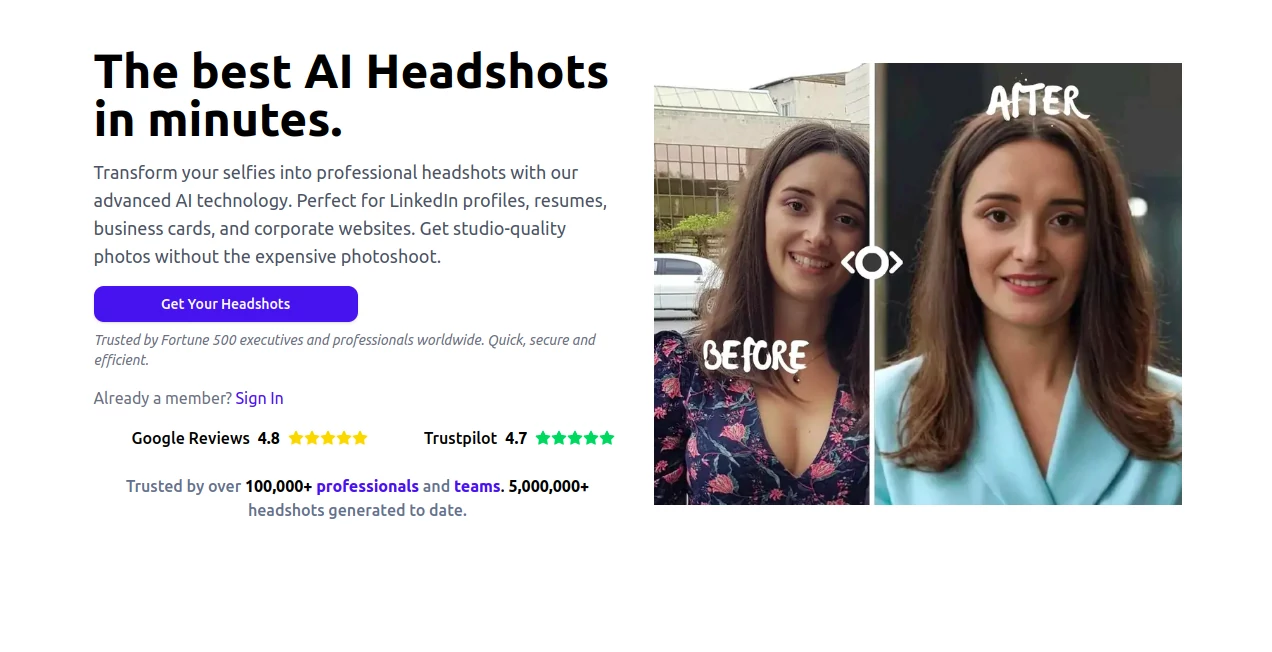
What is Headsnap?
Headsnap steps in as a game-changer for anyone needing sharp, professional portraits without the hassle of booking a session or fussing with lights. By simply sharing a few casual snaps, it crafts polished images that capture your best self, ready for everything from job hunts to social spotlights. Professionals and everyday users alike rave about how it turns ordinary selfies into standout visuals that open doors and spark connections.
Introduction
Headsnap burst onto the scene with a simple promise: make high-end portraits accessible to all, ditching the costly setups and stiff poses that often come with traditional shoots. It caught on fast among job seekers and networkers who needed quick refreshes for their online presence, sharing stories of interviews landed thanks to a fresh-faced profile pic. What started as a handy tool for a few has grown into a go-to for over a hundred thousand users, blending clever tech with real-world results that feel effortless. At its heart, it's about giving you the confidence of a studio shot from your living room, proving that a great image can be just a few clicks away.
Key Features
User Interface
The layout keeps things welcoming and straightforward, starting with a clear call to pick your style from a gallery of options that pop right on the homepage. Upload spots guide you gently, with tips on what makes a strong selfie, and a timeline teases the wait without overwhelming the screen. Once ready, your new shots arrive in a tidy download hub, easy to sort and share, making the whole journey feel like a quick chat rather than a chore.
Accuracy & Performance
It zeros in on your features with a keen eye, blending them into scenes that ring true to life, often nailing expressions and angles that pros would applaud. Turnarounds clock in around twenty minutes flat, with files crisp enough for prints or pixels, holding up under scrutiny without the usual digital glitches. Users point to how it preserves that personal spark, avoiding the uncanny vibes that can creep into lesser attempts.
Capabilities
From crisp business looks to lively social vibes, it spins out dozens of variations per go, complete with tailored backdrops and moods that fit the moment. You can aim for conference-ready poise or casual dating flair, all while keeping your core likeness intact. The output packs enough detail for commercial gigs, opening doors to uses beyond the personal, like team branding or event promos.
Security & Privacy
Your originals get a secure once-over and then wiped clean post-process, with no lingering copies unless you choose to keep them. It sticks to tight standards on handling, letting you focus on the fun without fretting over where your face might end up. That peace of mind has built a loyal crowd, especially those dipping toes into online sharing for the first time.
Use Cases
Job hunters refresh their LinkedIn glow-ups, landing nods from recruiters with shots that scream sharp and approachable. Speakers prep for stages with poised previews that match the mic's energy. Daters swap out tired pics for ones that draw real chats, while small teams kit out bios with consistent, pro-level uniformity. Even side-hustlers use it for product pitches, adding a face that builds instant trust.
Pros and Cons
Pros:
- Delivers a bundle of options from one set of snaps, saving time and tries.
- Hits that natural sweet spot, looking lived-in rather than labored.
- Quick enough for last-minute needs without cutting corners.
- Fits a range of scenes, from boardrooms to barstools.
Cons:
- Best with clear, solo selfies—group shots or hats can throw it off.
- Higher packs needed for endless tweaks or team shares.
- No instant tweaks; it's a wait-and-see on the full set.
Pricing Plans
The entry point hooks you with a starter bundle for basic boosts, stepping up to fuller sets for those craving variety. Mid-range picks suit the steady user, while the top tier unlocks the most shots for big ambitions, all with easy monthly or one-off dips. Trials and social shares sweeten the pot with freebies, keeping the barrier low for first-timers.
How to Use Headsnap
Pick a vibe from the style lineup that matches your goal, then load up four or so fresh selfies facing front and clear. Let it mull them over for about twenty minutes, checking your inbox for the ping when they're primed. Dive into the gallery of goodies, snag your faves in high gear, and slot them straight into your profiles or prints. Repeat with fresh angles for ongoing glow-ups.
Comparison with Similar Tools
Where some apps lean heavy on filters that flatten features, Headsnap keeps the depth real, trading flash for faithful fits—though those might win for wilder whims. Against full-suite editors, it skips the learning loop, focusing on the finish line but perhaps missing mid-game molds. It shines for the snapshot seeker wanting pro punch without the pro price.
Conclusion
Headsnap hands you the keys to a sharper self-image, blending brains with beauty to craft portraits that pull people in. It turns the mirror moment into a momentum builder, proving that a fresh face can freshen up more than just your feed. As online impressions keep climbing, this one's a steady ally, turning everyday snaps into edges that endure.
Frequently Asked Questions (FAQ)
What makes a good selfie for this?
Front-on, well-lit solos without shades or headwear work wonders for the best blends.
How long until I see results?
Around twenty minutes from upload to email drop, quick as a coffee break.
Can I use these for work stuff?
Absolutely, they're cleared for commercial kicks like ads or cards.
What if the style doesn't click?
Mix and match from the pack, or spin up a new set with different starters.
Do my pics stay safe?
Processed privately and deleted after, keeping things just between us.
Photo & Image Editor , AI Photo Enhancer , AI Photography , AI Selfie & Portrait .
These classifications represent its core capabilities and areas of application. For related tools, explore the linked categories above.
Headsnap details
This tool is no longer available on submitaitools.org; find alternatives on Alternative to Headsnap.
Pricing
- Free
Apps
- Web Tools
Categories

Headsnap Alternatives Product

ImgEnhancer

Professional…

Photo Locati…

Image Text E…
upscayl

Beard Remover

PostPlus AI

insMind

Seedream 4.5
