🧠 AI Quiz
Think you really understand Artificial Intelligence?
Test yourself and see how well you know the world of AI.
Answer AI-related questions, compete with other users, and prove that
you’re among the best when it comes to AI knowledge.
Reach the top of our leaderboard.


















iCreat AI

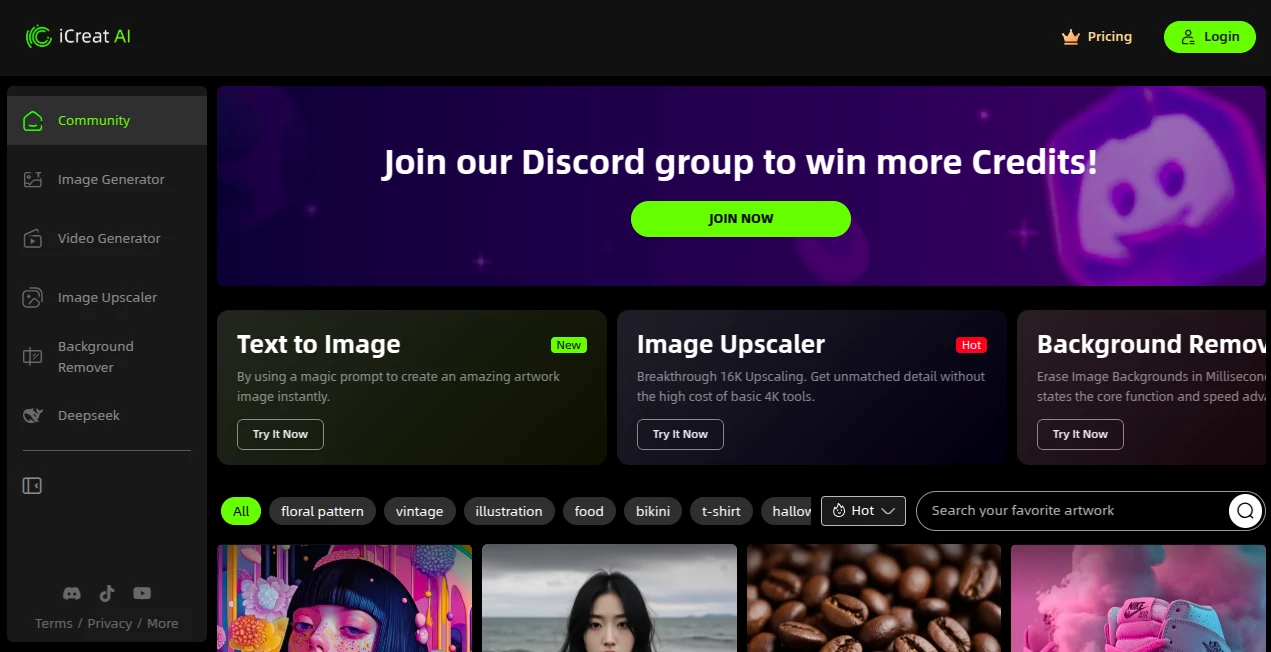
What is iCreat AI?
iCreat pulls together a world of visual wonders into one handy spot, letting creators spin up stunning pictures and clips from simple sparks of thought. This platform feels like a creative playground where ideas flow freely into eye-catching results, perfect for those who want to blend stills with motion without juggling a dozen apps. Many who've dived in talk about how it unlocks fresh ways to tell stories, turning quiet concepts into lively pieces that grab attention and hold it tight.
Introduction
iCreat took shape a short time ago, born from the hustle of makers who craved a single hub for their visual dreams instead of scattering efforts across scattered tools. It started with a focus on easy image builds but soon layered in video tricks that had users buzzing about seamless shifts from frame to footage. Over the months, feedback from everyday artists and pros alike has shaped it into a go-to for quick, quality outputs that feel personal yet pro. At its heart, it's about stripping away the barriers, so whether you're sketching a scene or scripting a short, the magic happens without the mess, fostering a flow that keeps the inspiration coming.
Key Features
User Interface
The dashboard opens wide with tabs that flip between picture and clip modes, each one sporting a clean prompt box that invites your words without overwhelming with options. Drag in extras like base images or tunes, and the preview updates on the spot, with sliders for tweaks that slide smooth as silk. It's built to feel welcoming, like a sketchpad that sketches back, keeping things light even when you're layering in details for a bigger build.
Accuracy & Performance
When you describe a bustling street at dusk, it captures the glow and bustle just as pictured, blending elements with a precision that rarely wanders off course. Processes hum along briskly, wrapping even multi-second clips in under a minute on most setups, so the wait never kills the vibe. Users often point out how it holds steady on repeated runs, delivering consistent charm that builds trust for those all-nighters chasing the perfect take.
Capabilities
It juggles a full spectrum, from crafting detailed portraits that breathe life into characters to animating them into short loops that tell a tale in seconds. Mix in styles from classic oils to futuristic glows, or stitch voiceovers with subtle moves for clips that feel complete. The real draw is the crossover—start with a still, nudge it to motion, and watch it evolve, opening doors to projects that blend the best of both worlds without a single export hiccup.
Security & Privacy
Your drafts and downloads stay shielded in personal folders, with access you control down to the share link, ensuring no stray eyes wander in uninvited. It follows solid standards for handling uploads, clearing temps right after the render to keep storage lean and secure. Creators lean on that peace of mind, especially when testing bold ideas that might not see the light of day just yet.
Use Cases
Social media whizzes craft eye-popping posts that rack up shares, blending custom art with quick clips to keep feeds fresh. Ad teams mock up campaign visuals, iterating on hero shots and promo reels without calling in the cavalry. Hobby filmmakers storyboard scenes digitally, turning rough sketches into animated previews that guide the shoot. Even educators pull in custom graphics for lessons, making abstract ideas pop with motion that sticks in minds long after the bell.
Pros and Cons
Pros:
- One-stop shop that skips the app-hop, saving time and sanity.
- Versatile enough for stills to stories, growing with your gigs.
- Prompts respond sharp, turning vague vibes into vivid hits.
- Free entry point lets you test without the tab.
Cons:
- Peak hours might slow the spin on bigger requests.
- Advanced blends need practice to perfect the phrasing.
- Export limits nudge upgrades for heavy daily dives.
Pricing Plans
Start free with a daily handful of credits for light explorations, enough to fuel fun without the upfront bite. Monthly basics run around the ten-dollar mark for boosted builds and longer clips, stepping to pro at thirty for unlimited runs and priority queues. Teams tag on shares for a bump, with annual deals trimming the total by a fifth, keeping the path open as your projects push further.
How to Use iCreat
Sign in swift, then pick your mode—image for fixed frames or video for flowing footage—and spill your scene in the prompt spot. Toss in a starter snap or sound if it fits, adjust the aspect or animation length, and tap create to see the first draft. Refine with follow-up nudges, like "add a sunset glow," then snag the final in your choice of formats. Build a library of likes to remix later, turning one-offs into ongoing series.
Comparison with Similar Tools
Where standalone image spots shine solo, iCreat bridges to video without the swap, though those might edge in raw depth for pure stills. Against full video suites, it lightens the load for quick hits, skipping heavy edits but perhaps missing timeline tricks. It strikes a sweet balance for multi-taskers, outpacing the piecemeal with its all-under-one-roof ease.
Conclusion
iCreat wraps the rush of visual creation in a package that's as intuitive as it is inspiring, letting ideas leap from mind to media with minimal muss. It empowers the everyday visionary to craft content that captivates, proving that a unified toolkit can unlock layers of potential in every project. As screens keep calling for more, this platform stands ready, fueling the next wave of wonders one prompt at a time.
Frequently Asked Questions (FAQ)
Can I start with my own photos?
Yes, upload bases to guide the generation toward your exact vision.
How long can clips run?
Up to ten seconds on basics, stretching longer with upgrades.
Does it support team shares?
Pro plans open collaborative folders for group grooves.
What formats come out?
PNG for pics, MP4 for motion, ready for web or print.
Any tips for better results?
Layer details like light and mood for outputs that wow.
AI Text to Image , AI Photo & Image Generator , AI Text to Video , AI Video Generator .
These classifications represent its core capabilities and areas of application. For related tools, explore the linked categories above.
iCreat AI details
This tool is no longer available on submitaitools.org; find alternatives on Alternative to iCreat AI.
Pricing
- Free
Apps
- Web Tools
Categories

iCreat AI Alternatives Product

seedance 3.0

seedance 3.0

GPT Image 1.5
whisk ai

Fast Wan

Seedance AI

AI Animate I…

Sora 2 AI

WonderShare …