🧠 AI Quiz
Think you really understand Artificial Intelligence?
Test yourself and see how well you know the world of AI.
Answer AI-related questions, compete with other users, and prove that
you’re among the best when it comes to AI knowledge.
Reach the top of our leaderboard.


















ImagesArt.ai

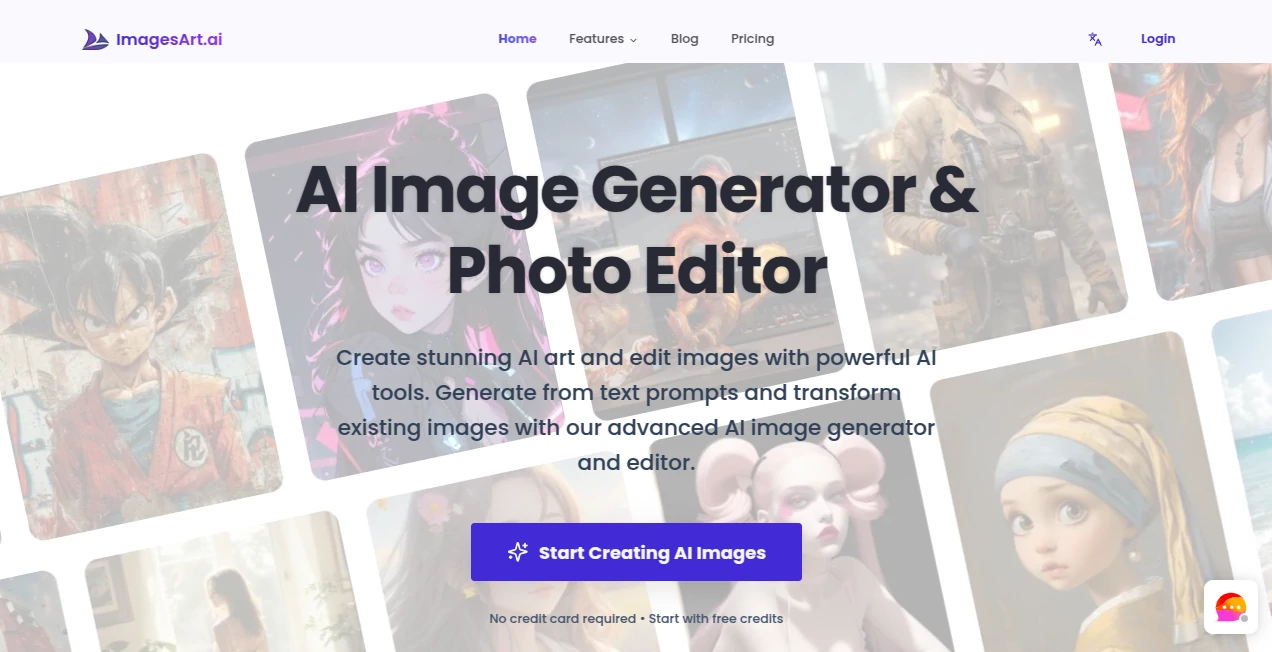
What is ImagesArt.ai?
Sometimes you have this vivid image in your head—a moody forest at dusk with fireflies drifting through, or a cyberpunk street buzzing with neon—and no amount of sketching or stock photos quite captures it. That's where this tool steps in, quietly turning those half-formed thoughts into artwork that feels eerily close to what you imagined. I remember feeding it a simple prompt about an old lighthouse during a storm, and the result had this haunting, painterly quality that made me stop scrolling just to stare. It's the kind of thing that makes you think twice before reaching for Photoshop again.
Introduction
What started as a playground for digital artists has quietly become a favorite among creators who want professional-grade visuals without the steep learning curve. The platform focuses on giving you control over every detail—style, aspect ratio, lighting, even the exact mood—while keeping the process simple enough that you can experiment freely. People who've used it for months talk about how it has replaced entire mood boards or stock searches; one friend turned a vague idea for a book cover into a striking piece that now sits proudly on her Amazon listing. It's not just about generating images; it's about making the creative spark feel effortless and inspiring.
Key Features
User Interface
The dashboard is refreshingly clean: a big prompt box, a handful of sliders for aspect ratio and quality, and a style selector that actually shows previews instead of vague names. You can switch between different models or fine-tune settings without feeling overwhelmed. What I love most is the real-time preview pane that updates as you type—it's like having an artist nod along while you describe the scene, so you know exactly what you're getting before hitting generate.
Accuracy & Performance
It consistently delivers what you ask for, even with complex prompts that mix styles or require specific compositions. Generations are quick—usually under 30 seconds—and the quality holds up at higher resolutions without that telltale AI blur. I've thrown tricky prompts at it, like "a Victorian woman reading by candlelight in a steampunk library," and it nails the atmosphere, lighting, and details every single time. The consistency is impressive, especially across multiple generations of the same idea.
Capabilities
Beyond basic text-to-image, you can upload your own photos for guided edits, inpainting to fix or replace parts, or outpainting to expand the scene. It handles everything from realistic portraits to abstract concepts, anime, oil paintings, digital art, and more. The control over aspect ratios (square, portrait, landscape, even custom) and the ability to blend multiple styles make it incredibly versatile for everything from social media graphics to concept art.
Security & Privacy
Your prompts and generated images stay private by default—no automatic sharing or public galleries unless you choose to post them. The platform uses secure processing and doesn't store your creations longer than necessary. For anyone working on client projects or personal ideas, that level of discretion is a huge plus; you can experiment without worrying about your work ending up somewhere public.
Use Cases
Graphic designers use it to mock up album covers or branding visuals in minutes instead of hours. Writers create striking book covers that match their story's tone perfectly. Small business owners generate product photography alternatives or social media posts that stand out. Game devs prototype character concepts or environments without hiring concept artists. Even hobbyists have fun creating custom wallpapers or gifts—it's the kind of tool that fits into so many creative routines.
Pros and Cons
Pros:
- Stunning detail and style control that rivals more expensive tools.
- Fast generations with high-quality results, even on free tier.
- Incredibly intuitive interface that gets out of your way.
- Strong privacy focus and generous free daily quota.
Cons:
- Free tier has daily limits that can feel tight if you're experimenting a lot.
- Occasional need for prompt tweaking on very specific or unusual requests.
Pricing Plans
The free plan gives you a solid number of generations each day with access to core models—plenty for casual use or testing ideas. Paid tiers unlock unlimited generations, priority queue, higher resolutions, and advanced features like more inpainting control. The pricing feels fair; you pay for speed and volume, not for basic access. Many users start free and upgrade once they realize how much time it saves.
How to Use ImagesArt
Start by typing your prompt in the main box—be as descriptive as you like. Choose your preferred aspect ratio and style from the dropdowns. Hit generate and watch the preview build in real time. If you want to refine it, use the edit tools to adjust parts of the image or expand the canvas. Download your favorite variation or upscale it for print-quality. The whole process feels like collaborating with a talented artist who never gets tired.
Comparison with Similar Tools
Compared to other generators, this one stands out for its balance of quality, speed, and ease of use. Many competitors either overwhelm you with settings or produce inconsistent results—this tool keeps things focused and delivers polished work consistently. The real-time preview and strong privacy focus are nice touches that make it feel more thoughtful and user-friendly.
Conclusion
This platform quietly raises the bar for AI art generation by making high-quality, customizable visuals feel effortless and accessible. Whether you're a professional needing quick concepts or someone who just loves creating, it delivers results that surprise and delight. It's one of those tools you start using casually and then wonder how you ever did without it.
Frequently Asked Questions (FAQ)
How many images can I generate for free?
The free plan gives you a generous daily quota—enough for regular use without feeling restricted.
Can I use the images commercially?
Yes, especially on paid plans, with full ownership and commercial rights.
Does it support uploading my own images?
Absolutely—use them as references, for inpainting, or outpainting to expand scenes.
How good is the style control?
Excellent; you can blend multiple styles or reference artists for precise results.
Is it fast?
Very—most generations finish in under 30 seconds, even at higher quality.
AI Photo & Image Generator , AI Art Generator , AI Design Generator , AI Text to Image .
These classifications represent its core capabilities and areas of application. For related tools, explore the linked categories above.
ImagesArt.ai details
This tool is no longer available on submitaitools.org; find alternatives on Alternative to ImagesArt.ai.
Pricing
- Free
Apps
- Web Tools
Categories

ImagesArt.ai Alternatives Product

ModelsLab
z image

meta ai image

Nano Banana 2
Lensgo

RGB to CMYK …

AI Raphael

Nano Banana 2

Tryonr