
🧠 AI Quiz
Think you really understand Artificial Intelligence?
Test yourself and see how well you know the world of AI.
Answer AI-related questions, compete with other users, and prove that
you’re among the best when it comes to AI knowledge.
Reach the top of our leaderboard.


















Imagika
Transform Photos into Your Perfect Vibe

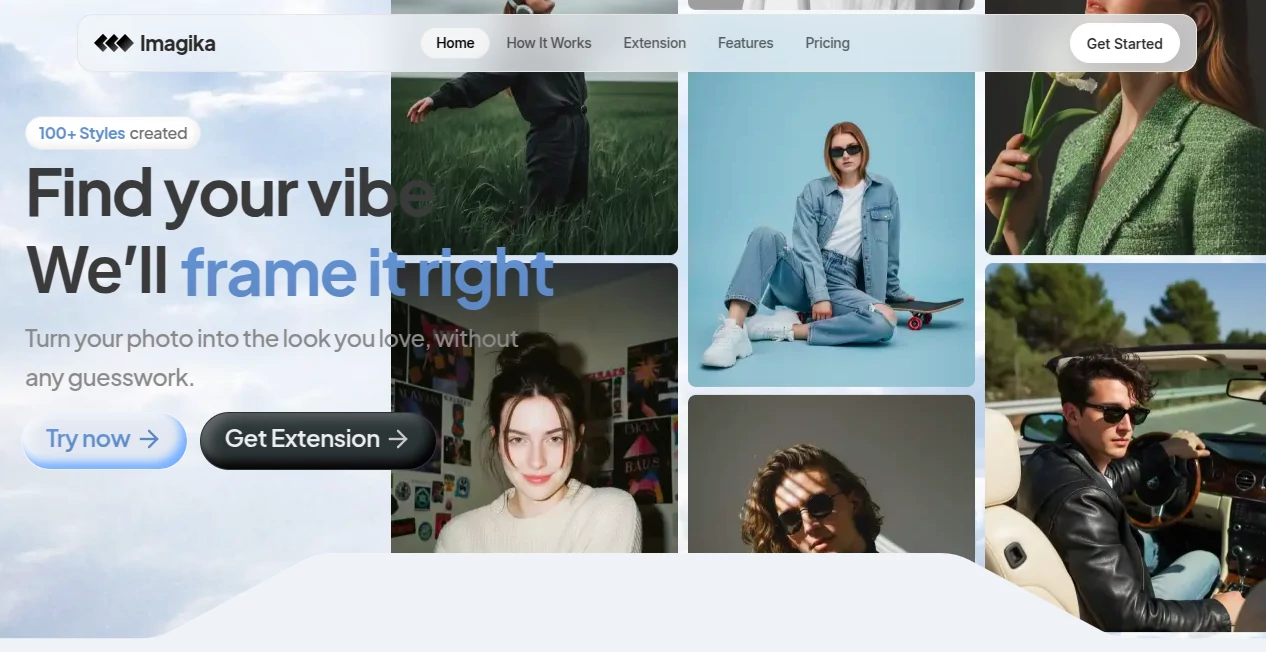
What is Imagika?
Imagika bursts onto the scene like a digital stylist with a knack for nailing that elusive look, taking your everyday snapshots and draping them in vibes that feel just right. Whether you're chasing a sun-kissed glow or a moody noir edge, this spot lets you experiment without the mess of filters or the wait for edits. Folks who've dipped in often come away with shots that capture their mood spot-on, turning ordinary moments into shareable gems that draw likes and lingering glances.
Introduction
Imagika kicked off as a clever fix for those endless scrolls through bland photo dumps, dreamed up by a handful of creators who'd grown weary of mismatched aesthetics. It hit the web not long ago, but already it's buzzing in corners where style seekers swap tips, praised for making overhauls feel effortless rather than exhaustive. Picture this: a quick upload, a vibe pick, and suddenly your selfie fits the fantasy— that's the hook that's got users from casual posters to budding influencers raving about how it unlocks that 'aha' moment without the trial-and-error slog. Over time, it's carved out a niche for anyone who wants visuals that whisper their story, proving that a touch of tech can turn flat frames into full-fledged statements.
Key Features
User Interface
You slide right into a clean canvas that practically begs for your pic—just drag it over, and the magic stirs without a single extra tap. A sidebar whispers style suggestions, popping thumbnails that you can thumb through like flipping a mood board, all while the preview updates on the spot. It's that rare setup where everything lands intuitively, even if you're more thumb-scroller than tech whiz, keeping the focus on the fun of seeing your shot shift shapes in real time.
Accuracy & Performance
Feed it a snapshot, and it snaps back with tweaks that hug the details tight, blending your original essence with the chosen flair so nothing feels forced or fuzzy. Results roll in quicker than a double-click, holding sharp even on wonky uploads, and users nod at how it dodges those off-kilter colors that plague quick fixes. It's the kind of reliable zip that lets you chain experiments without frustration, turning what could be a chore into a chain of 'one more try' thrills.
Capabilities
From wrapping your face in festival lights to staging products against dream backdrops, it stretches across moods and mediums, even slipping a browser buddy for trying on looks mid-shop spree. Whip up social scrolls that sync with trends or mock up designs that dazzle clients, all from one humble snap—it's like having a pocketful of poses ready to pull. The extension seals the deal for on-the-fly fits, bridging the gap between window gazing and wardrobe wins with seamless swaps.
Security & Privacy
Your uploads get a gentle once-over then fade into the ether, handled through trusted lanes that keep things locked without the lecture. No sneaky saves or shares sneak in unless you nudge them out, and the whole flow feels fortified for those personal pics you wouldn't flaunt lightly. It's that understated shield that lets you play bold, knowing the backstage stays buttoned up and your creative spills remain just yours.
Use Cases
Weekend warriors test out that vacation glow on city selfies, prepping feeds that fool friends into beach envy. Shopaholics snag the extension to layer try-ons over online hauls, dodging returns with virtual verdicts that fit like fate. Crafters stage handmade wonders against chic scenes, luring buyers with visuals that sell the story. Even event planners mock up invites with themed twists, turning flat flats into festive forecasts that wow the guest list.
Pros and Cons
Pros:
- Snaps up styles in a snap, skipping the filter frenzy.
- Extension magic bridges browsing to buying without the blues.
- Feels fresh and forgiving for folks new to the nudge.
Cons:
- Shy on specifics for super-custom curves, needing a few spins.
- Relies on steady streams for the swiftest shifts.
- Gallery teases more than it tells at first glance.
Pricing Plans
You can wander in without a wallet for a whirl at the basics, dipping toes into a dozen or so delights before the door nudges toward paid paths. Core kicks in around the low teens monthly for boundless brews and extension extras, with pro paths pushing mid-twenties for priority pulls and print-perfect packs. They sweeten the pot with trial turns and bundle breaks for yearly yeses, keeping the gate low enough for curious clicks to commit.
How to Use Imagika
Drag your darling pic to the drop zone, skim the style squad for a spark that sings, and watch the wizardry weave it in. Tweak the tilt or tone if the tease tempts, then snag the shine for your scrapbook or share straight to the spotlight. For shop-side sorcery, clip the extension and hover over hauls to layer looks live, flipping fits till one feels forever. Bookmark your best bets to revisit, building a vibe vault one vivid visit at a time.
Comparison with Similar Tools
Where filter farms flood you with fleeting fads, Imagika insists on instant infusions that stick the style, though those might muster more manual mixes for the meticulous. Against app armies that arm with add-ons, it keeps the core crisp, skipping sprawl but perhaps pinching on plugin plays. It hums high for hasty hits, outpacing ponderous picks with punch and poise tailored to the trend chaser.
Conclusion
Imagika invites you to reframe the frame, handing the brush to breathe life into lackluster lenses with a wink and a whirl. It turns the 'what if' of wardrobe whims into wearable wins, proving that a splash of smarts can spotlight your spark. As feeds fill with fleeting fancies, this haven holds the hues that haunt and heal, one heartfelt hue at a time.
Frequently Asked Questions (FAQ)
Does it play nice with phone pics?
Perfectly, pulling punches from pixels whether snapped on the sly or staged just so.
Can I snag the results for prints?
Yup, downloads dazzle in sizes suited for screens or shelves alike.
What's the extension's edge?
It layers live looks over online lots, turning tabs into try-on tales.
Any limits on uploads?
Free floats a few, but paid paths pave the way for endless experiments.
How fresh are the styles?
Pulled from pulsing trends, keeping your kit current without the chase.
AI Photo & Image Generator , Photo & Image Editor , AI Photo Enhancer , AI Image to Image .
These classifications represent its core capabilities and areas of application. For related tools, explore the linked categories above.
Imagika details
This tool is no longer available on submitaitools.org; find alternatives on Alternative to Imagika.
Pricing
- Free
Apps
- Web Tools
Categories

Imagika Alternatives Product

GPT Image 1.5

Leonardo.ai

NanoAI

Image Unblur

SuperAI

square face …

Z Image Turbo
imagen 5

AI Age Progr…
