🧠 AI Quiz
Think you really understand Artificial Intelligence?
Test yourself and see how well you know the world of AI.
Answer AI-related questions, compete with other users, and prove that
you’re among the best when it comes to AI knowledge.
Reach the top of our leaderboard.


















img2img.net
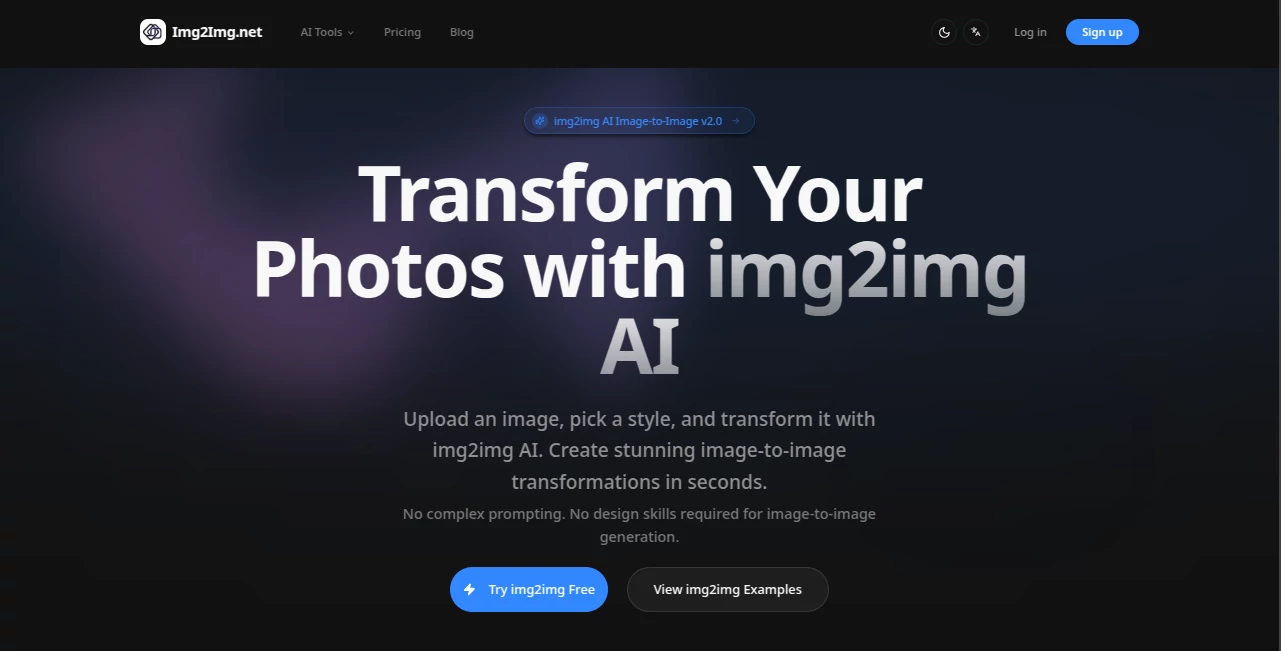
What is img2img.net?
There's a quiet thrill in watching a plain snapshot suddenly bloom into something entirely new—your casual selfie reimagined as a Studio Ghibli scene, or a city street glowing with cyberpunk neon. This little gem makes that kind of transformation feel effortless and fun, no endless tweaking or design degree required. I've played with plenty of image tools over the years, but the way this one keeps the core of your original photo while draping it in fresh style always surprises me. It's the kind of thing that turns a quick lunch-break experiment into something you actually want to show off.
Introduction
Most of us have a phone full of photos that are decent but never quite pop. This platform steps in with a simple promise: upload what you've got, pick a look you like, and get a version that feels artistic and polished in seconds. It's built around that sweet spot between power and ease—pre-made styles handle the heavy lifting so you don't have to wrestle with prompts, yet there's room for custom nudges if you want to get picky. I remember uploading an old family portrait and watching it turn into a soft watercolor piece; the result kept every facial detail while adding a dreamy quality that made it feel special again. For anyone who's ever wished their pictures could tell a better story, this is the shortcut that actually delivers.
Key Features
User Interface
The layout is refreshingly straightforward: big upload area that welcomes drag-and-drop or a quick click, a row of style thumbnails that preview exactly what you'll get, and a generate button that doesn't hide behind menus. Optional prompt box sits there if you feel like guiding it further, but you can ignore it entirely. It's the sort of design that lets you jump in and play without second-guessing—my non-designer friends have used it happily, no tutorial needed.
Accuracy & Performance
What stands out is how faithfully it holds onto the important parts of your photo—faces, outfits, composition—while layering the new aesthetic cleanly. Generations come back fast, usually under half a minute, and the quality holds up even on larger files. I've tried busier images and simpler ones; it rarely loses track of the subject, which is more than I can say for some flashier competitors that turn portraits into abstract messes.
Capabilities
It shines at style transfers—think anime, oil paint, watercolor, cyberpunk, sketch, or even enhancements like upscaling and sharpening. You can go pure artistic or keep things subtle; the advanced editor opens up more control for those who want it. Supporting common formats up to 15MB means most phone pics work fine, and the results feel versatile enough for social posts, prints, or even mood boards.
Security & Privacy
Your uploads are processed quickly and not kept hanging around longer than necessary. There's a reassuring sense that the focus stays on delivering the transformation rather than harvesting your images. For personal or client work, that matters a lot—no lingering worry about where your photos end up.
Use Cases
Content creators refresh their feed by turning everyday shots into eye-catching art that matches their aesthetic. Photographers experiment with painterly versions of client portraits to offer unique prints. Marketers mock up campaign visuals in different moods without reshooting. Even casual users breathe new life into travel snaps or pet pics, turning them into shareable pieces that get more likes than the originals ever did.
Pros and Cons
Pros:
- Keeps the soul of your original photo intact while adding real artistic flair.
- Style previews make choosing feel like browsing a gallery.
- Fast enough for spontaneous fun, polished enough for real use.
- Beginner-friendly without feeling dumbed down.
Cons:
- Free tier includes watermarks, though they're easy to remove with a small upgrade.
- Very complex scenes can sometimes need a second try.
Pricing Plans
You can start for free with a daily handful of tries—enough to see if the magic clicks. Paid tiers are gentle on the wallet: a basic monthly plan unlocks watermark-free work and more generations, while higher ones add priority speed and extra credits. Annual options shave the cost nicely, and occasional credit packs fit when you need a burst for a project. It's structured so you only pay for the extra juice you actually want.
How to Use Img2Img.net
Drop your photo in—drag it or browse—then browse the style cards until one catches your eye. If you want a twist, toss in a few descriptive words, hit transform, and wait a short beat. Preview the result, download what you love, or tweak and go again. I've found keeping the original fairly clear gives the best outcome, but even slightly imperfect shots often surprise you with how well they adapt.
Comparison with Similar Tools
Plenty of image editors promise style shifts, but many either waterlog the output or demand perfect prompts to avoid weird artifacts. This one stands out by prioritizing simplicity and fidelity—you get strong, usable results even if you're not an expert prompter. It's less about overwhelming options and more about reliable, beautiful transformations that feel worth sharing right away.
Conclusion
This tool quietly rekindles the joy of seeing your photos in a new light, without turning the process into a chore. It's perfect for anyone who wants to experiment creatively or give their visuals a fresh edge. Whether you're refreshing a personal album or prepping content that needs to stand out, it delivers that little spark of wonder every time. Give it a shot—you might find yourself scrolling through your camera roll with entirely new ideas.
Frequently Asked Questions (FAQ)
What file sizes work best?
Up to 15MB in JPG, PNG, or WebP—most phone photos fit comfortably.
Do I need to write detailed prompts?
Not at all—the styles do most of the work, but a short note can fine-tune the mood.
Are the results good for printing?
Yes, especially higher-res generations; they hold detail nicely.
Can I use them commercially?
Paid plans include commercial rights—great for marketing or products.
What if the style isn't quite right?
Regenerate or add a custom prompt—small adjustments usually nail it.
AI Photo & Image Generator , Photo & Image Editor , AI Image to Image , AI Design Generator .
These classifications represent its core capabilities and areas of application. For related tools, explore the linked categories above.
img2img.net details
Pricing
- Free
Apps
- Web Tools
Categories

img2img.net Alternatives Product

String Art G…

Generador De…
Free AI Kiss…

Grok Imagine

Nano Banana 2

Sora Waterma…

bananaai.app

AI Image Edi…

AI Polaroid …