🧠 AI Quiz
Think you really understand Artificial Intelligence?
Test yourself and see how well you know the world of AI.
Answer AI-related questions, compete with other users, and prove that
you’re among the best when it comes to AI knowledge.
Reach the top of our leaderboard.


















ImgUnblur
What is ImgUnblur?
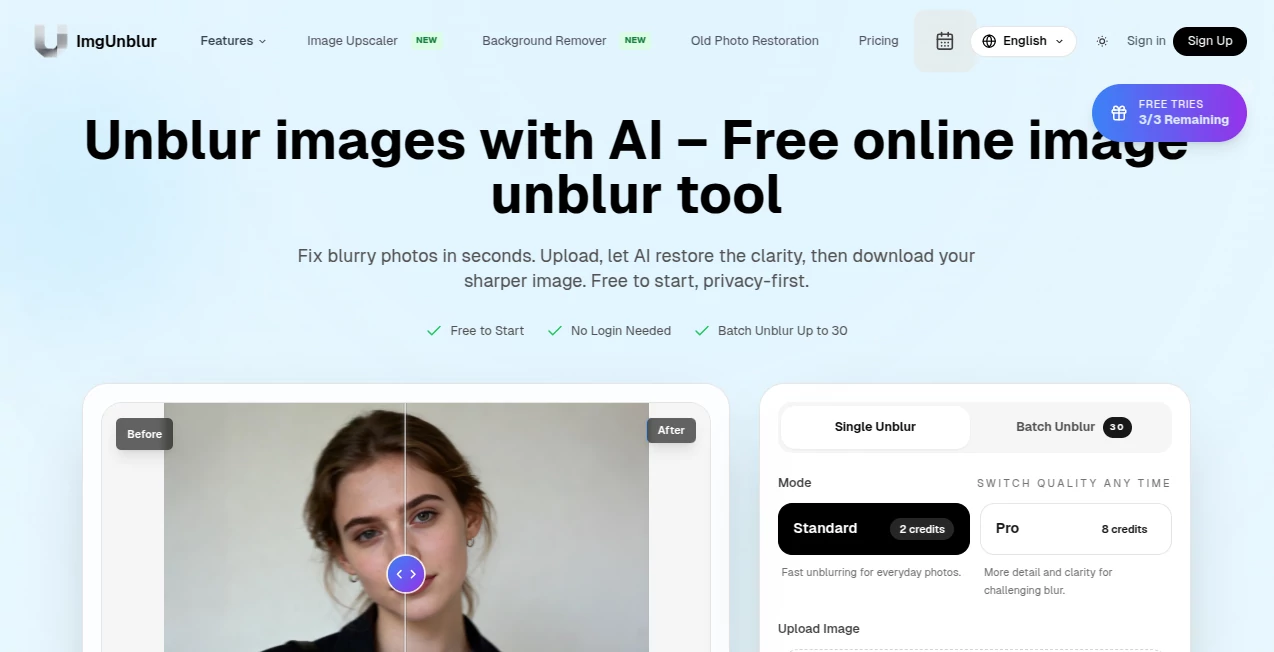
We've all been there — you capture a perfect moment with your phone, but the photo comes out soft, shaky, or just plain blurry. That once-in-a-lifetime shot of your child’s first steps, a once-clear landscape, or a product photo for your shop suddenly looks unusable. This tool brings those moments back from the edge. Upload the blurry image, wait a few seconds, and watch it sharpen into something crisp and clear again. The results often feel almost magical, like someone waved a wand over the photo. I’ve restored old family pictures that were nearly thrown away and turned shaky vacation shots into keepers. It’s the kind of simple rescue that makes you grateful the photo wasn’t lost forever.
Introduction
Blurry photos are one of photography’s most common frustrations. Whether it’s camera shake, motion blur, low light, or just an unsteady hand, the moment is gone — or so you think. This platform specializes in bringing sharpness back without making the image look artificial or over-processed. It uses smart AI that understands what details should look like in faces, textures, landscapes, and objects. No complicated sliders or technical knowledge needed. Just upload and let it work. For parents, travelers, small business owners, and anyone who values their memories or professional images, it’s become a quiet hero in the background of daily life.
Key Features
User Interface
The design is wonderfully straightforward. A large, inviting upload area sits front and center. Once you drop your photo in, the tool immediately begins processing with a clean progress indicator. Before-and-after views appear side by side so you can see the transformation clearly. There are minimal options — mostly just a strength slider if you want to fine-tune — keeping the experience focused and frustration-free. It works smoothly on phones too, which is perfect when you’re out and about and realize a shot didn’t turn out sharp.
Accuracy & Performance
What stands out is how naturally the sharpening happens. Faces regain detail without looking plastic, text becomes readable again, and backgrounds gain clarity without introducing weird artifacts. It handles different types of blur — motion, defocus, low-resolution — with impressive consistency. Processing usually takes just a few seconds, even on higher-resolution images. In real tests, it often rescues photos that other tools give up on, delivering results that look like they were taken with a steadier hand or better lens.
Capabilities
It restores sharpness to portraits, landscapes, product shots, old scanned photos, and even slightly out-of-focus group pictures. You can adjust the enhancement strength to keep things natural or push for maximum clarity. Outputs come in high resolution, suitable for printing, social media, or professional use. It also works surprisingly well on images with text, helping menus, signs, or documents become readable again. The balance between aggressive sharpening and natural-looking results is one of its strongest points.
Security & Privacy
Your photos are processed securely and not stored long-term on their servers. There’s no forced account creation for basic use, so you can enhance images privately without leaving a trail. For personal family photos or client work, that respectful approach to privacy adds real peace of mind.
Use Cases
A parent rescues a blurry first-step video still and turns it into a framed keepsake. A small business owner sharpens product photos taken in poor lighting, improving their online listings and sales. A traveler restores shaky sunset shots from a moving boat, turning “almost good” into “wow, that’s beautiful.” A teacher enhances old scanned documents for classroom materials. Wherever clarity was lost but the moment still matters, this tool quietly saves the day.
Pros and Cons
Pros:
- Delivers natural-looking sharpness without over-processing or artifacts.
- Extremely fast — most photos are ready in seconds.
- Works on many types of blur, including motion and low-light shots.
- Simple enough for anyone, powerful enough for real improvements.
- Generous free tier lets you test it on important photos right away.
Cons:
- Extremely blurry or heavily damaged images may still need manual touch-up afterward.
- Batch processing and unlimited use require a paid plan.
- Very artistic or heavily stylized photos can sometimes lose their intended softness.
Pricing Plans
The free version gives you several high-quality enhancements per day — more than enough to rescue treasured personal photos or test on a few product shots. Paid plans remove daily limits, unlock batch processing, higher resolution options, and priority support. The pricing is reasonable considering how much time and frustration it saves, especially for small businesses or frequent users.
How to Use Image Unblur
Go to the main page and drag your blurry photo into the upload area or click to select the file. The tool starts working automatically. Once processing finishes, compare the before and after using the slider. If you want a slightly different strength, adjust the control and regenerate. When you’re happy with the result, download the sharpened version in high resolution. The entire process usually takes less than 30 seconds from upload to finished photo.
Comparison with Similar Tools
Many free sharpeners either do too little (leaving blur behind) or too much (creating unnatural halos and noise). This one finds a better middle ground — effective sharpening that still looks natural. It handles real-world blur better than most basic apps and offers cleaner results than some more complicated paid editors. The speed and simplicity give it an edge for everyday use.
Conclusion
Blurry photos don’t have to be permanent disappointments. This tool brings back clarity, detail, and emotion that seemed lost, turning “I wish it was sharper” into “this actually looks great.” Whether you’re preserving family memories, improving business images, or salvaging travel shots, it delivers reliable, natural-looking results with almost no effort. In a world full of perfect filters, sometimes the most valuable thing is simply making an imperfect photo look its best again.
Frequently Asked Questions (FAQ)
How blurry can a photo be and still work?
It handles mild to moderate blur very well. Extremely out-of-focus or heavily motion-blurred shots may improve but not become perfectly sharp.
Can I use it on old scanned photos?
Yes — it often does a great job restoring clarity to aged or low-resolution scans.
Is there a limit on free use?
Yes, the free tier allows several enhancements per day. Paid plans remove the limit.
Will the enhanced photo look artificial?
No — the AI is tuned to keep results natural while improving sharpness and detail.
Can I batch process multiple photos?
Batch processing is available on paid plans for users who need to enhance many images at once.
Photo & Image Editor , AI Photo Enhancer , AI Background Remover , AI Image Recognition .
These classifications represent its core capabilities and areas of application. For related tools, explore the linked categories above.
ImgUnblur details
Pricing
- Free
Apps
- Web Tools
Categories

ImgUnblur Alternatives Product

Remove Text

Art-Neurona

Image to STL

VIGGLE

Kirkify

Flux.2 AI

Upscale image

Sora Waterma…

Pixelied