
🧠 AI Quiz
Think you really understand Artificial Intelligence?
Test yourself and see how well you know the world of AI.
Answer AI-related questions, compete with other users, and prove that
you’re among the best when it comes to AI knowledge.
Reach the top of our leaderboard.

















JobInterview

What is JobInterview?
Walking into an interview room feeling prepared instead of panicked is a game-changer, and this tool makes that shift feel almost effortless. It simulates real conversations with AI interviewers who throw curveballs, give spot-on feedback, and help you refine answers until they shine. I've talked to friends who used it before big tech gigs and walked away with offers—they swear it gave them the edge by practicing tough questions in a safe space. What stands out is how it feels like a patient coach who's always available, turning nerves into quiet confidence.
Introduction
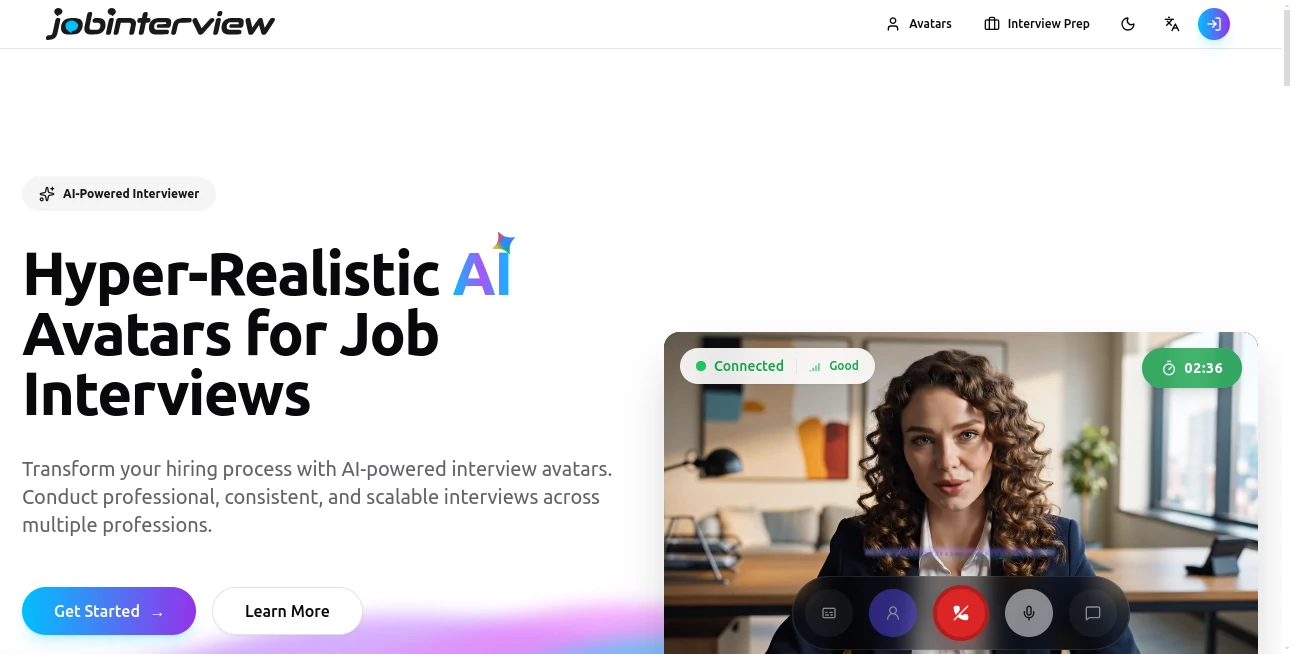
Job interviews can feel like a high-stakes guessing game, but this platform flips the script by putting a smart, adaptable interviewer right in your pocket. It draws from real-world job descriptions and common pitfalls to create sessions that mirror actual conversations, complete with avatars that react naturally. Users often mention how it helped them spot weak spots they never noticed—like rambling on behavioral questions or missing key details in technical ones. From fresh grads to seasoned pros switching fields, it's become a quiet ally for anyone who wants to show up sharp and ready, without the awkward practice sessions with friends.
Key Features
User Interface
The dashboard greets you warmly, with big buttons to pick your role or browse guides, and everything loads fast so you can jump straight into practice. Avatars appear on screen, making it feel like a real chat, and controls for pausing or replaying answers sit right where you'd expect them. It's straightforward enough that even someone new to tech tools can start practicing in under a minute—no cluttered menus or hidden settings to frustrate you.
Accuracy & Performance
The AI listens closely, picking up on nuances in your responses and delivering feedback that's surprisingly insightful, like suggesting you tie examples back to company values or speak more slowly during technical parts. Sessions run smoothly without lag, even on mobile, and the analysis feels fresh each time, adapting to how you answer. Many users say the tips land exactly where they needed them most, helping them sound more polished and confident in the real thing.
Capabilities
It covers a wide range of roles with tailored questions—technical deep dives, behavioral scenarios, even cultural fit chats—and lets you practice as many times as you want. The avatar system makes it engaging, and built-in guides break down what interviewers really want to hear. Whether you're prepping for a coding round or a leadership discussion, it adapts to your progress, offering progressively harder questions as you improve.
Security & Privacy
Your practice sessions stay completely private; nothing gets saved or shared without your say-so. It's reassuring to know that the answers you give during mock runs aren't being logged or used elsewhere—everything stays between you and the AI. This level of care lets you answer honestly, even when practicing tough topics, without any lingering worries.
Use Cases
A software engineer I know used it to nail behavioral questions for a senior role, practicing until her stories flowed naturally and got the job. Recent grads facing their first big interviews build confidence by running through common traps like "tell me about yourself." Career switchers rehearse explaining their background in a compelling way, while remote candidates test how they come across on video. It's versatile enough to help anyone—from entry-level to executive—walk in feeling ready and authentic.
Pros and Cons
Pros:
- Feels like a real conversation, with avatars that react naturally.
- Feedback that's constructive and specific, not generic.
- Unlimited practice sessions to build real confidence.
- Tailored to different roles and industries.
Cons:
- Free tier might limit advanced features or sessions.
- Best with a quiet space and good mic for voice practice.
Pricing Plans
You can start free to get a solid feel for the basics, which is plenty for light practice or testing the waters. Paid plans unlock unlimited sessions, deeper feedback, and extras like resume tips or follow-up strategies—usually starting around a monthly coffee budget. It's straightforward value: the more you use it, the more it pays off in interview success.
How to Use JobInterview
Sign up in seconds, pick your target role or browse guides to find the right fit. Choose your interview type—technical, behavioral, whatever—and start chatting with the avatar. Answer out loud, get instant feedback, and replay sections to refine your delivery. Go through a few rounds, note the tips, and watch your answers get stronger each time. It's addictive in the best way; one session often leads to another until you're walking in feeling unstoppable.
Comparison with Similar Tools
While some mock interview apps offer scripted questions, this one stands out with its adaptive AI that feels more like a real interviewer and provides feedback that's actually actionable. It skips the robotic feel of basic tools and focuses on helping you sound natural, which is what hiring managers really notice. For anyone serious about landing the job, it's a clear step above the rest.
Conclusion
This tool turns interview prep from a stressful chore into something almost enjoyable—giving you the practice and polish needed to show up as your best self. It's not just about passing questions; it's about building the confidence that comes from knowing you've prepared thoroughly. If you've got an interview coming up, give it a shot—you might just walk out with the offer you've been chasing.
Frequently Asked Questions (FAQ)
Is it really like talking to a real interviewer?
Yes—the avatars respond naturally, and the AI adapts to your answers for a genuine back-and-forth.
What kinds of jobs does it cover?
A wide range, from tech and finance to creative and entry-level roles, with tailored questions for each.
Do I need a webcam or mic?
Mic helps for voice practice, but you can start with text-only if you're more comfortable.
How accurate is the feedback?
Very—it's based on real hiring insights and helps you fix common mistakes quickly.
Is there a free version?
Definitely—start free to try it out and see how it clicks for you.
AI Coaching , AI Productivity Tools , AI Interview Assistant .
These classifications represent its core capabilities and areas of application. For related tools, explore the linked categories above.
JobInterview details
This tool is no longer available on submitaitools.org; find alternatives on Alternative to JobInterview.
Pricing
- Free
Apps
- Web Tools
Categories

JobInterview Alternatives Product
CSCA Prepare…

Kaamfu

Keepmind
Graph Maker

Grok 4
Unix Timesta…

Enji

Dialogues wi…

Markdown to …
