
🧠 AI Quiz
Think you really understand Artificial Intelligence?
Test yourself and see how well you know the world of AI.
Answer AI-related questions, compete with other users, and prove that
you’re among the best when it comes to AI knowledge.
Reach the top of our leaderboard.


















JSON to Table

What is JSON to Table?
There are moments when you stare at a messy JSON response—nested objects, long arrays, weird keys—and you just want to see it laid out clearly, like a proper spreadsheet, without fighting code or online converters that break formatting. This tool does exactly that, and it does it with surprising elegance. Paste any JSON, hit convert, and suddenly you have a clean, readable table that makes sense at a glance. I’ve used it during API debugging sessions where the difference between confusion and clarity was literally seconds. It’s one of those small tools that quietly saves sanity every single time you reach for it.
Introduction
JSON is everywhere—APIs, config files, logs, data exports—but it’s terrible for humans to read when it gets deep or wide. Traditional pretty-printers help with indentation, but they don’t solve the real problem: turning structured data into something scannable and shareable. This platform bridges that gap beautifully. Paste raw JSON (or upload a file), and it renders a responsive, syntax-highlighted table with expandable nested objects, array indexing, and clean typography. Developers, analysts, support engineers, and even non-technical folks who occasionally deal with API responses find themselves coming back because it turns minutes of squinting into instant understanding. It’s simple, fast, and feels like it was built by someone who’s been annoyed by bad JSON viewers one too many times.
Key Features
User Interface
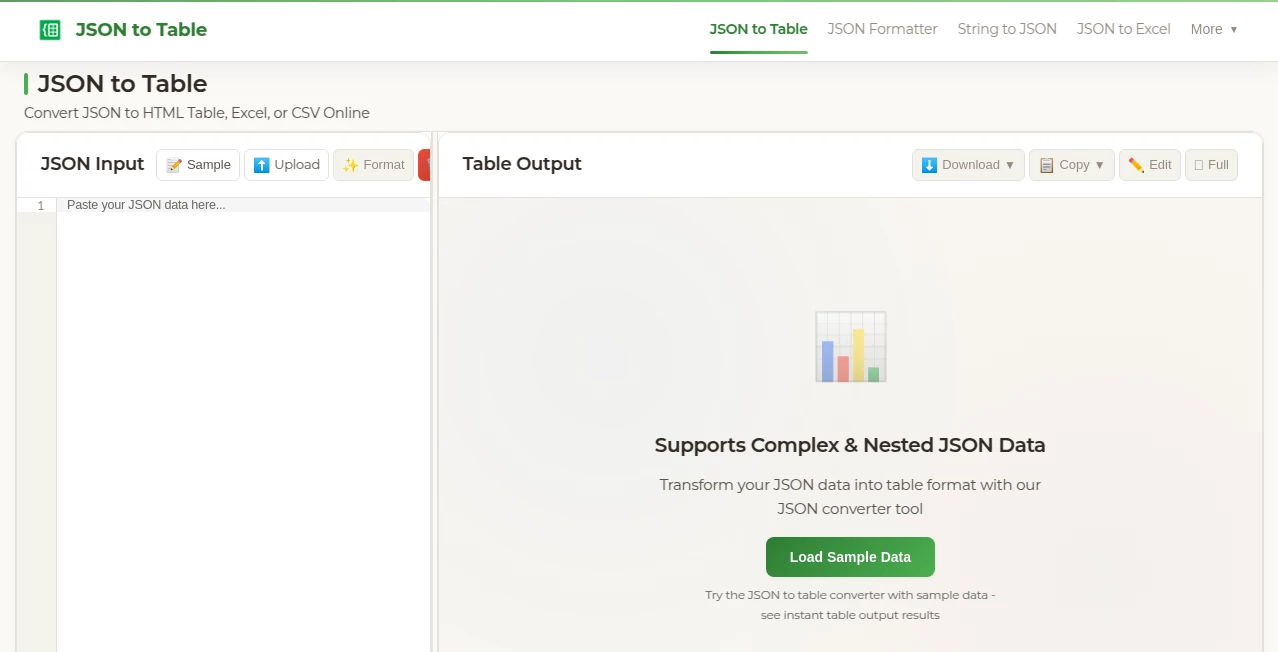
The page loads with a spacious textarea that invites you to paste or drop JSON—no login, no ads crowding the view. As soon as valid JSON is detected, a “Convert” button lights up. Click it and the table appears below—clean borders, subtle zebra striping, expandable nodes for objects/arrays, and copy-to-clipboard buttons everywhere. Dark mode is built-in and remembers your preference. It’s one of those rare tools where the interface disappears—you focus on the data, not the tool.
Accuracy & Performance
It parses large JSON files (several MB) without choking, preserves key order, handles nulls/booleans/strings/numbers/objects/arrays correctly, and renders nested structures with clear hierarchy indicators. No data is lost or mangled—even deeply nested or irregularly structured JSON comes out readable. Rendering is near-instant for typical API responses, and only slightly slower for very large payloads. The table stays responsive on desktop and mobile, which is a small but meaningful win when you’re debugging on the go.
Capabilities
Converts any valid JSON to an interactive HTML table, supports deep nesting with collapsible rows, shows array indices, syntax-highlights different value types, offers one-click copy of table as Markdown/CSV/HTML, exports full table as CSV/JSON/YAML, and includes a “flatten” mode for simpler views of complex data. It auto-detects and prettifies dates, URLs (clickable), and even small embedded objects. Perfect for API debugging, data exploration, sharing responses with non-devs, or quickly documenting payloads.
Security & Privacy
All processing happens in your browser—no data is sent to servers, no uploads, no tracking. Paste JSON and it stays on your machine. For anyone working with sensitive API responses (tokens, PII, internal configs), that client-side-only approach is a massive relief. Zero risk of data leakage, zero account required. Just pure, private conversion.
Use Cases
A backend developer pastes a complex API response during debugging and instantly sees why a nested field is null. A support engineer shares a formatted table of error payload with the product team—no more screenshots of raw JSON. A data analyst quickly flattens a large export to spot patterns before loading into a spreadsheet. A technical writer copies the table as Markdown for clean documentation. Even PMs and designers use it to understand API shapes without asking devs to explain. It’s the bridge between raw data and human eyes.
Pros and Cons
Pros:
- Completely client-side—zero data leaves your browser.
- Beautiful, readable tables even for messy, deeply nested JSON.
- Expandable/collapsible nodes make huge objects manageable.
- Multiple export formats (Markdown, CSV, HTML, JSON) save time.
- Free, no sign-up, no limits, no watermarks—pure utility.
Cons:
- Very large JSON (>10–20 MB) can slow down the browser tab.
- No server-side processing means no sharing of live tables (by design).
- Extremely malformed JSON will fail to parse (as expected).
Pricing Plans
It’s completely free. No tiers, no premium features locked away, no ads. The creator built it as a genuine utility and keeps it open and unlimited. That alone makes it stand out in a world where most tools eventually push for subscriptions. Use it as much as you want, forever—no catch.
How to Use JSON to Table
Copy any JSON string (from Postman, browser console, log file, etc.). Paste it into the large textarea on the page. If it’s valid, the “Convert” button activates—click it. The table appears instantly below. Expand/collapse nested sections as needed. Use the copy buttons for Markdown, CSV, or HTML versions, or export full file formats. Done. Under 10 seconds from paste to usable table in almost every case.
Comparison with Similar Tools
Many JSON viewers are either basic pretty-printers (good indentation, no table), server-side converters (privacy concerns), or bloated IDE plugins. This one stands apart: fully offline, table-first layout, beautiful readability, and thoughtful extras like export options and collapsible nesting. It’s lighter and faster than most desktop tools, more private than web-based alternatives, and more human-friendly than raw console output. For quick inspection and sharing, it’s hard to beat.
Conclusion
JSON is powerful, but it’s not friendly. When you need to actually understand, share, or document it, raw text falls short. This tool turns that frustration into clarity with zero ceremony—just paste and see. It’s the kind of utility you don’t realize you needed until you use it once, then wonder how you ever lived without it. For developers, analysts, support folks, writers—anyone who touches JSON regularly—it’s one of those rare tools that quietly makes life better every single time.
Frequently Asked Questions (FAQ)
Is my JSON sent to a server?
No—everything runs 100% in your browser. Nothing leaves your device.
Can I use it on mobile?
Yes—the table is responsive and works well on phones/tablets.
What if my JSON is invalid?
It shows a friendly error message with the exact line/position so you can fix it quickly.
Can I save my converted table?
Yes—copy as Markdown/HTML or export CSV/JSON directly from the page.
Is there a limit on JSON size?
Technically limited by browser memory—most common API responses (up to a few MB) work perfectly.
AI Productivity Tools , AI Developer Tools .
These classifications represent its core capabilities and areas of application. For related tools, explore the linked categories above.
JSON to Table details
This tool is no longer available on submitaitools.org; find alternatives on Alternative to JSON to Table.
Pricing
- Free
Apps
- Web Tools
Categories

JSON to Table Alternatives Product

Coresite

Scillus

AntForms

Hands Off

TopPDF

KaneAI

DiRe-RAPIDS

Classroom Sc…

Workik
