
🧠 AI Quiz
Think you really understand Artificial Intelligence?
Test yourself and see how well you know the world of AI.
Answer AI-related questions, compete with other users, and prove that
you’re among the best when it comes to AI knowledge.
Reach the top of our leaderboard.


















Learn Place AI
Learn 3-5x Faster with Your Personal AI Tutor

What is Learn Place AI?
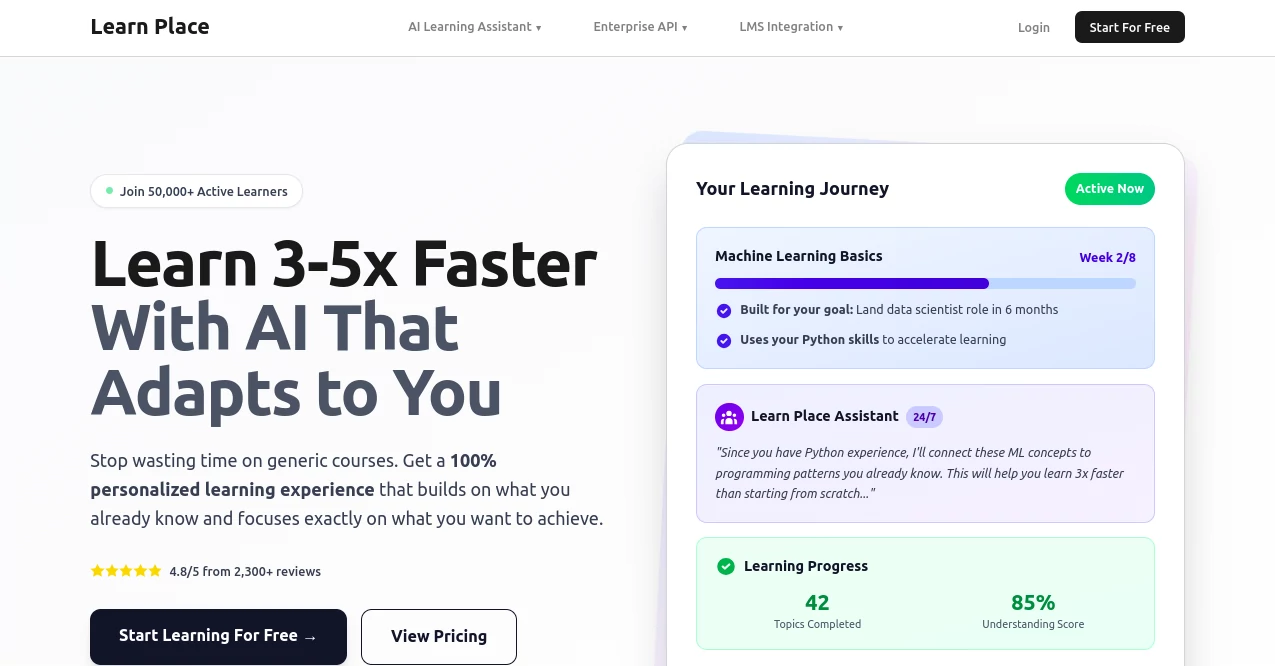
Learnplace hands you a private professor who knows exactly where you stand and what fires you up, building a roadmap that skips the fluff and dives straight into what moves the needle. Over fifty thousand busy learners have traded scattered videos for focused sessions that stick, turning weeks of grinding into days of real progress.
Introduction
Learnplace sprang from late-night study marathons and the wish for a guide who actually listens. A small crew of educators and coders watched friends drown in generic courses, so they stitched together smart tech that reads your backstory and spins a syllabus just for you. In under two years it’s become the quiet powerhouse behind career leaps—from engineers flipping to data roles in six months to curious minds mastering quantum physics over coffee breaks. What keeps people hooked is the feeling of a real conversation: ask anything, anytime, and watch tough ideas click because they’re tied to what you already get.
Key Features
User Interface
You land on a calm dashboard that asks three quick questions—goal, drive, current level—then paints your path in clean modules you can swipe on phone or stretch across a big screen. Progress rings glow as you tick topics, and a chat bubble sits ready for instant clarifications, all without a single confusing menu.
Accuracy & Performance
Explanations land crisp and on-point, linking fresh concepts to memories you already own so nothing floats in isolation. Sessions fly—even on spotty café Wi-Fi—delivering new angles in seconds and tracking every “aha” with an understanding score that actually means something.
Capabilities
It spins full curricula for anything from Python loops to Renaissance art, layering in hands-on drills and live Q&A that adjusts mid-sentence. Paid tiers let you toss in your own slides or PDFs, turning company decks into bite-size mastery plans while the core engine keeps every path gap-free.
Security & Privacy
Your goals and notes stay locked behind standard shields, wiped clean after sessions unless you save them, with payments handled by trusted gates and a clear promise that nothing feeds outside models.
Use Cases
Engineers plot six-month sprints into machine-learning gigs, parents sneak business strategy between bedtimes, and high-schoolers turn fuzzy interests into college-ready portfolios. Researchers upload dense papers and walk out with plain-English breakdowns ready for the next grant pitch.
Pros and Cons
Pros:
- Builds on what you know, slashing hours of review.
- Chat feels like a patient mentor, never a robot.
- Free tier delivers real syllabi, no teaser walls.
- Progress stats keep momentum even on busy weeks.
Cons:
- Heavy upload habits need the paid lane.
- Super-niche jargon sometimes asks for a nudge.
- No offline mode yet—internet stays the lifeline.
Pricing Plans
Free forever gives unlimited sessions and smart syllabi. Professional at nine bucks monthly opens generous limits, Premium at twenty adds file uploads, and Premium+ at sixty triples the runway for power learners. Every paid seat carries a full-refund safety net and one-click cancel.
How to Use Learnplace
Tap “Start Free,” spill your goal in plain words, watch the syllabus bloom, then dive into the first module. Ask the assistant to slow down or zoom in—type, speak, or snap a doubtful paragraph. Mark topics green as they click, glance at your rising score, and carry the same thread from phone to laptop without missing a beat.
Comparison with Similar Tools
Generic bots spit answers; Learnplace hands you a sequenced ladder with built-in checkpoints. Fixed platforms lock everyone in the same twelve-week box—this one redraws the map the moment your schedule shifts. It’s the difference between a library card and a study buddy who already read your notes.
Conclusion
Learnplace turns the lonely slog of self-teaching into a guided adventure where every minute counts. Fifty thousand stories later, it keeps proving that the fastest way to mastery isn’t more content—it’s content that knows you.
Frequently Asked Questions (FAQ)
Will it work for total beginners?
Yes—it meets you wherever you stand and climbs from there.
Can I learn on my phone during a commute?
Seamlessly; progress follows you across devices.
What if I get stuck on a concept?
Ask the assistant for a different angle—it rewires the explanation on the spot.
Is my data safe?
Locked tight, never shared, gone when you say so.
Any subject limits?
If you can name it, the engine can frame it.
AI Tutorial , AI Course , AI Homework Helper , AI Education Assistant .
These classifications represent its core capabilities and areas of application. For related tools, explore the linked categories above.
Learn Place AI details
This tool is no longer available on submitaitools.org; find alternatives on Alternative to Learn Place AI.
Pricing
- Free
Apps
- Web Tools
Categories

Learn Place AI Alternatives Product

Gochu

优秀PTE

Google Skills

Casper Pract…

Mexty AI

UPDF AI

Ryne AI

Your Own AI

Sourcetable
