🧠 AI Quiz
Think you really understand Artificial Intelligence?
Test yourself and see how well you know the world of AI.
Answer AI-related questions, compete with other users, and prove that
you’re among the best when it comes to AI knowledge.
Reach the top of our leaderboard.

















LinkedIn Speak
What is LinkedIn Speak?
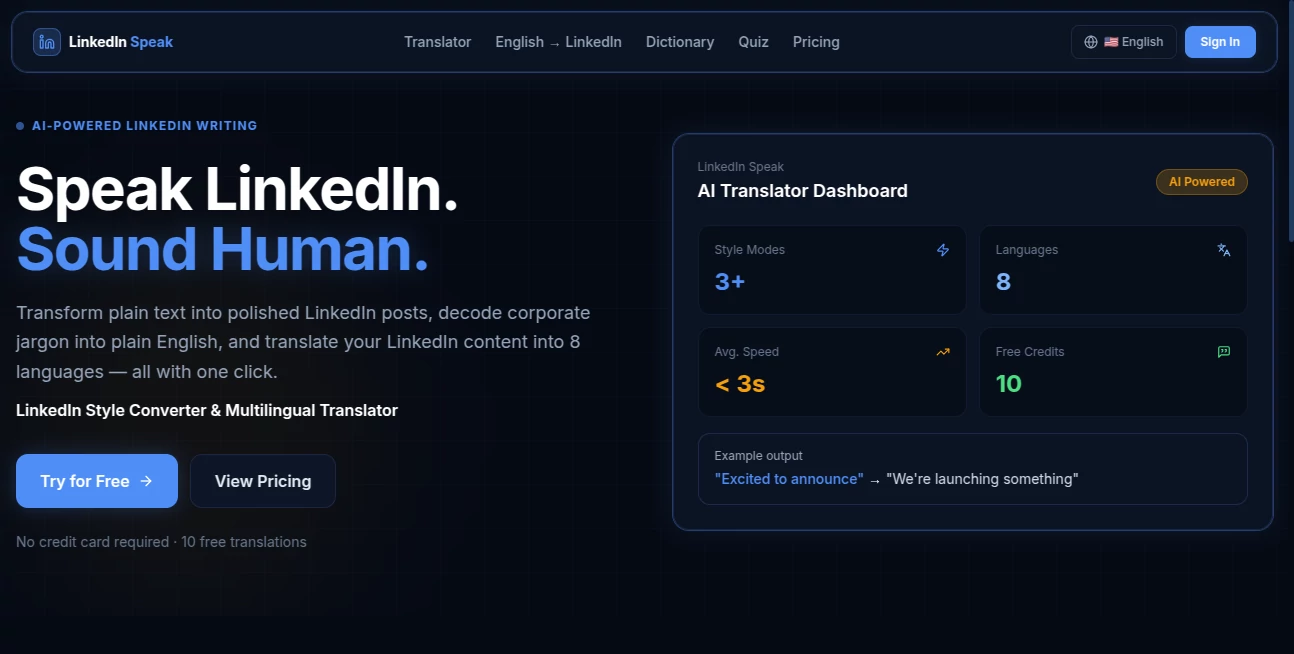
We've all been there — you have something genuine to say on LinkedIn, but it feels too casual or doesn't quite land in that polished, professional tone everyone seems to use. This clever translator fixes that awkward gap. Type your real thoughts in plain English, and it instantly turns them into that smooth, thought-leader style LinkedIn loves, complete with the right buzzwords and structure. Or go the other way: paste a heavy corporate post and get a clear, human translation that actually makes sense. I’ve watched colleagues use it to turn simple updates into posts that get real engagement, and it never fails to make me chuckle at how accurately it captures the vibe.
Introduction
LinkedIn has its own language — a mix of ambition, gratitude, and strategic jargon that can feel intimidating if you're not fluent. Whether you're a founder sharing a win, a professional reflecting on a project, or just someone trying to network without sounding stiff, striking the right tone matters. This tool acts as your personal interpreter for that unique dialect. Built as a free translator with style conversion, it helps you communicate authentically while matching the platform's expectations. No more staring at a blank post wondering how to sound impressive without sounding fake. It's become a go-to for many who want their message to land better without spending hours rewriting.
Key Features
User Interface
The design is delightfully simple — two side-by-side boxes like a classic translator. Paste or type in one side, choose the direction (plain English to LinkedIn speak, or the reverse), and watch the magic happen with one click. Clean, fast, and no unnecessary distractions. You can switch languages too, making it useful for global professionals. It's the kind of interface that gets out of your way so you can focus on your message.
Accuracy & Performance
It nails the tone remarkably well — turning casual updates into polished posts that still feel like you, not a robot. The reverse translation (LinkedIn speak to plain English) is equally sharp, cutting through buzzwords to reveal the real meaning. Results come back almost instantly, and the quality stays consistent whether you're translating a short status or a longer article summary. It's reliable enough that many people use it daily without second-guessing the output.
Capabilities
Beyond basic translation, it handles full style conversion — making your writing sound more strategic, inspirational, or professional as needed. It supports multiple languages, works with longer texts, and preserves your core message while adapting the delivery. You can use it for posts, comments, profile summaries, or even decoding what others wrote. The dual-direction flow makes it versatile for both creating content and understanding what you read on the platform.
Security & Privacy
Your text isn't stored or used beyond the current translation. No account is required to start using it, which keeps things light and private. For professionals sharing sensitive ideas or company updates, that respect for your input builds real trust.
Use Cases
A founder turns a raw product update into an engaging LinkedIn announcement that gets comments and shares. A job seeker rewrites their experience bullets into compelling profile content that stands out to recruiters. A manager decodes a senior leader’s vague corporate post to understand the actual expectations. An international professional translates their thoughts into natural English before converting them to polished LinkedIn style. It's especially handy during busy periods when you want to stay visible but don’t have time to craft every post manually.
Pros and Cons
Pros:
- Transforms ordinary thoughts into posts that actually get engagement.
- Reverse translation helps you understand LinkedIn jargon quickly.
- Fast, free to start, and surprisingly accurate at capturing tone.
- Supports multiple languages for global users.
- Simple enough for daily use without a learning curve.
Cons:
- Very niche or highly technical content may need light manual editing.
- Heavy daily use benefits from any premium options if available.
Pricing Plans
It’s free to use with generous daily limits, making it accessible for regular professionals and casual users alike. Any premium upgrades (if offered) would likely focus on unlimited translations and advanced features for power users. The free access alone delivers enough value that many people stick with it happily for their LinkedIn needs.
How to Use LinkedIn Speak Translator
Go to the translator page and choose your direction — plain English to LinkedIn speak, or the other way around. Type or paste your text into the left box. Click translate and review the result on the right. Tweak your original input if you want a different flavor, or copy the output directly to LinkedIn. For best results, be clear in your original text — the tool works with your ideas, not against them. Many users keep a tab open during content creation sessions because it speeds up the whole process dramatically.
Comparison with Similar Tools
Generic AI writers can feel stiff or overly salesy, while basic translators miss the cultural nuances of professional platforms. This one is laser-focused on LinkedIn’s unique voice, delivering results that sound natural within that ecosystem. The bidirectional capability (creating and decoding) gives it an edge over one-way tools. It strikes a sweet spot — helpful enough to use daily, fun enough that you actually enjoy it.
Conclusion
LinkedIn rewards those who communicate clearly and professionally, but finding that balance isn’t always easy. This translator makes it simple and even enjoyable. It helps you show up authentically while speaking the language the platform understands best. Whether you’re building your personal brand, sharing wins, or just trying to stay visible, it gives you an unfair advantage in a sea of average posts. For anyone serious about making their LinkedIn presence count, it’s one of those small tools that delivers outsized results.
Frequently Asked Questions (FAQ)
Is it really free?
Yes — generous free daily usage with no credit card required to start.
Can it handle long posts or articles?
It works well with longer text — ideal for thought leadership pieces or detailed updates.
Does it support other languages?
Yes, you can translate across multiple languages and then convert to LinkedIn style.
Will it make me sound fake?
No — it enhances your voice rather than replacing it. The best results come when you start with authentic thoughts.
How accurate is the reverse translation?
Very — it cuts through jargon effectively and reveals the real meaning behind corporate speak.
AI Reply Assistant , AI Content Generator , AI Social Media Assistant , AI Writing Assistants .
These classifications represent its core capabilities and areas of application. For related tools, explore the linked categories above.
LinkedIn Speak details
Pricing
- Free
Apps
- Web Tools
Categories

LinkedIn Speak Alternatives Product

Instaposts.ai

AISEOMate

AHelp
Publiq Studio

PrompTessor
Ai Book Publ…

ReportMaker.…

Z-Image

Overlap