🧠 AI Quiz
Think you really understand Artificial Intelligence?
Test yourself and see how well you know the world of AI.
Answer AI-related questions, compete with other users, and prove that
you’re among the best when it comes to AI knowledge.
Reach the top of our leaderboard.


















Lipsync Studio

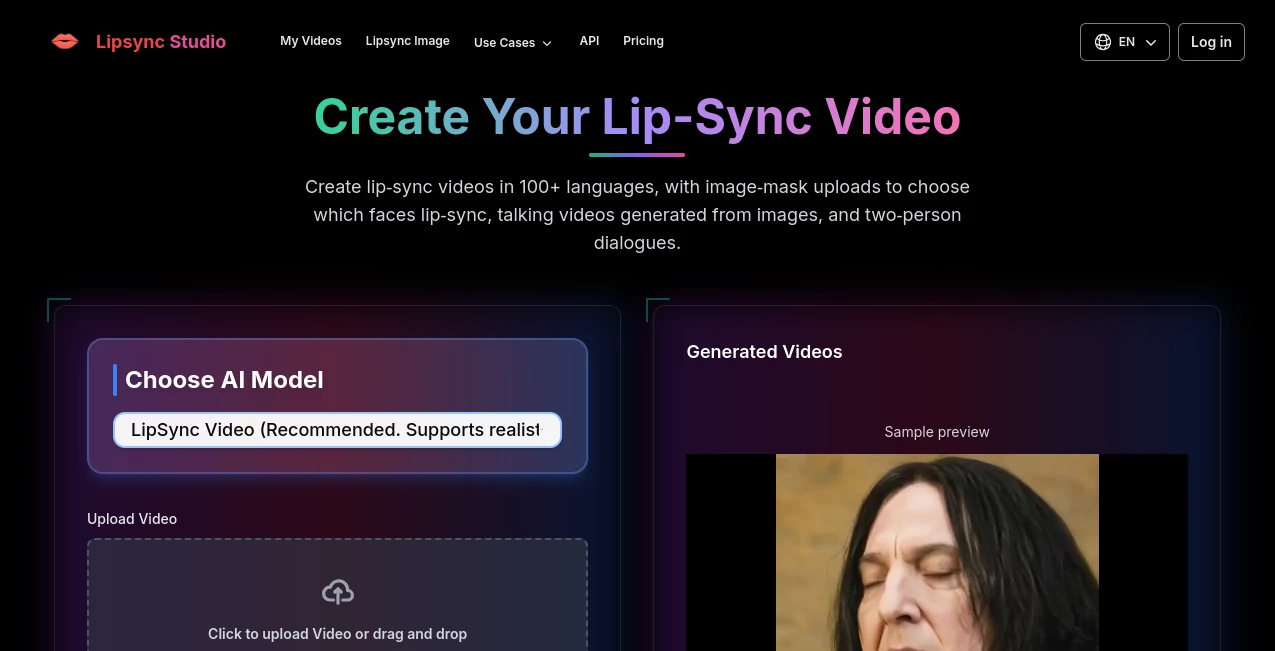
What is Lipsync Studio?
Imagine taking a static clip or a favorite cartoon frame and making the characters chat away in perfect sync with any voice or song you throw at it—flawlessly, in over a hundred languages, and looking so natural it fools the eye every time. That's the sheer delight this platform delivers, bridging the gap between raw footage and polished, talking-head magic without needing a film crew or fancy gear. I've watched friends turn silly pet videos into hilarious dubbed skits overnight, and the results had us in stitches—it's that kind of effortless fun mixed with pro-level polish that hooks you right away.
Introduction
In the rush of content creation these days, getting voices to match mouths just right used to mean hours in editing suites or hiring specialists, but this tool flips that on its head with smart tech that handles the heavy lifting. It burst onto the scene aiming to democratize lip sync for everyone—from social media mavens crafting viral parodies to educators localizing lessons across borders. What draws people in is the way it tackles real humans, quirky animals, or beloved cartoons with equal finesse, even forgiving dodgy audio recordings. Folks share stories of breathing new life into old family videos or whipping up multi-language ads that feel authentic, all while slashing costs and timelines. It's a quiet revolution for anyone who's ever dreamed of making their visuals speak volumes, literally.
Key Features
User Interface
Stepping in feels like a breeze—the upload spots welcome your videos and audio with open arms, supporting all the usual formats without a fuss. A clever mask system lets you paint which faces get the talking treatment, black for silent, white for chatty, or grab a template for duos. Modes split neatly between precision for lifelike folks and flow for animated fun, with advanced tweaks tucked away for when you need them. It's straightforward enough that my non-techy pal nailed a singing cat video on her first try, grinning the whole time.
Accuracy & Performance
The sync here is uncanny—every syllable lands spot-on, capturing nuances in speech or song that make movements feel alive, not robotic. It powers through imperfect recordings, cleaning up the match without you lifting a finger, and churns out results fast enough to keep ideas flowing. One creator I know dubbed a short film trailer in minutes, and the alignment held up so well under slow-mo scrutiny that it passed for studio work, no exaggerations.
Capabilities
Whether you're dubbing dramas, syncing music videos, or animating parodies, it covers humans to cartoons with seamless multi-character support and instant translations that preserve natural flow. Upload a portrait and audio, and out comes a talking head; add masks for selective sync in crowded scenes. The resilience to noisy audio and breadth across languages make it a powerhouse for global reaches, turning one clip into dozens of localized gems without losing the original spark.
Security & Privacy
Your projects stay in safe hands, with logged-in saves keeping things private and anonymous runs chugging along without ties. It follows standard practices to handle uploads discreetly, focusing on the craft rather than data digs. For sensitive corporate or personal clips, that layer of care means you can experiment freely, knowing your creations won't wander off uninvited.
Use Cases
Social creators craft TikTok parodies that rack up views with spot-on cartoon dubs, while marketers localize ads for new markets overnight, keeping brand voices intact. Educators turn static lessons into engaging multi-language modules, and music fans sync beats to animal antics for laughs that go viral. Film buffs revive old footage with fresh narration, or podcasters visualize episodes with talking avatars—it's these everyday wins, from corporate trainings to heartfelt family tributes, that showcase its versatility.
Pros and Cons
Pros:
- Generous daily free allowance that lets you play without commitment.
- Uncanny natural sync across wildly different styles and languages.
- Mask tricks for precise control in multi-face chaos.
- Quick, forgiving processing that embraces real-world audio messes.
Cons:
- Free tier caps length and resolution, teasing the full feast.
- Longer epics might need chopping or premium boosts.
Pricing Plans
Dive in free with daily credits that fuel solid short clips—20 seconds low-res or 10 higher, renewing login fresh. Premium monthly or yearly plans unlock the floodgates with discounts on annual, perfect for heavier creators chasing unlimited runs. It's priced to welcome tinkers yet scale for pros, with flash sales sweetening the deal and no hidden traps.
How to Use LipSync Studio
Upload your video and audio clips—mix formats freely—then pick precision for realistic or cartoon mode for animated flair. Whip up a black-and-white mask to spotlight speaking faces, or snag a template for quick duos. Tweak advanced if the mood strikes, hit generate, and grab the synced masterpiece for download. I once masked a crowded party clip to dub just one friend singing happy birthday—the rest stayed silent, and it came out hilarious in under five minutes.
Comparison with Similar Tools
Plenty of sync options float around, but few match this one's blend of free daily kicks and broad style support—from gritty real-life to whimsical cartoons—without demanding downloads or steep fees upfront. Where others stumble on accents or noise, this forgives and flourishes, delivering studio sheen at a fraction of the fuss. It's the balanced pick for creators who want reliability across languages and characters, edging out narrower or pricier rivals with its welcoming vibe.
Conclusion
This platform isn't just syncing lips—it's syncing dreams to reality, handing creators a shortcut to content that captivates without the customary grind. From viral laughs to global messages, it opens doors that once stayed shut for lack of resources. If you've got a clip begging for voice, this is your invitation to make it sing, speak, or surprise in ways that'll stick with viewers long after the play button stops.
Frequently Asked Questions (FAQ)
How many languages does it cover?
Over a hundred, with natural flow that keeps dubs feeling genuine.
Works on cartoons or animals too?
Absolutely—syncs seamlessly across humans, pets, or animated pals.
What about noisy audio?
It handles imperfections like a champ, pulling clean sync from messy recordings.
Free daily limit details?
Login for 20 credits—enough for 10-20 seconds depending on quality.
Mask for multiple faces?
Paint or template your way to selective sync, easy as pie.
AI Animated Video , AI Video Editor , AI Video Generator , AI Lip Sync Generator .
These classifications represent its core capabilities and areas of application. For related tools, explore the linked categories above.
Lipsync Studio details
This tool is no longer available on submitaitools.org; find alternatives on Alternative to Lipsync Studio.
Pricing
- Free
Apps
- Web Tools
Categories

Lipsync Studio Alternatives Product

Leonardo.ai

VIGGLE
Seedance 2.0…
Veo 3.2 AI V…

VidiOne
AISeedance2
Seedance 2.0…

Sora AI Vide…

Logo Animati…