
🧠 AI Quiz
Think you really understand Artificial Intelligence?
Test yourself and see how well you know the world of AI.
Answer AI-related questions, compete with other users, and prove that
you’re among the best when it comes to AI knowledge.
Reach the top of our leaderboard.


















livetalktranslate
What is livetalktranslate?
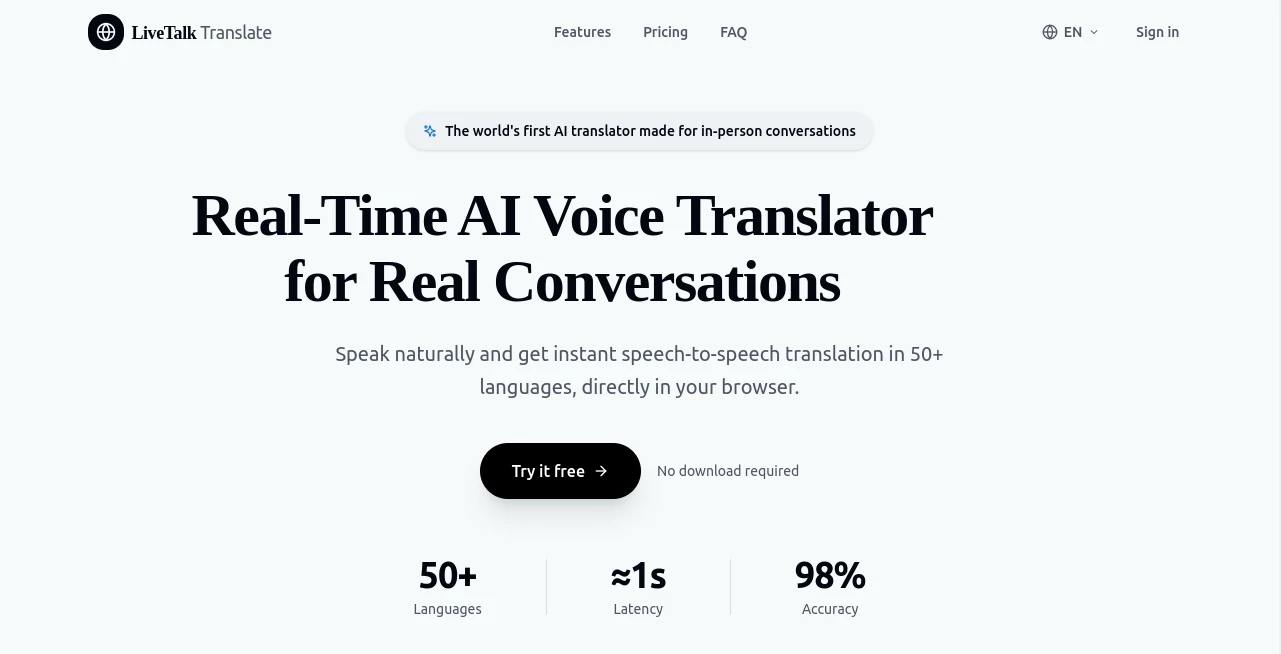
Picture standing in a busy market in Tokyo, needing to ask about a price, or sitting in a meeting with a client who speaks only Spanish. Instead of fumbling with phrasebooks or awkward hand gestures, you open your browser, select the languages, hold the microphone, and speak naturally. Seconds later, you hear a clear, natural-sounding translation in the other person’s language while seeing the text on screen. That seamless moment is what this tool makes possible every single day. I’ve used it during a family video call with relatives abroad and watched the conversation flow without the usual pauses and misunderstandings. It feels less like technology and more like a helpful friend who just happens to speak every language.
Introduction
Breaking language barriers used to mean downloading apps, granting microphone permissions, or dealing with clunky interfaces. This platform changes that by bringing real-time voice translation straight into your browser—no downloads, no installations, no fuss. Powered by advanced AI models, it listens as you speak, translates instantly, and speaks back with natural-sounding voices. It supports over 50 languages and keeps getting better as new ones are added. Whether you’re traveling, closing a deal, chatting with family, or helping a customer, it turns awkward silences into smooth conversations. The best part? It feels private and respectful, never storing your chats longer than needed.
Key Features
User Interface
The design is wonderfully straightforward. Pick two languages with a tap, press and hold the microphone button (or hit spacebar), speak naturally, and release. You instantly hear the translation and see both original and translated text on screen. Switching direction is one click. Everything loads fast, works on desktop and mobile browsers, and never overwhelms you with options. It’s the kind of interface that disappears so you can focus on the actual conversation.
Accuracy & Performance
The translations land with impressive accuracy, often above 98% for common language pairs, catching context and tone rather than just word-for-word swaps. Voices sound clear and natural, not robotic. The system processes in real time with low latency, so conversations keep their natural rhythm instead of turning into stop-start exchanges. Even with background noise or slight accents, it performs reliably enough that people forget they’re using a tool at all.
Capabilities
Two-way voice translation in over 50 languages, real-time audio playback as the translation arrives in chunks, readable dual-text transcripts, instant language switching, and support for both short phrases and longer back-and-forth talks. It works entirely in-browser on desktop and mobile, with no app needed. Paid plans add priority processing and extended monthly minutes, making it suitable for everything from quick travel questions to longer business discussions.
Security & Privacy
Your conversations are encrypted and not stored on servers after the session ends. No unnecessary data collection, no training on your voice or words. It’s built with privacy in mind, so you can speak freely whether you’re discussing personal matters or sensitive business details. That sense of security makes the tool feel trustworthy for real everyday use.
Use Cases
Travelers ask for directions, order food, or chat with locals without pulling out their phone every few seconds. Business professionals hold meetings across language barriers and keep the discussion flowing naturally. Families separated by distance finally talk heart-to-heart without awkward pauses or mistranslations. Customer support teams help international clients in real time, building better relationships. It shines anywhere two people want to connect without a common language getting in the way.
Pros and Cons
Pros:
- Works instantly in any modern browser—no downloads or setup required.
- Natural-sounding voices and solid accuracy make conversations feel smooth.
- Simple, clean interface that anyone can use right away.
- Strong privacy focus gives peace of mind during important talks.
- Generous free tier lets you test it before committing.
Cons:
- Free plan has a monthly minute limit suitable for light use.
- Very noisy environments can still challenge accuracy (like most voice tools).
- Longer, complex discussions may need occasional repetition for best results.
Pricing Plans
The free starter plan gives 180 seconds per month—enough to try it on real conversations and see the difference. The Pro plan at $19.99/month (billed yearly) unlocks 240 minutes, all languages, priority processing, and faster support. Enterprise options scale for teams with higher volume, custom needs, and dedicated onboarding. It’s priced so you only pay for the conversation power you actually need.
How to Use LiveTalk Translate
Open the site in your browser, choose the two languages you need (you can switch direction anytime), press and hold the microphone button, and speak clearly. Release when you’re done. Listen to the natural translation and read both texts on screen. For back-and-forth chats, simply take turns speaking. No account is required to start, though signing up unlocks saved history on paid plans. That’s it—conversations flow naturally from the first try.
Comparison with Similar Tools
Many translation apps require downloads, force accounts, or feel clunky on desktop. This one runs smoothly in any browser, keeps things private, and focuses on natural voice flow rather than robotic output. While some dedicated devices or apps excel in specific niches, the combination of instant access, good accuracy, and browser simplicity makes it stand out for everyday travel, business, and personal use.
Conclusion
Language should connect people, not create barriers. This tool quietly removes one of the biggest ones with speed, simplicity, and respect for privacy. It turns “I don’t speak your language” into “let’s talk anyway,” whether you’re ordering coffee in a foreign city, closing a deal across continents, or just catching up with family. In a world that feels increasingly global, having reliable, instant voice translation right in your browser is more than convenient—it’s genuinely empowering.
Frequently Asked Questions (FAQ)
Do I need to download an app?
No. It works directly in your browser on desktop or mobile—no installation needed.
How many languages are supported?
Over 50 and growing, including major ones like English, Spanish, Chinese, Japanese, Arabic, Hindi, and more.
Is my conversation private?
Yes—conversations are encrypted and not stored on servers after the session ends.
What’s included in the free plan?
180 seconds per month to test real conversations and see the quality for yourself.
Can I use it for business meetings?
Absolutely. Many professionals rely on it for client calls, negotiations, and team discussions across languages.
AI Translate , AI Speech Recognition , AI Speech Synthesis , AI Voice Assistants .
These classifications represent its core capabilities and areas of application. For related tools, explore the linked categories above.
livetalktranslate details
Pricing
- Free
Apps
- Web Tools
Categories

livetalktranslate Alternatives Product

AI2AI project
Kindroid

WonderShare …

Klyra AI

Krisp

AI Manga Tra…

Manga Transl…

SuperAI

Weblo AI
