
🧠 AI Quiz
Think you really understand Artificial Intelligence?
Test yourself and see how well you know the world of AI.
Answer AI-related questions, compete with other users, and prove that
you’re among the best when it comes to AI knowledge.
Reach the top of our leaderboard.


















MakeMyOC
What is MakeMyOC?
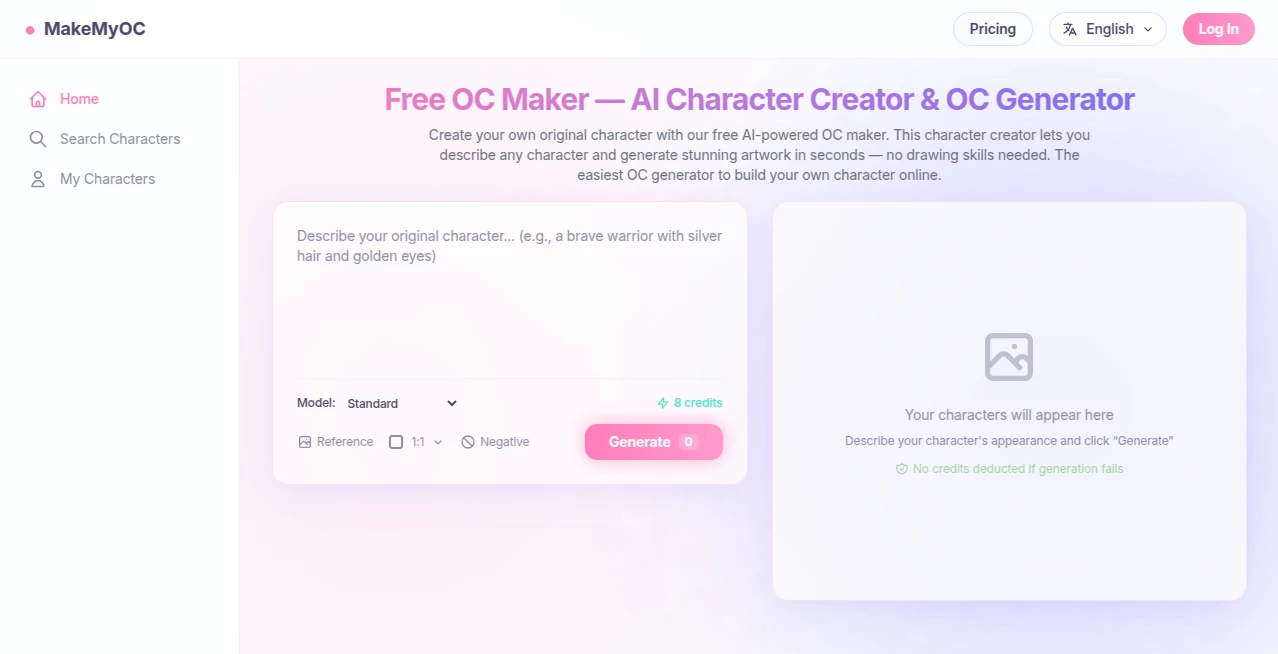
Coming up with a character that feels alive—someone with the right look, the right vibe, the right little quirks—is half the fun of writing, roleplaying, or world-building. But turning that fuzzy idea in your head into a visual you actually love can take forever… unless you have something that just gets it. This tool does. You describe who they are (appearance, personality, outfit, mood, setting), and it builds them from scratch in seconds—consistent, detailed, and surprisingly true to what you pictured. I’ve watched writers go from “I can’t draw to save my life” to posting full character sheets that look like they hired an artist. It’s not just pretty pictures; it’s a shortcut to seeing your story people become real.
Introduction
Original characters are the heart of so many creative projects—fanfiction, TTRPGs, novels, comics, VTubing, cosplay concepts—but visualizing them consistently across poses, expressions, and outfits is brutally time-consuming. This platform quietly removes that pain point. Describe once, generate dozens of variations, refine with more detail, and suddenly you have a visual library that matches your imagination instead of fighting it. It’s become a favorite among creators who need speed without sacrificing soul. The results don’t feel like generic AI slop; they feel like your character stepped out of your notes and onto the canvas.
Key Features
User Interface
The flow is clean and forgiving. Start with a big text box where you pour out everything—hair color, eye shape, scars, clothing style, expression, background vibe. A few style presets sit nearby if you want a quick direction (anime, semi-realistic, chibi, etc.). Generate, browse variations side-by-side, pick favorites, then refine with additional prompts or pose references. It’s intuitive enough that my non-artist friends created usable refs on their first try—no tutorials needed, just type and see.
Accuracy & Performance
It holds character identity shockingly well across generations. Same face shape, same freckle pattern, same piercing—even when you ask for wildly different angles or outfits. Generation is fast (under 30 seconds for most), and the model rarely “forgets” key details once they’re established in the prompt. The consistency is what sets it apart; you can actually build a coherent character reference sheet instead of getting a new random person every time.
Capabilities
Full-body and portrait generation, multiple art styles (realistic, anime, painterly, sketch, pixel art, etc.), pose control via text or reference images, outfit swapping while keeping the face intact, expression variety, background inclusion or removal, and batch generation for building sheets quickly. It understands layered descriptions (“scar over left eyebrow, heterochromia, leather jacket with red accents, confident smirk”) and rarely needs heavy re-rolls to get close.
Security & Privacy
No mandatory login for basic generation. Images are processed ephemerally and not stored or used for training unless you explicitly save them to an account. For creators protective of original characters or story IP, that low-commitment privacy is a genuine comfort.
Use Cases
A TTRPG player builds their new rogue character in ten minutes instead of commissioning art they can’t afford yet. A writer creates consistent protagonist portraits for chapter headers and social teasers. A VTuber designer iterates on model concepts rapidly before finalizing with a 3D artist. A roleplayer generates matching refs for their entire party so the DM can visualize everyone. It’s perfect whenever you need “this person exists” visuals fast and affordably.
Pros and Cons
Pros:
- Outstanding character consistency—same person, different poses and outfits.
- Fast enough to iterate in real time during brainstorming sessions.
- Wide style range covers almost any aesthetic you’re going for.
- Free tier is generous; you can build solid refs without paying.
- Results look hand-drawn enough to use in pitches or portfolios.
Cons:
- Occasional prompt wrestling needed for very specific or unusual features.
- Free generations have lower resolution and occasional watermarks.
- Complex multi-character scenes can still be hit-or-miss.
Pricing Plans
Free daily credits let you experiment freely—enough to create several full characters per day. Paid plans unlock unlimited generations, higher resolutions, faster queue times, no watermarks, and priority access during peak hours. Pricing is modest—many creators say it costs less than one commission but delivers dozens of usable refs. It’s built to reward play without punishing curiosity.
How to Use Caricature Generator
Go to the generator page, write a detailed description (include age, build, hair, eyes, clothing, expression, pose, background if wanted). Choose a style preset or leave it open. Hit generate and browse the variations. Pick your favorite, then refine by adding more prompt detail (“more freckles, softer lighting, holding a dagger”). Download high-res PNGs or generate a new batch with slight tweaks. Save good ones to your gallery if you make an account. It’s fast enough to refine a character in one focused session.
Comparison with Similar Tools
Many character generators produce one-off images that change drastically between generations. This one excels at keeping the same person consistent while letting you explore outfits, expressions, and poses. It’s less “random art generator” and more “your character’s visual bible builder.” Speed, fidelity, and creative control put it ahead of most free and even some paid alternatives.
Conclusion
Creating original characters should be exciting, not frustrating. This tool takes the friction out of visualization so you can spend your energy on story, personality, and world instead of struggling to draw or begging for commissions. When your character finally looks the way you always pictured them—and you can see them in ten different moods and outfits in under an hour—something clicks. It’s not just art; it’s a bridge between imagination and reality. For writers, roleplayers, creators of any kind, that bridge is worth crossing.
Frequently Asked Questions (FAQ)
How detailed should my prompt be?
The more specific, the better—mention key features (eye color, scars, clothing style, pose, mood) for strongest results.
Can I keep generating the same character?
Yes—use the same base prompt and add variations (“same character but now in armor”) to maintain consistency.
What styles are available?
Anime, semi-realistic, chibi, painterly, sketch, pixel art, and more—plus you can describe custom vibes.
Are the images free to use?
Yes—commercial use is allowed, even on free tier (check current terms for attribution if any).
How many can I make for free?
Generous daily limit—enough for several full characters or sheets per day.
AI Image to Image , AI Character , AI Art Generator , AI Design Generator .
These classifications represent its core capabilities and areas of application. For related tools, explore the linked categories above.
MakeMyOC details
Pricing
- Free
Apps
- Web Tools
Categories

MakeMyOC Alternatives Product

Nano Banana …

Nano Banana 2

MuseCraft.AI

Seedream Ima…
QR Menu Gene…

OutfitSwap S…
Nano Banana …

NanoAI
Birthday Car…
