
🧠 AI Quiz
Think you really understand Artificial Intelligence?
Test yourself and see how well you know the world of AI.
Answer AI-related questions, compete with other users, and prove that
you’re among the best when it comes to AI knowledge.
Reach the top of our leaderboard.


















Meet Lea
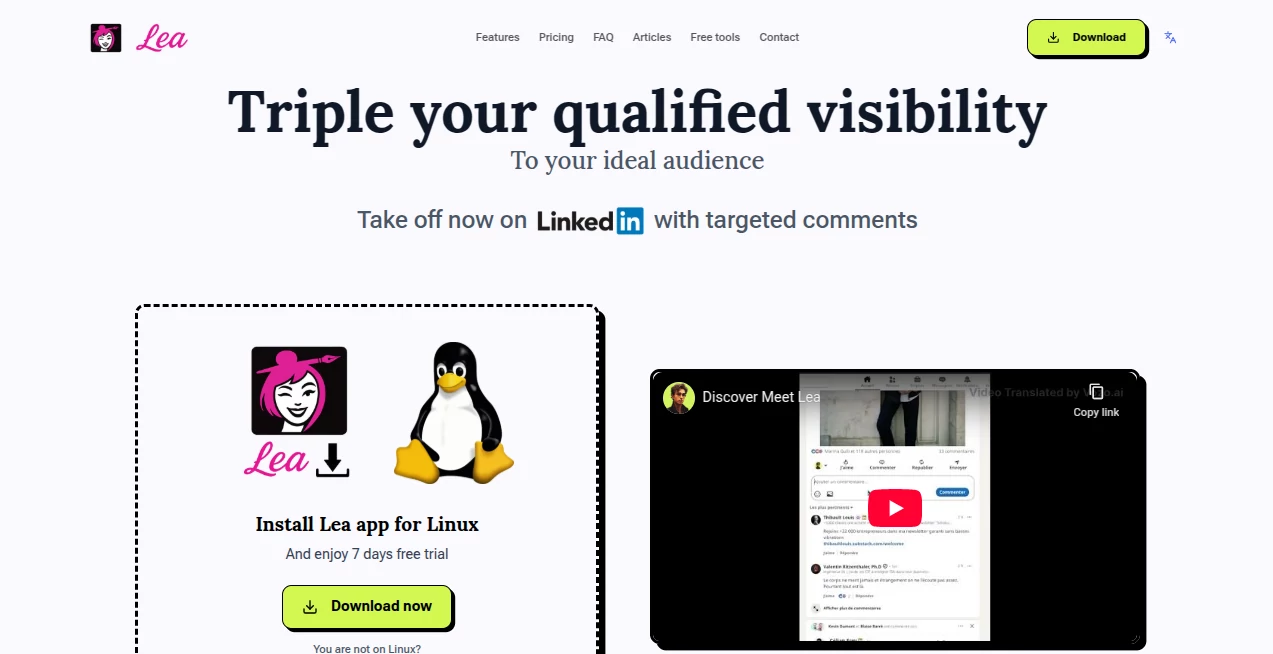
What is Meet Lea?
LinkedIn can feel like shouting into a crowded room where only a handful of people ever turn around. Most folks burn out posting daily just to stay visible, but the algorithm keeps shifting the rules. This desktop app quietly flips that script. Instead of forcing more content, it helps you show up smarter—right in the conversations your ideal audience is already having. I know people who went from getting a trickle of views to suddenly seeing their name pop up under viral posts, all because they started commenting in the right places with the right words. It's not automation in the risky sense; it's guided, thoughtful engagement that feels authentic and keeps your account safe.
Introduction
The big shift happened a couple years back when LinkedIn dialed back reach for organic posts unless they went viral. Creators and founders who used to get steady traction suddenly had to grind twice as hard just to stay seen. This tool was built exactly for that moment. It runs on your desktop (Windows, macOS, Linux), scans feeds intelligently, and surfaces posts where your target people are already active. Then it suggests comments crafted to land high up—often becoming the top reply—exposing you to thousands of new eyes without ever asking you to post another update. Users tell me they notice more inbound messages and profile visits within the first week. It's less about volume and more about precision, and that precision is what keeps accounts healthy and growing sustainably.
Key Features
User Interface
The app opens to a calm, focused workspace—no chaotic feeds or distracting notifications. A sidebar shows your custom lists of interesting accounts, the main window highlights suggested posts with one-click comment previews, and everything is designed so you stay in control. You read the suggestion, tweak the wording if you want, then post. It's like having a smart assistant sitting next to you who already did the research and is now just handing you the best lines. Clean, fast, and surprisingly satisfying to use day after day.
Accuracy & Performance
The comment suggestions are trained on tens of thousands of real top-performing replies from viral posts, so they carry that proven DNA—curious, value-adding, never spammy. Lea picks posts where your audience is genuinely present, not just random noise. In practice, users see comments climb to top spots more often than not, which translates to outsized visibility. The app runs locally and respects LinkedIn limits, so performance stays smooth and safe even during longer sessions.
Capabilities
Lea Top Comment finds high-potential posts and crafts replies designed to rise to the top. Lea Flash Answer watches your own post comments and prepares thoughtful responses to keep conversations alive and reward engagement. You can build custom feed lists for niche targeting, track comment performance stats to see what resonates, and do all of this without ever sounding robotic. Everything requires your review and edit, so it enhances your voice instead of replacing it.
Security & Privacy
Because it's a desktop app with no browser extension or risky permissions, your LinkedIn activity stays entirely under your control. Lea respects official usage limits and uses methods that stay undetectable. Data is handled responsibly—GDPR compliant, never sold or shared. For anyone who's ever worried about account flags, that level of care is a big reason people trust it long-term.
Use Cases
A consultant who hates posting daily starts getting inbound leads after consistently appearing under industry thought leaders' posts. A SaaS founder builds relationships with potential customers by adding value in relevant threads, leading to warmer demos. A coach grows their audience by engaging meaningfully in client-rich conversations, turning lurkers into followers. It's especially powerful for people whose expertise shines in replies more than in standalone updates.
Pros and Cons
Pros:
- Genuinely multiplies reach without forcing you to create more content.
- Comment suggestions feel natural and high-quality, rarely needing major rewrites.
- Keeps your account safe by staying within limits and requiring manual approval.
- Performance stats help you double down on what actually works.
Cons:
- Requires consistent manual posting of comments (no full auto-pilot).
- Monthly comment quota on Lea-generated suggestions (though manual ones are unlimited).
Pricing Plans
It starts with a 7-day trial so you can see real results before committing. After that, monthly and yearly plans unlock the full power—higher quotas, faster suggestions, and all features. The current launch discount makes it even more approachable. Many users say the visibility gains cover the cost quickly, especially when inbound opportunities start flowing.
How to Use It
Download the app for your OS, sign in, and let it scan your feed. Browse suggested posts, read the proposed comment, edit to match your tone if needed, then post. For your own content, watch for incoming comments and use Flash Answer to craft quick, engaging replies. Build custom lists for your niche, review stats weekly to refine your approach. It's a light daily habit that compounds fast.
Comparison with Similar Tools
A lot of LinkedIn helpers push heavy automation that risks bans or sounds robotic. This one stays human-first—every action needs your approval, suggestions are trained on real top comments, and the focus is strategic visibility rather than volume. It avoids the red flags others trigger and delivers more sustainable growth as a result.
Conclusion
LinkedIn rewards presence, but not everyone has hours to post daily. This app finds a smarter path: show up where conversations are already happening, add real value, and let visibility grow naturally. When you start seeing your name in more feeds and your inbox gets warmer leads, it feels less like work and more like momentum. For anyone tired of the content treadmill, it's a breath of fresh air.
Frequently Asked Questions (FAQ)
Is it safe for my account?
Yes—it respects limits, requires manual approval, and uses undetectable methods.
Do I have to post every day?
No—the whole point is growing reach without more posting.
How many comments can I make?
Manual comments are unlimited; AI-suggested ones have a monthly quota.
Can I try it first?
7-day trial lets you see real impact before deciding.
Does it work on mobile?
It's a desktop app (Windows, macOS, Linux) for focused, controlled use.
AI Reply Assistant , AI Social Media Assistant , AI Digital Marketing Generator , AI Response Generator .
These classifications represent its core capabilities and areas of application. For related tools, explore the linked categories above.
Meet Lea details
Pricing
- Free
Apps
- Web Tools
Categories

Meet Lea Alternatives Product

Linkedora
Apify

Kapwing

Customer Fee…

Jasper

Simplified

Quso AI

Lime Social

Klyra AI
