
🧠 AI Quiz
Think you really understand Artificial Intelligence?
Test yourself and see how well you know the world of AI.
Answer AI-related questions, compete with other users, and prove that
you’re among the best when it comes to AI knowledge.
Reach the top of our leaderboard.


















MyPicNow

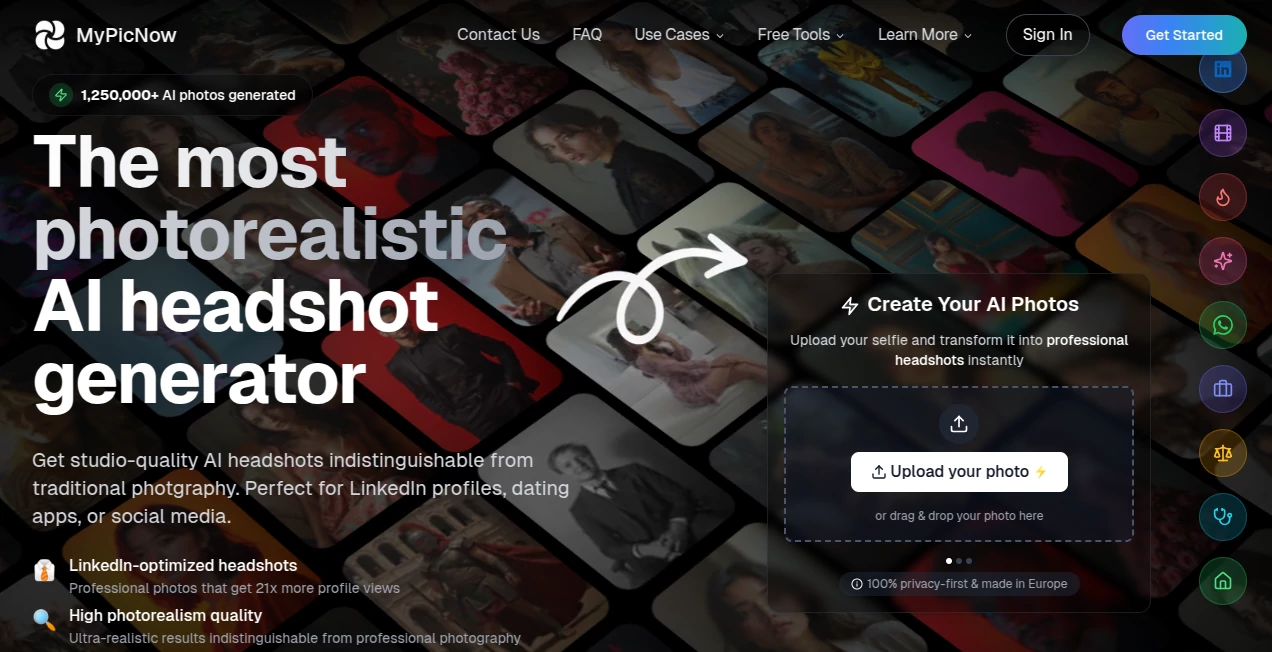
What is MyPicNow?
There's something quietly powerful about seeing yourself in a photo that looks like it came straight from a high-end studio session—sharp lighting, perfect expression, background that actually fits the vibe you're going for—without ever leaving your couch or spending hundreds on a photographer. This tool makes that happen in a way that still surprises me every time I try it. You upload a handful of your own selfies, wait about half an hour while it trains a model just for you, and then it starts spitting out images that feel genuinely like you, not some generic avatar. Friends I've shown it to usually do a double-take because the likeness is so tight, down to the way your eyes crinkle when you smile.
Introduction
Most of us have stared at our LinkedIn profile pic or Tinder shots and thought, "This could be better." Getting professional headshots used to mean booking time, outfits, lighting setups, and a big bill. Now imagine cutting all that away and still ending up with photos that look expensive and authentic. That's where this platform quietly changes the game. It trains a custom AI model on your photos so every generation keeps your face, skin tone, and little personal quirks intact—no more weird distortions or "close enough" results. People use it for everything from job-hunting confidence boosts to dating profile refreshes, and the feedback loop is addictive: generate a few, pick favorites, tweak prompts, generate again. It's become a small ritual for many—quick, private, and surprisingly affordable compared to the real thing.
Key Features
User Interface
The whole experience stays calm and focused. You sign up, drop in 10–15 photos (mix of angles, expressions, lighting), and the training starts in the background—no complicated steps or confusing dashboards. Once it's ready, you're greeted with a simple prompt box and a gallery of style templates. Everything loads smoothly on phone or desktop, previews appear fast, and the built-in editor lets you fix tiny flaws without leaving the page. It's designed so you spend time creating, not figuring things out.
Accuracy & Performance
The likeness is the standout here—facial structure, hair texture, even the way light hits your cheekbones stay consistent across wildly different outfits and settings. Generations usually finish in about 8–10 seconds each, and you can queue up four at once. I've seen results that look like they were shot with a DSLR and proper lighting, not pieced together by software. The model learns your unique features so well that even side profiles or slight smiles come out natural, not forced.
Capabilities
You get over 60 ready-made styles tailored for LinkedIn professionalism, Tinder/Bumble appeal, Instagram aesthetics, or TikTok energy. Want something custom? Just describe it—different backgrounds, clothing, poses, moods—and the AI follows through while keeping your face 100% recognizable. There's a photo editor for small touch-ups, high-res 4K downloads, and the option to recreate a vibe from one image onto another. It's flexible enough for serious career shots or playful social content.
Security & Privacy
Your photos are used only to train your personal model—never mixed into a general dataset or shared. Everything is encrypted end-to-end, processed in isolated environments, and you can delete your data or entire account anytime (fully purged within 30 days). Ownership of every generated image stays with you, no restrictions on personal or commercial use. It's reassuring to know the process respects boundaries while still delivering top-tier results.
Use Cases
A recent grad updating their LinkedIn before job applications generates a full set of professional headshots that make their profile pop—suddenly more views, more messages. Someone tired of lackluster dating pics creates warmer, more approachable images and watches match rates climb. Content creators refresh their Instagram grid with consistent-looking portraits in different outfits without endless photoshoots. Even small business owners get clean product-model shots without hiring talent. It's the kind of tool that quietly solves real, everyday frustrations.
Pros and Cons
Pros:
- Uncanny likeness that holds up across dozens of variations.
- Fast generations and smart editing tools save tons of time.
- Huge range of styles that feel purpose-built for real platforms.
- Strong privacy controls and full ownership of outputs.
Cons:
- No free unlimited tier due to the compute cost—starts paid after trial.
- Best results come from good, varied input photos.
Pricing Plans
It keeps things straightforward: individual plan around $20/month gives 50 generations, creator tier at $40 bumps to 1,000, and premium at $100 offers 3,000 with priority processing and support. Annual billing knocks the price down noticeably. The investment feels fair when you compare it to one traditional photoshoot—here you're getting endless variations for less.
How to Use MyPicNow
Sign up, upload 10–15 clear, varied selfies (different angles, lighting, no group shots or heavy filters), and let the model train for about 30 minutes. Once ready, browse templates or type a custom prompt—"confident business portrait in modern office" or "casual Tinder shot on beach at sunset"—then generate. Pick your favorites, use the editor for small fixes, download in high-res, and you're set. Experimenting is half the fun; you can always refine the prompt and try again.
Comparison with Similar Tools
Plenty of AI photo generators exist, but few maintain such strong facial consistency while offering this many platform-specific styles. Others often produce "almost you" results or require heavy prompt engineering; here the custom training does the heavy lifting, so outputs feel authentically yours. It's a noticeable step up in realism and usefulness for anyone who needs photos that actually represent them.
Conclusion
This isn't just another filter app—it's a practical shortcut to looking like the best version of yourself in any setting you can imagine. Whether you're leveling up your professional presence, refreshing your dating game, or simply wanting content that stands out, the results speak for themselves. It's one of those tools you try once and then wonder how you ever managed without it—quietly transformative and surprisingly fun.
Frequently Asked Questions (FAQ)
How many photos should I upload?
10–15 varied shots work best—mix close-ups, full-body, different expressions and lighting.
How long does training take?
Around 30 minutes; you can leave and come back when it's ready.
Can I use the photos commercially?
Yes—full ownership and no restrictions on personal or business use.
What if a generation has a small flaw?
The built-in editor lets you fix minor artifacts easily.
Is my data safe?
Bank-level encryption, GDPR/CCPA compliant, photos used only for your model.
AI Photo & Image Generator , Photo & Image Editor , AI Selfie & Portrait , AI Design Generator .
These classifications represent its core capabilities and areas of application. For related tools, explore the linked categories above.
MyPicNow details
This tool is no longer available on submitaitools.org; find alternatives on Alternative to MyPicNow.
Pricing
- Free
Apps
- Web Tools
Categories

MyPicNow Alternatives Product
svgstud.io

Artguru
JPG to Small
Image By Qwen
Nanosora

Ultra Face S…

MixHub AI

AIImageEdit

Nano Banana 2
