
🧠 AI Quiz
Think you really understand Artificial Intelligence?
Test yourself and see how well you know the world of AI.
Answer AI-related questions, compete with other users, and prove that
you’re among the best when it comes to AI knowledge.
Reach the top of our leaderboard.

















Nano Banana 2
What is Nano Banana 2?
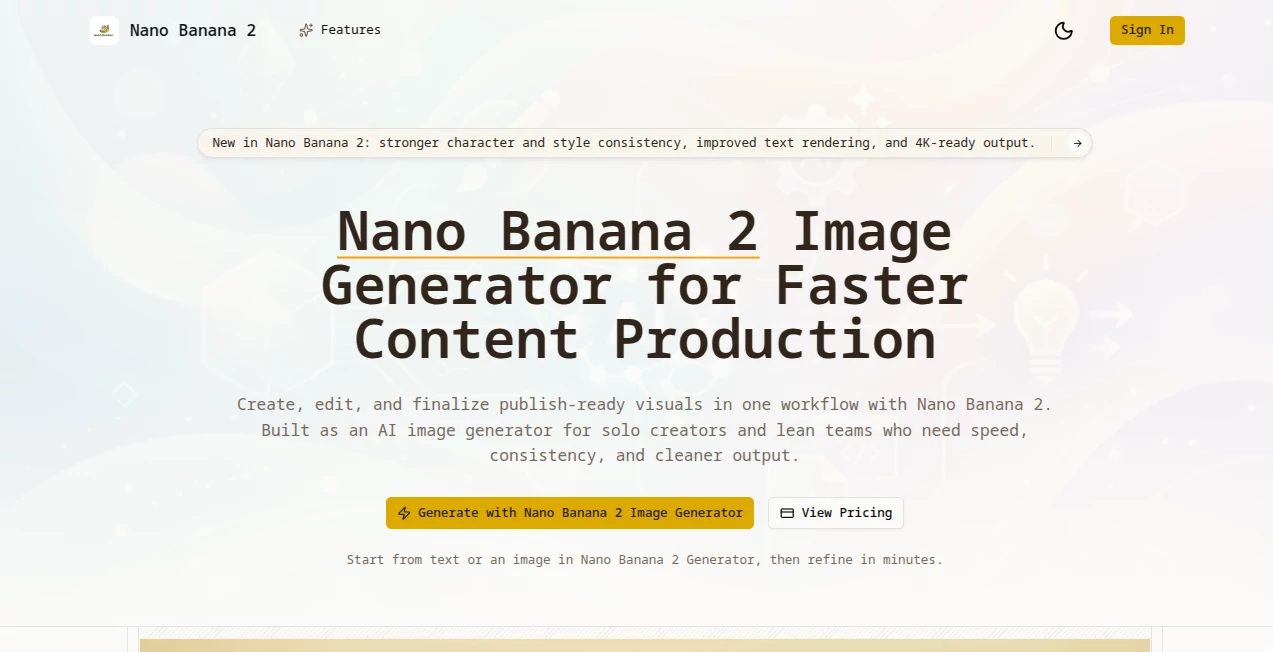
There’s something satisfying about typing a quick idea and watching a clean, detailed image appear almost instantly—characters that actually look like the same person across variations, text that reads properly, and details that hold up even at higher resolutions. Nano Banana 2 delivers that experience reliably. It’s built for creators who need speed without sacrificing quality, whether you’re making thumbnails, social graphics, product visuals, or just experimenting with wild concepts. I’ve seen freelancers knock out an entire week’s worth of visuals in an afternoon and still have time to refine them. The consistency and attention to small details make it feel like a real creative partner rather than a hit-or-miss generator.
Introduction
Most AI image tools force you to choose between speed and quality. You either get fast but inconsistent results or slower outputs that still need heavy editing. Nano Banana 2 bridges that gap nicely. It combines the quick generation of lighter models with stronger character consistency, better text rendering, and support for higher resolutions—including 4K-ready output. Solo creators and small teams especially appreciate how it lets them move from idea to publish-ready visual in minutes. The workflow feels natural: start with text or an image, refine with natural language edits, and finalize without losing the original vision. It’s become a daily go-to for people who create visuals regularly and don’t want to fight the tool every step of the way.
Key Features
User Interface
The interface keeps things focused and friendly. A prominent prompt area, easy image upload for reference or editing, clear style and resolution options, and a straightforward generate button. Edits happen through natural language instructions—“make the background warmer” or “add more detail to the clothing”—which keeps the process conversational. Previews load quickly, so you can iterate without frustration. It never feels cluttered or intimidating, even when you’re deep into a project.
Accuracy & Performance
One of the standout improvements is how well it maintains character and style consistency across multiple generations or edits. Faces stay recognizable, outfits hold their details, and overall composition remains coherent. Text rendering is noticeably better than many competitors—no more garbled letters or floating nonsense. Generation speed is impressive, often delivering usable results in seconds, and the output quality scales nicely to higher resolutions without introducing heavy artifacts. It handles both simple concepts and more complex scenes with surprising reliability.
Capabilities
You can generate fresh images from text prompts, edit existing photos with natural language instructions, remix concepts, strengthen character consistency, improve text in visuals, and produce high-resolution outputs suitable for print or digital use. It supports a wide range of styles—from photorealistic to stylized illustrations—and works well for thumbnails, social media graphics, marketing visuals, concept art, and more. The combination of fast iteration and solid consistency makes it practical for both quick experiments and production-level work.
Security & Privacy
Your prompts and uploaded images are handled with care during processing. The platform focuses on delivering the result without unnecessary data retention or sharing. For creators working on client projects or personal ideas, that respectful approach to privacy adds a welcome layer of comfort.
Use Cases
A content creator generates a week’s worth of eye-catching thumbnails in one sitting, tweaking styles until the brand voice clicks. A small business owner turns product photos into polished marketing visuals with natural language edits like “make the lighting warmer and add a subtle shadow.” An illustrator uses it to explore variations on a character design quickly, keeping consistency while testing different outfits and poses. Social media managers batch-create cohesive post graphics that maintain the same aesthetic across a campaign. It shines anywhere visuals need to be fast, consistent, and on-brand.
Pros and Cons
Pros:
- Strong character and style consistency that saves hours of manual fixes.
- Improved text rendering that actually looks professional.
- Fast generation and editing that keeps creative momentum high.
- Versatile enough for both quick ideas and more polished work.
- Approachable interface that doesn’t intimidate new users.
Cons:
- Free daily limits may feel restrictive for heavy daily users.
- Extremely complex or highly specific artistic directions can still benefit from careful prompting.
- Higher resolutions and unlimited use require a paid plan.
Pricing Plans
It starts with a generous free tier that lets you test the quality and workflow without commitment. Paid plans remove generation limits, unlock higher resolutions, faster priority processing, and additional features for serious creators. The pricing feels balanced for the time and consistency it delivers—many users find the upgrade pays for itself quickly through saved hours and better output.
How to Use Nano Banana 2
Head to the generator, type your prompt or upload a reference image, and choose any style or resolution options you want. Hit generate and review the result. For edits, simply describe changes in plain language—“make the sky more dramatic” or “change the outfit to vintage style”—and generate again. Download the version you like best. For batch or more advanced work, the paid tier offers extra capacity and tools. The whole process is quick enough that you can explore multiple directions in one focused session.
Comparison with Similar Tools
Many AI image generators still struggle with consistency or produce results that need significant post-editing. Nano Banana 2 stands out for its balance of speed, character coherence, and cleaner text handling. While some tools excel at one specific strength (ultra-realism or pure speed), this one delivers reliable, production-friendly results across a wide range of use cases without forcing you into a narrow style. It feels like a practical daily driver rather than an occasional experiment.
Conclusion
Creating strong visuals shouldn’t require fighting the tool or spending hours on fixes. Nano Banana 2 makes the process feel natural and productive, giving creators the speed they need and the quality they want. Whether you’re building a brand, telling stories, or just having fun with ideas, it turns “I need an image” into “here’s something I’m proud to share.” In a crowded creative space, that combination of reliability and ease is genuinely refreshing.
Frequently Asked Questions (FAQ)
How fast are generations?
Most images appear in seconds, with editing iterations staying quick and responsive.
Does it handle text well in images?
Yes—text rendering is one of the notable improvements, producing readable and properly placed text in most cases.
Can I edit existing photos?
Absolutely—upload an image and describe the changes you want in natural language.
Is there a free way to try it?
Yes, the free tier offers enough generations to test quality and workflow thoroughly.
What resolutions are supported?
From standard sizes up to 4K-ready output on higher plans.
AI Photo & Image Generator , AI Image to Image , AI Art Generator , AI Design Generator .
These classifications represent its core capabilities and areas of application. For related tools, explore the linked categories above.
Nano Banana 2 details
Pricing
- Free
Apps
- Web Tools
Categories

Nano Banana 2 Alternatives Product

Imgezy
PixAI - AI A…

Kirkify

flux 3

nana banana …

insMind

Z-Image

z-image.me
China Brush
