
🧠 AI Quiz
Think you really understand Artificial Intelligence?
Test yourself and see how well you know the world of AI.
Answer AI-related questions, compete with other users, and prove that
you’re among the best when it comes to AI knowledge.
Reach the top of our leaderboard.

















Nano Banana

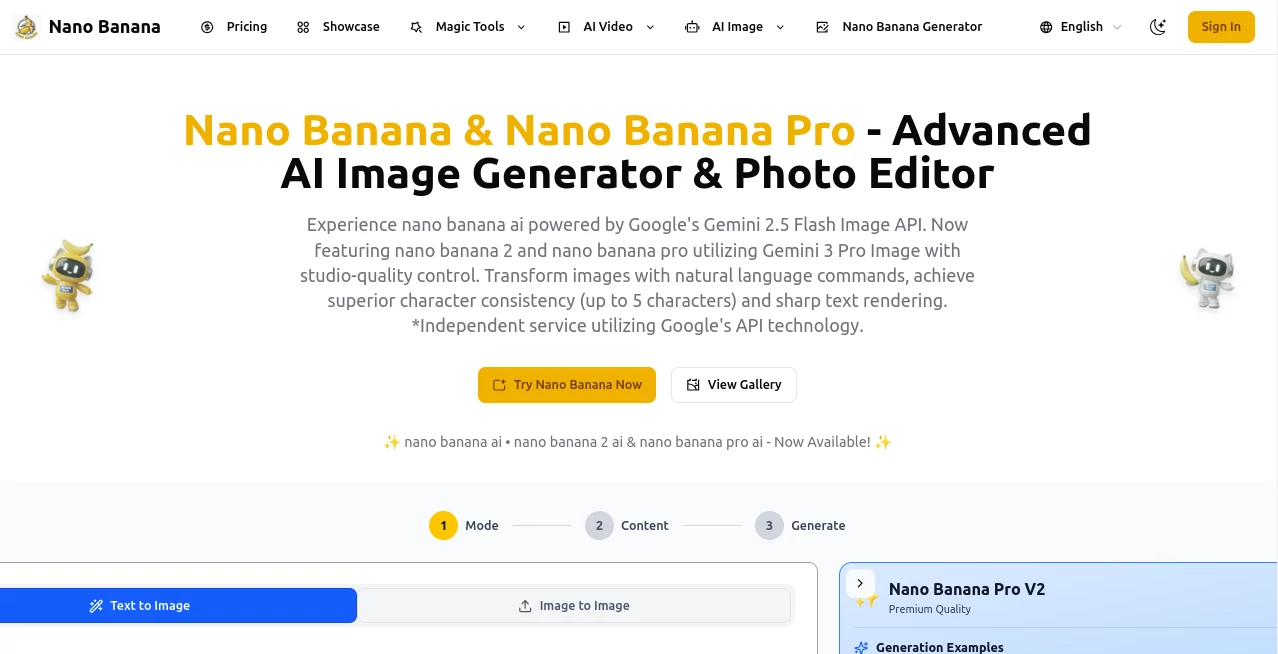
What is Nano Banana?
There's a quiet thrill in watching a half-baked idea turn into a crisp, detailed image that looks like it took hours in a design studio. This platform delivers that thrill reliably, blending Google's sharp tech with an interface that feels almost conversational. I've spent evenings tinkering with prompts for everything from quirky marketing mocks to personal art pieces, and the way it holds onto character details or fuses elements from different photos never fails to impress—it's like having a patient collaborator who gets the nuances right on the second or third try.
Introduction
Built around Google's Gemini models, this tool stands out for its knack at understanding complex instructions in plain words, whether you're starting from scratch or refining an existing shot. It shines in keeping faces and styles consistent across multiple characters—up to five at once—or rendering text that's actually readable, even in fancy scripts. What started as access to a speedy base model has grown into versions with studio-level control and high-res options that punch way above their weight. For anyone who's wrestled with inconsistent outputs elsewhere, stumbling on this feels like finding the right key for a stubborn lock—suddenly, ideas flow without the usual frustrations.
Key Features
User Interface
The dashboard keeps things refreshingly uncluttered: upload spots for images, a generous prompt box with a character counter, and straightforward toggles for resolution or style. Random suggestions pop up to spark ideas, and the generate button delivers previews fast, with options to refine or upscale on the spot. It's the sort of setup that invites experimentation—my last session started with a vague "cyberpunk cafe scene" and evolved into a series of tweaks that felt effortless.
Accuracy & Performance
It grasps context deeply, preserving lighting and composition during edits while nailing sharp text or blending sources without awkward seams. Generations fly in seconds for the lighter version, a bit longer for pro-level detail, but the wait pays off with outputs that rarely need major fixes. In head-to-head tries, it edges out others on tricky multi-character scenes, delivering that cohesive look that makes stories pop.
Capabilities
Text-to-image from detailed descriptions, natural language edits that target specific areas, seamless fusion of multiple uploads, and high-res scaling up to 4K with legible overlays. Multi-step refinements let you build complexity gradually, and world-aware processing ensures elements make sense together—like realistic shadows or logical placements. It's particularly strong for branding consistency or narrative series, turning scattered references into unified visuals.
Security & Privacy
Credits and subscriptions handle access smoothly, with commercial allowances and watermarking for transparency on generated content. Data flows securely, focused on your projects without unnecessary retention, giving that comfortable assurance for professional or personal use alike.
Use Cases
Marketers craft campaign visuals that stay on-brand across variations, swapping scenes while keeping models intact. Content creators build social series with recurring figures that feel familiar to followers. Designers prototype product placements in real-world settings, or storytellers visualize chapters with consistent casts. Even casual users revive old photos into fresh concepts, like turning a vacation snap into stylized art that captures the memory better.
Pros and Cons
Pros:
- Exceptional hold on character details, even in crowded compositions.
- Edits via everyday language that land precisely where intended.
- Blending multiple sources into coherent wholes without forced feels.
- Scalable quality from quick drafts to detailed finals.
Cons:
- Higher-res runs eat more credits and time than basic ones.
- Best with thoughtful prompts—vague ones can wander a bit.
Pricing Plans
A handful of free credits greet new arrivals for immediate tries, then subscriptions roll in at reasonable monthly rates for steady access—basic for everyday volume, pro for priority and extras, max for heavy lifters. Credits carry over, one-time packs fill gaps, and yearly commits shave costs, making it flexible whether you're dipping in occasionally or relying daily.
How to Use Nano Banana
Drop an image or start blank, craft your description—detailed the better—choose your model tier and size, then generate. Review the lineup, refine with follow-up instructions for targeted changes, and download when it clicks. Batch similar ideas or chain edits to build depth; it's rewarding how small adjustments yield big leaps.
Comparison with Similar Tools
Against flashier rivals, this one prioritizes thoughtful integration and reliability, often winning on subtle consistency or text clarity where others blur. It's less about endless styles and more about nailing the intended outcome, feeling more grounded and professional for workflows that demand precision over spectacle.
Conclusion
This platform quietly raises the bar for what everyday creators can achieve, blending power with practicality in a way that invites deeper exploration. It's the tool that turns "good enough" into "exactly right," fueling projects that linger in the mind long after the screen goes dark. Give it a prompt that matters to you, and see how far a clear vision can stretch.
Frequently Asked Questions (FAQ)
How many characters stay consistent?
Up to five, with faces and styles holding steady across scenes or edits.
What resolutions are available?
From standard to crisp 4K on higher tiers, with sharp results throughout.
Can I fuse multiple images?
Yes, it blends them intelligently, respecting context and lighting.
Is text in images readable?
Remarkably so, even lengthy bits come out clear and styled.
Free to try?
Starting credits let you jump in without commitment.
AI Photo & Image Generator , Photo & Image Editor , AI Art Generator , AI Text to Image .
These classifications represent its core capabilities and areas of application. For related tools, explore the linked categories above.
Nano Banana details
This tool is no longer available on submitaitools.org; find alternatives on Alternative to Nano Banana.
Pricing
- Free
Apps
- Web Tools
Categories

Nano Banana Alternatives Product
GPT Image 1.5

ChatGPT Imag…

NanoBanana P…

ModelsLab

X Grok Imagi…

Nano Banana …
nano banana

Caricature G…

Paper Animat…
