🧠 AI Quiz
Think you really understand Artificial Intelligence?
Test yourself and see how well you know the world of AI.
Answer AI-related questions, compete with other users, and prove that
you’re among the best when it comes to AI knowledge.
Reach the top of our leaderboard.


















NanoPic

What is NanoPic?
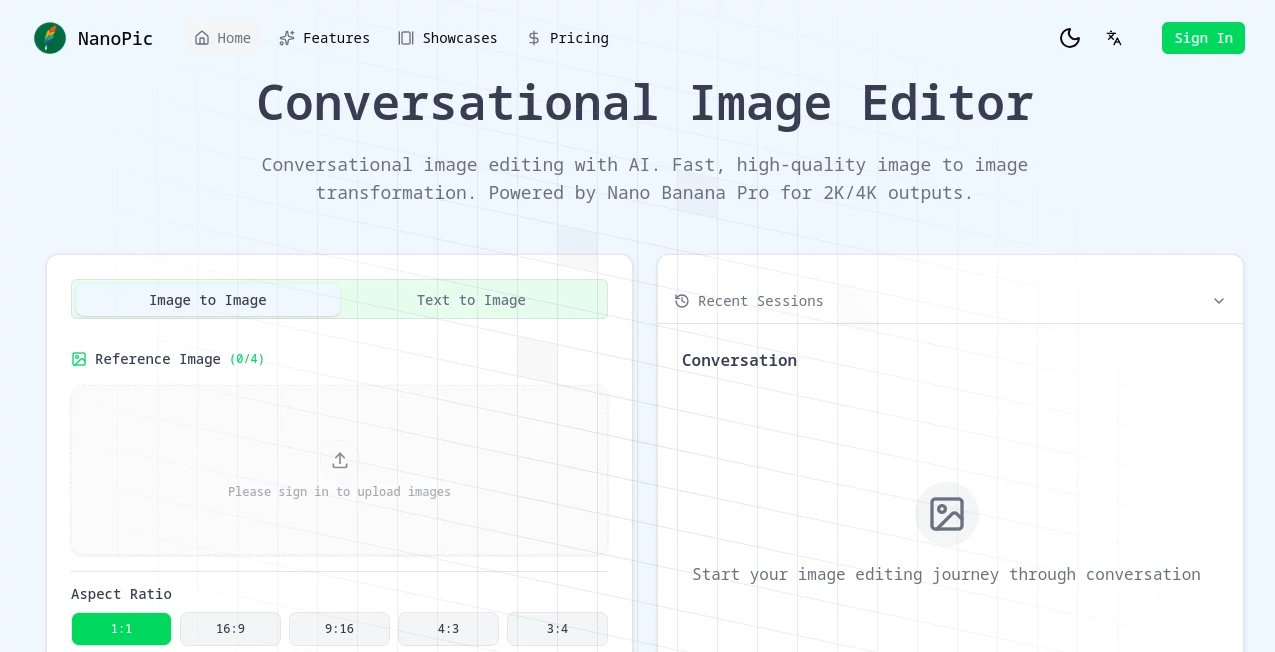
NanoPic opens a door to effortless image tweaking, where a simple conversation turns your snapshots into polished gems. This handy spot lets you upload a picture and describe tweaks in plain words, watching as it reshapes the scene to match your vision. Creators everywhere are buzzing about how it cuts down on fiddly tools, delivering results that look like they came from a pro's desk, all in a fraction of the time.
Introduction
NanoPic came about when a group of image lovers got fed up with clunky editors that demanded too much know-how for basic changes. They rolled it out as a fresh way to chat through edits, and it didn't take long for word to spread among photographers and marketers who needed quick fixes without the hassle. Now, it's a go-to for folks turning rough drafts into sharp visuals, with stories floating around of sessions that wrap up in minutes instead of hours. What draws people in is that easy back-and-forth feel, like bouncing ideas off a savvy friend who always gets it right, keeping the creative juice flowing without a single frustrating freeze.
Key Features
User Interface
The setup greets you with a clean chat window that feels like texting a buddy, complete with spots to drop in your starting pic or link right from the web. Dropdowns for shapes and sharpness sit handy without crowding the view, and past chats pop up in a sidebar for easy jumps back in. It's all built to keep your eyes on the fun, with previews that update smooth as you type, making even long threads a breeze to follow.
Accuracy & Performance
Describe a subtle shift like warmer tones or a swapped backdrop, and it captures the nuance without going overboard, often nailing the look on the first go. Jobs fly through in mere seconds, even for beefier tweaks, letting you stack changes without losing steam. Users share how it holds steady on busy scenes, pulling out details that shine clear and true, turning what could be a guessing game into a straight shot to satisfaction.
Capabilities
It shines at reshaping uploads through layered talks, from boosting a product's glow to dreaming up wild variations that fit your story. Pick from a bunch of frame fits and clarity levels up to super crisp, and it handles multiple starters at once for side-by-side compares. The real magic lies in that ongoing dialogue, where each nudge builds on the last, opening doors to everything from quick social snaps to full-blown design drafts.
Security & Privacy
Your files get a quick pass through the system then cleared out, with no extras hanging around unless you tuck them away yourself. It keeps things straightforward, giving you full say on what sticks or shares, so private projects stay just that. Folks working on sensitive stuff appreciate the no-fuss approach, letting them experiment freely without a nagging doubt about loose ends.
Use Cases
Shop owners refresh product shots to match the season, chatting in cozy setups that make listings pop and pull in more clicks. Designers iterate on mockups during client calls, tweaking on the fly to land that perfect pitch. Content makers whip up eye-catchers for posts, blending trends with their twist in under a minute. Even game builders sketch out character looks, layering details through easy exchanges that speed up the whole concept chase.
Pros and Cons
Pros:
- Feels like a natural chat, no steep steps to climb.
- Blasts through changes fast, keeping ideas hot.
- Outputs crisp and pro, ready for real-world rolls.
- Builds on your words layer by layer for spot-on fits.
Cons:
- Chat limits cap longer rants, so break 'em up.
- Credit dips mean topping up for heavy hauls.
- Best with clear starters—fuzzy ones need a cleanup first.
Pricing Plans
It starts with a flexible grab-what-you-need setup, where each tweak pulls a couple credits, perfect for light dips without big commitments. From there, steady subs open up more room to play, though the sweet spot lands around a few bucks for batches that last. Trials let you test the flow risk-free, and bundles keep the cost low for those who stick around, making sure the fun doesn't fizzle out mid-stream.
How to Use NanoPic
Sign in to unlock the chat, then slide in your pic or link it up quick. Pick a frame shape and sharpness that suits, and start spilling your tweaks in the box—keep it under the word cap for smooth sails. Hit send to see the shift, layer on more if it needs a nudge, and snag the final in your go-to format. Bookmark the thread for tweaks later, turning one-off wins into ongoing gems.
Comparison with Similar Tools
Where some editors lock you into menus that drag, NanoPic's talk-style flow frees you up for faster fun, though those might offer more manual grips for picky tweaks. Against one-shot wonder apps, it layers chats for deeper dives, skipping the restart blues but perhaps pinching on raw power for mega jobs. It slots in sweet for conversational crafters, edging out the rigid with responsive riffs.
Conclusion
NanoPic wraps the wrap of image work into a welcoming whisper, handing creators a chat that clicks without the clunk. It turns the tide on tedious touch-ups, proving that a bit of back-and-forth can birth visuals that vibe just right. As more eyes chase that perfect frame, this one's poised to keep the conversation going, one clever change at a time.
Frequently Asked Questions (FAQ)
What file types fit the bill?
Common picks like JPEG or PNG slide in easy, up to a handful at once.
How long till I see changes?
Snaps back in seconds, even for layered lifts.
Can I use the results for sales?
Absolutely, they're yours to roll out in shops or shares.
What's the chat cutoff?
Around two thousand characters per round—plenty for most musings.
Any tips for sharper shots?
Start clear and specific, building bit by bit for best bangs.
AI Content Generator , Photo & Image Editor , AI Image to Image , AI Design Assistant .
These classifications represent its core capabilities and areas of application. For related tools, explore the linked categories above.
NanoPic details
This tool is no longer available on submitaitools.org; find alternatives on Alternative to NanoPic.
Pricing
- Free
Apps
- Web Tools
Categories

NanoPic Alternatives Product

Nano Banana …

Text Remover…

Beard Remover

Createimg.ai

PrompTessor

Face Shape D…

chibi genera…

Flux Kontext…

Freepik