🧠 AI Quiz
Think you really understand Artificial Intelligence?
Test yourself and see how well you know the world of AI.
Answer AI-related questions, compete with other users, and prove that
you’re among the best when it comes to AI knowledge.
Reach the top of our leaderboard.


















NovaVideo.ai
Turn Ideas into Stunning Videos Effortlessly

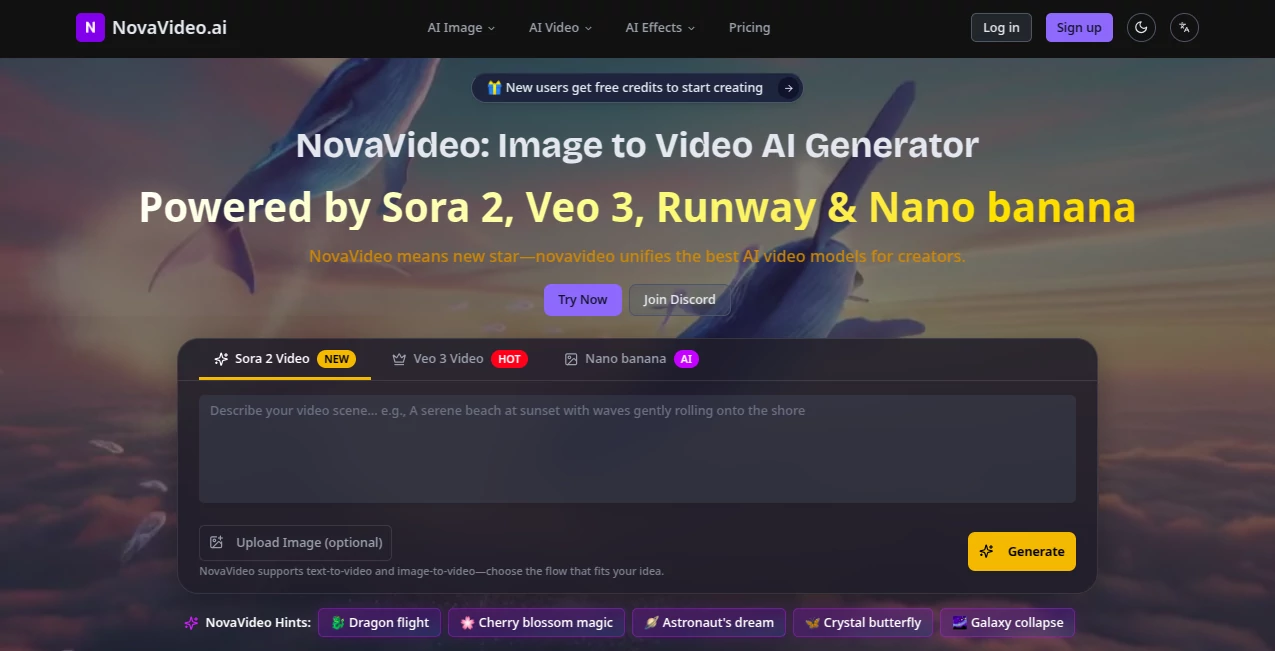
What is NovaVideo.ai?
NovaVideo steps in as a creative powerhouse, pulling together top-notch models to whisk still images or simple descriptions into dynamic clips that capture the imagination. This platform feels like having a full production team at your fingertips, blending seamless workflows with trendy touches to make standout content without the usual sweat. Many who've dived in come away buzzing about how it turns a quiet afternoon idea into something shareable that hooks viewers right away.
Introduction
NovaVideo came together from a shared itch among creators who juggled too many apps just to get a decent clip off the ground, launching as a one-stop haven that knits everything under one roof. It hit the mark early on, drawing in a wave of social sharers and brand builders who traded stories of campaigns that clicked faster thanks to its smart shortcuts. Over the months, it's grown through those quiet word-of-mouth wins, like a marketer's quick pivot that doubled engagement or a hobbyist's montage that lit up feeds. What pulls people back is that sense of flow—it listens to your starting point, be it a photo or a phrase, and builds out something that feels polished yet personal, easing the leap from spark to screen.
Key Features
User Interface
The dashboard opens wide with a drag-and-drop zone that's hard to miss, inviting your image or text right up front, followed by a clean picker for models that line up like old pals. As you type a motion nudge or pick a template vibe, the screen shifts smooth to previews, with sliders for ratios and speeds that respond without a fight. It's that rare setup where everything sits just where you'd expect, letting you bounce between tests and tweaks like flipping pages in a well-worn notebook, all without the clutter that kills the mood.
Accuracy & Performance
When you lay out a scene with layers of action, it holds the line on details, keeping movements natural and elements in place as if someone double-checked the script. Clips come together in under a minute for shorts, stretching to a few for fuller takes, without the stutters that yank you out of the zone. Folks who've run side-by-sides often point to how it nails those fluid shifts, like a gentle sway or sharp turn, landing results that blend right into pro reels without a hint of the rush.
Capabilities
It stretches from breathing life into a single shot to chaining moments into mini-stories, pulling in effects that range from whimsical flutters to bold bursts, all tuned to your input. You can layer in audio syncs or style swaps, testing packs across the same base to spot what sings, and even batch out variants for quick picks. The real draw lies in those ready-made hooks, like turning a portrait into a dreamy drift or a product into a lively loop, opening doors to content that feels fresh yet familiar.
Security & Privacy
Your uploads get a swift pass through secure channels, wrapping up without leaving traces behind, and you hold the reins on every output for sharing or shelving. It plays fair with the rules baked into its models, ensuring your work stays yours to run with, whether for a quick post or a client handoff. That straightforward safeguard lets creators breathe easy, focusing on the fun without the nagging pull of what-ifs about where their drafts might drift.
Use Cases
Social butterflies snap a selfie and spin it into a trending twirl for their next reel, watching likes roll in without the edit marathon. Shop keepers stage a gadget against dream backdrops, crafting spins that sell without staging a shoot. Storytellers weave fan sketches into animated arcs, pulling viewers deeper with motions that match the mood. Even planners test ad angles from brand snaps, landing on winners that cut through the noise in half the time.
Pros and Cons
Pros:
- Gathers the best tools in one spot, skipping the app-hop hassle.
- Fresh templates keep things current, fueling viral hits.
- Quick turns mean more time dreaming than waiting.
- Outputs ready for the world, with rights that let you run free.
Cons:
- Longer clips take a patient wait, not ideal for split-second needs.
- Sharp inputs yield the sharpest results—fuzzy starts can fuzz the finish.
- Credit watch means planning ahead for big batches.
Pricing Plans
It eases in with a starter at around ten bucks a month for casual spins, covering the basics with room to play. Pros bump to fuller access for endless tests and team shares, while bigger outfits scale up for custom flows. The beauty's in the pay-as-you-render setup—no flat fees eating idle time—and yearly nods trim the tab, making it stretch further for steady hands.
How to Use NovaVideo
Drop your image or jot a scene starter into the main slot, then pick a model that matches your aim—something fluid for stories or snappy for shorts. Nudge the action with a few words, like a gentle pan or lively leap, and let it brew; soon, variants line up for a swipe-through. Grab the standout, tweak the frame if it calls, and export straight to your feed or folder, ready to roll.
Comparison with Similar Tools
Where standalone apps lock you into one style, NovaVideo mixes the menu for picks that fit the moment, though those might dive deeper in a single lane. Against scattered suites, it trims the transfers, keeping the creative current flowing, but could trail in raw power for niche tweaks. It shines for the all-rounder, blending breadth with bite where others narrow or nod off.
Conclusion
NovaVideo nudges the edge of what's possible in a clip, handing creators a canvas that comes alive with minimal muss. It turns the solitary spark into shared spectacle, proving that a smart hub can hush the hurdles between head and heart. As screens keep calling for the next big thing, this one's poised to keep the motion going, one seamless scene at a time.
Frequently Asked Questions (FAQ)
What's the quickest way to start?
Upload a clear shot and pick a template—auto-magic handles the rest in under a minute.
How long for a full clip?
Shorts zip in seconds; fuller flows take a few minutes, worth the watch.
Can I use these for sales?
Absolutely, full reins to run them in ads, shops, or anywhere that pays.
What if my image isn't perfect?
Bright and centered works best, but it forgives a bit of blur with grace.
Any fresh tricks coming?
Templates refresh weekly, dropping new waves to keep your feed alive.
AI Image to Video , AI Text to Video , AI Video Generator , AI Short Clips Generator .
These classifications represent its core capabilities and areas of application. For related tools, explore the linked categories above.
NovaVideo.ai details
This tool is no longer available on submitaitools.org; find alternatives on Alternative to NovaVideo.ai.
Pricing
- Free
Apps
- Web Tools
Categories

NovaVideo.ai Alternatives Product

Sora AI Vide…
Veo4AI

ai seedance …

gpt video

ImagineToVid…
AI Best

Image to Vid…

Seedance 3.0
Seedance 2.0