🧠 AI Quiz
Think you really understand Artificial Intelligence?
Test yourself and see how well you know the world of AI.
Answer AI-related questions, compete with other users, and prove that
you’re among the best when it comes to AI knowledge.
Reach the top of our leaderboard.

















OutfitSwap Studio
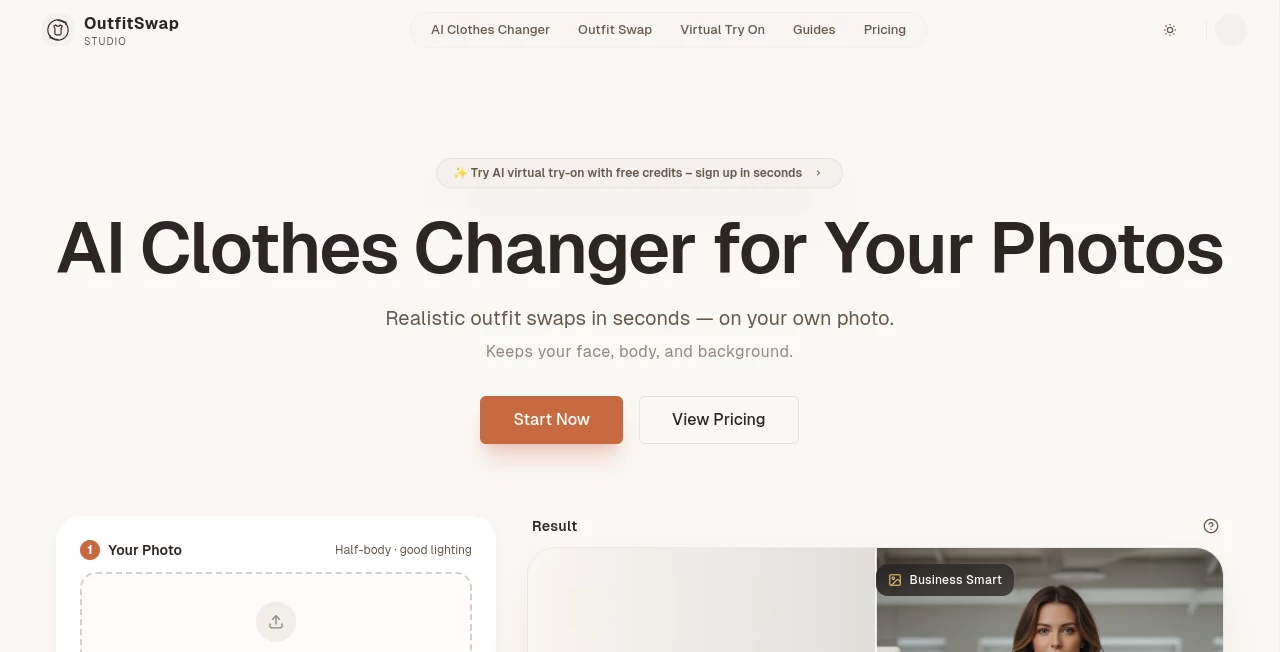
What is OutfitSwap Studio?
There's a quiet thrill in seeing yourself in a completely different outfit without ever changing clothes—same smile, same pose, but suddenly dressed for a boardroom or a beach day. This tool captures that feeling perfectly, swapping in fresh looks while keeping everything else about you untouched. I tried it with a quick selfie and a professional suit preset; the result looked so natural I almost forgot it wasn't a real photoshoot. It's the kind of thing that makes you wonder why we ever needed racks of clothes just to try something on.
Introduction
In a world where first impressions often start with a photo, having the right look matters more than ever, yet actually getting it can feel like a hassle. This platform changes that by letting you experiment freely with styles on your own images, preserving your face, body shape, pose, and even the background so the focus stays purely on the outfit. What began as a smart way to test virtual wardrobes has become a favorite for anyone who wants realistic previews without the time or cost of real shoots. I've watched friends use it to nail interview outfits in minutes or play with seasonal looks for social posts—the results are strikingly convincing, edges clean and lighting balanced like a pro edit.
Key Features
User Interface
The whole experience is built around simplicity: a big, friendly upload area greets you, followed by curated style presets that are easy to browse and select. One click kicks off the generation, and soon you're looking at before-and-after views with clear download buttons. It's refreshingly uncluttered—no overwhelming options or hidden settings—so even first-timers feel right at home right away.
Accuracy & Performance
The swaps come out remarkably lifelike, with natural folds, proper shadows, and skin tones that blend seamlessly into the new fabric. Generations typically finish in about 20 seconds, and higher plans bump up the number of variations so you can pick the best fit. In my experience, a well-lit portrait delivers edges so sharp and proportions so true that the output could easily pass for a styled shoot.
Capabilities
It excels at portrait and half-body photos, offering presets for everything from everyday casual to business sharp, e-commerce catalog shots, or even wedding gowns. You can generate multiple results per run on paid tiers, download in original resolution without watermarks, and handle batches for bigger projects. The focus on realism means backgrounds stay intact, lighting adjusts naturally, and the overall effect feels authentic rather than pasted-on.
Security & Privacy
Your photos are processed securely and deleted periodically, never used for training public models or shared with third parties. It's reassuring to know uploads stay private, used only to create your results, with strong safeguards in place so you can experiment without worry.
Use Cases
Job seekers preview professional outfits for interviews, seeing how different blazers or ties look without buying anything. Brides-to-be virtually try on gowns, narrowing choices before appointments. Content creators swap casual streetwear or party looks for posts, while small shops stage products on models from single photos. It's those quick, confident decisions—picking the perfect date-night dress or seasonal campaign vibe—that make it feel indispensable.
Pros and Cons
Pros:
- Keeps your real appearance intact while changing only the clothes—face, pose, background all preserved.
- Fast generations with natural-looking results that save time on real photoshoots.
- Curated presets make it easy to find polished, ready-to-use styles.
- Free start with credits lets you see the quality before spending.
Cons:
- Works best with clear, well-lit portraits—trickier angles or busy backgrounds may need extra care.
- Watermarks on free outputs, though paid plans remove them cleanly.
Pricing Plans
You can jump in for free with 25 credits to try several swaps and get a real sense of the results. One-time starter packs offer more for occasional use, while monthly creator and pro plans unlock priority speed, multiple variations per generation, batch uploads, and longer history storage. It's flexible—pay only for what you need, with no hidden catches—and the value feels strong once you see how much time and effort it saves.
How to Use Outfit Swap Studio
Start by uploading a clear portrait or half-body photo—good lighting and a simple pose help most. Browse the style presets, pick one that catches your eye, and hit generate. In about 20 seconds you'll see the new look; review the options, download the favorite in full quality if paid, or tweak and try again. For bigger projects, batch a few photos on higher plans to speed through variations.
Comparison with Similar Tools
Many outfit changers struggle with unnatural blending or distorted proportions, but this one prioritizes realism and clean preservation of your original photo. It stands apart by focusing on portrait-first results with curated, high-quality presets rather than overwhelming choices, delivering quicker, more usable outputs that feel professional without extra editing.
Conclusion
This tool quietly revolutionizes how we play with appearance in photos, making style experimentation feel effortless and fun instead of expensive or time-consuming. It's empowering—whether you're prepping for an important moment or just exploring new looks for the joy of it. Give it a photo you've got handy; the transformation might just become your new favorite way to see yourself.
Frequently Asked Questions (FAQ)
What kind of photos work best?
Clear portraits or half-body shots with good lighting and simple poses give the most realistic swaps.
Do I lose my face or background?
No—everything stays exactly as is except the outfit, keeping your identity intact.
How many results do I get?
Paid plans offer multiple variations per generation so you can pick the perfect one.
Can I use this commercially?
Yes, paid results are yours to use for business, ads, or e-commerce without restrictions.
Are my photos safe?
They are processed privately, auto-deleted over time, and never used for training.
AI Photo & Image Generator , Photo & Image Editor , AI Image to Image , AI Fun Tools .
These classifications represent its core capabilities and areas of application. For related tools, explore the linked categories above.
OutfitSwap Studio details
Pricing
- Free
Apps
- Web Tools
Categories

OutfitSwap Studio Alternatives Product

Luma AI

BananaFrame

AI Dream Ana…
Nano Banana …

Nano Image AI

Leonardo.ai

Just Christm…

Nano Banana 2

MixHub AI