
🧠 AI Quiz
Think you really understand Artificial Intelligence?
Test yourself and see how well you know the world of AI.
Answer AI-related questions, compete with other users, and prove that
you’re among the best when it comes to AI knowledge.
Reach the top of our leaderboard.

















Pencil Art AI

What is Pencil Art AI?
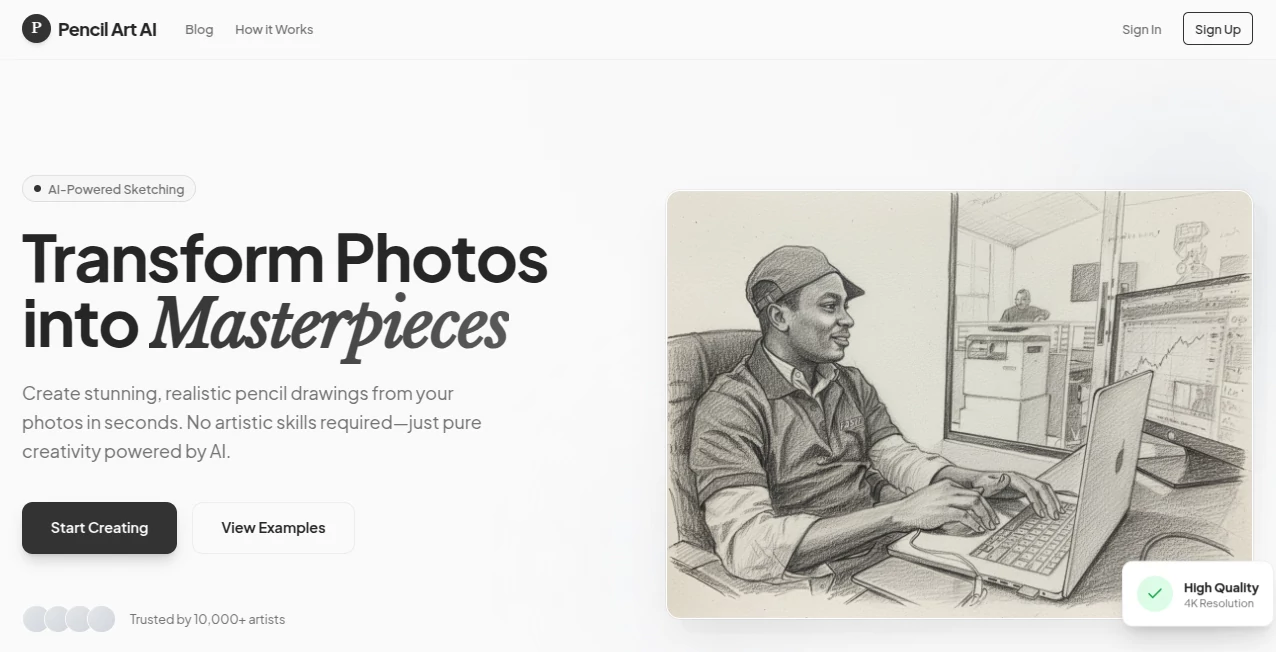
There's something quietly magical about seeing a favorite photo reimagined as a hand-drawn pencil sketch—those soft lines and subtle shading that make even a casual snapshot feel like a piece of art. This little gem does exactly that: takes your images and transforms them into pencil drawings that look like they were crafted by an artist with years of practice. I tried it with a quick selfie and an old family portrait, and the results were so natural I almost forgot they started as digital files. It's the kind of tool that surprises you with how good it feels to use.
Introduction
Most photo editors throw a million filters at you, but few manage to capture the warmth and personality of a true pencil drawing. This one does—and does it beautifully—by focusing purely on that classic, timeless style. Whether you're looking to turn a vacation photo into a keepsake or give a product shot a handcrafted touch, it delivers results that feel personal and polished. People who've used it keep coming back because it doesn't just apply a filter; it reinterprets your image with care, preserving details and emotion in a way that feels almost handmade. It's refreshing to see a tool that knows exactly what it wants to be and does it so well.
Key Features
User Interface
The interface is one of those rare ones that gets out of your way. You drop your photo in, pick from a handful of clear styles, and watch the preview update instantly. No cluttered menus, no endless sliders—just a clean, focused workspace that invites you to experiment without frustration. I appreciate how it feels like a thoughtful sketchbook rather than a tech-heavy app; everything is right where you'd expect it, and the whole process flows naturally.
Accuracy & Performance
What really sets it apart is how faithfully it translates your image into pencil strokes. Faces stay recognizable, textures hold their depth, and even fine details like hair strands or fabric folds come through without looking overprocessed. The speed is impressive too—most conversions finish in seconds, even on higher resolutions. I've run it on everything from phone snaps to high-res portraits, and it consistently delivers results that look convincingly hand-drawn.
Capabilities
You get multiple pencil styles to choose from—some soft and dreamy, others crisp and detailed—so you can match the mood of the original photo. It works equally well on people, landscapes, pets, or even products, making it versatile for personal projects or professional use. The output quality is high enough for printing or sharing online, and the ability to adjust intensity gives you just enough control without overwhelming you.
Security & Privacy
Your photos are processed quickly and deleted from their servers shortly after, so there's no lingering worry about where your images end up. It's a small detail, but in a world full of privacy concerns, it's reassuring to know your personal shots aren't being stored or shared. That level of care makes the whole experience feel trustworthy and respectful.
Use Cases
Wedding photographers love turning candid moments into timeless keepsakes for albums. E-commerce sellers give product photos a unique, artisanal feel that stands out in listings. Parents create framed drawings of their kids' portraits that become family heirlooms. Social media creators use it to give posts a distinctive vintage vibe. It's one of those tools that quietly elevates everyday content into something special.
Pros and Cons
Pros:
- Produces genuinely realistic pencil drawings that feel authentic, not artificial.
- Super fast and simple—great for quick turns around.
- Multiple styles let you match the exact mood you're going for.
- High-quality output suitable for print or social sharing.
Cons:
- Focused only on pencil drawings, so if you're looking for other effects, you'll need another tool.
- Free tier has limits; heavy users will want the paid plan.
Pricing Plans
You can start for free with a generous number of conversions per day—no credit card required. For unlimited use and higher resolution downloads, the paid plan is reasonably priced and removes any restrictions. It's straightforward and fair: pay only when you need more, and get full access without surprises.
How to Use PencilArt
Upload your photo (or paste a URL), choose a pencil style that catches your eye, and hit generate. The preview appears almost instantly. If you like it, download in high resolution or tweak the style and try again. I usually start with the default setting, then play with the options until it feels just right—takes less than a minute from start to finish.
Comparison with Similar Tools
Many apps offer "sketch" filters, but few achieve this level of realism and control. Others can look cartoonish or overly processed, while this one consistently delivers that authentic pencil-on-paper look. It's also faster and cleaner than desktop software that requires manual adjustments. For anyone who wants beautiful pencil drawings without the hassle, this stands out as the clear favorite.
Conclusion
In a sea of flashy filters and gimmicks, this tool quietly excels at one thing—and does it exceptionally well. It turns ordinary photos into drawings that carry emotion and craftsmanship, making it a favorite for anyone who appreciates the charm of hand-drawn art. Whether you're creating gifts, enhancing content, or just playing around, it brings a little bit of timeless beauty to every image. Give it a try; you might find yourself reaching for it more often than you expect.
Frequently Asked Questions (FAQ)
What kind of photos work best?
Clear, well-lit images with good contrast give the best results—portraits and landscapes shine especially.
Can I use it for commercial purposes?
Yes, especially with the paid plan, which offers commercial rights and watermark-free downloads.
How long do conversions take?
Usually just a few seconds, even on higher resolutions.
Is there a limit on free use?
Yes, a daily quota—perfect for casual use, but paid unlocks unlimited.
Do I need to install anything?
No, it's completely web-based—just upload and go.
AI Photo & Image Generator , Photo & Image Editor , AI Design Generator , AI Image to Image .
These classifications represent its core capabilities and areas of application. For related tools, explore the linked categories above.
Pencil Art AI details
This tool is no longer available on submitaitools.org; find alternatives on Alternative to Pencil Art AI.
Pricing
- Free
Apps
- Web Tools
Categories

Pencil Art AI Alternatives Product

NanoBanana P…

Flux.2 AI
Uni-1

Gpt Image 1.5

Yodayo AI

Ultra Face S…

NanoBanana2
Image By Qwen

ModelsLab
