
🧠 AI Quiz
Think you really understand Artificial Intelligence?
Test yourself and see how well you know the world of AI.
Answer AI-related questions, compete with other users, and prove that
you’re among the best when it comes to AI knowledge.
Reach the top of our leaderboard.


















PhotoArtAI

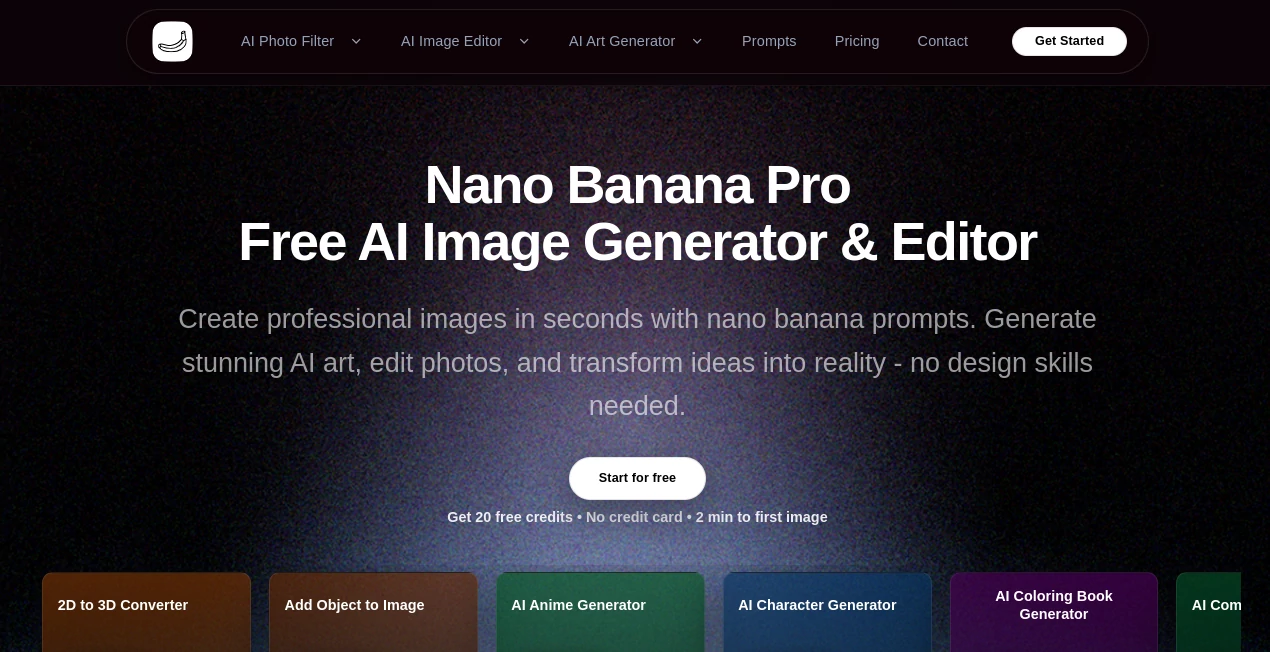
What is PhotoArtAI?
There's a certain thrill in typing out a wild idea and watching it turn into a crisp, professional image almost instantly, especially when no design experience is required. This platform captures that excitement beautifully, powered by advanced prompts that handle complex requests with ease, delivering results that look thoughtfully crafted. A friend of mine, who's always sketching concepts for clients, told me it cut her turnaround time in half—ideas that used to linger now pop out ready to impress.
Introduction
Built around a robust model that excels at interpreting detailed instructions, this tool opens up image creation and editing to everyone, from casual experimenters to busy professionals. It stands out with a collection of specialized generators that go beyond basic art, tackling everything from anime characters to comic panels or even converting sketches into polished pieces. Starting with free credits means you can dive right in, seeing firsthand how it transforms vague thoughts into visuals that feel spot-on, often in seconds. It's the kind of resource that feels like a creative partner, always ready to iterate until the vision clicks.
Key Features
User Interface
The layout keeps things uncomplicated, with straightforward upload spots and prompt fields that guide without overwhelming. Tools for specific tasks line up clearly, making it easy to jump between generating art or editing existing photos. It's approachable enough that even on a first visit, you feel in control, no hunting for hidden options.
Accuracy & Performance
It grasps layered prompts remarkably well, producing outputs that align closely with descriptions, handling styles and details that lesser setups might muddle. Generations wrap up quickly, maintaining quality across different tasks, so you stay in the flow rather than waiting around.
Capabilities
A standout lineup includes turning 2D into 3D, adding or removing objects seamlessly, crafting anime or comic styles, expanding images, and vectorizing for clean lines. Sketch-to-art conversions breathe life into rough drawings, while character builders offer consistency for series work. It's versatile for both fresh creations and refinements, always aiming for that professional touch.
Security & Privacy
Your uploads and generations stay handled responsibly, with the focus on giving you control over your work without unnecessary risks. It's reassuring for personal or client projects, keeping things straightforward and secure.
Use Cases
Designers prototype characters for games or animations, quickly iterating from sketches to dynamic figures. Marketers enhance product shots by removing distractions or adding elements that fit the brand story. Hobbyists explore comic ideas, building panels that flow naturally. Educators create coloring books or illustrative aids that engage students visually.
Pros and Cons
Pros:
- Broad range of specialized tools that cover niche needs beautifully.
- Fast results that encourage experimentation and quick revisions.
- Generous free start to build confidence before deeper dives.
- Strong prompt understanding for outputs that match intent closely.
Cons:
- Credits can add up for heavy daily use.
- Best with thoughtful prompts to unlock full potential.
Pricing Plans
Kick off with 20 free credits—no card required—for that first taste in minutes. Plans scale from there to fit ongoing needs, offering more generations and features as you go, keeping it accessible while rewarding committed creators.
How to Use PhotoArtAI
Upload your base image or start from a prompt, select the tool that fits—like object removal or anime style—and refine details as needed. Preview and regenerate until it clicks, then download for your project. It's simple enough for a quick edit, yet layered for more involved creations.
Comparison with Similar Tools
While many focus on general art, this one's strength lies in targeted editors and converters that deliver precise results for specific tasks, often with less trial and error. It's a solid choice for those needing variety in one spot, balancing breadth with reliable depth.
Conclusion
This platform makes image work feel approachable and rewarding, bridging the gap between imagination and execution with tools that just work well. It's a quiet powerhouse for turning concepts into compelling visuals, worth exploring if you're ready to elevate your creative output.
Frequently Asked Questions (FAQ)
How many free tries do I get?
20 credits to start, plenty for several solid experiments.
What styles does it cover?
A wide mix, from anime and comics to sketches and vectors.
Can I edit existing photos?
Yes, with removers, adders, and expanders for seamless tweaks.
Is 3D conversion included?
Absolutely, turning flat into dimensional with ease.
Skills needed?
None—just your ideas and a bit of description.
AI Photo & Image Generator , Photo & Image Editor , AI Art Generator , AI Design Generator .
These classifications represent its core capabilities and areas of application. For related tools, explore the linked categories above.
PhotoArtAI details
This tool is no longer available on submitaitools.org; find alternatives on Alternative to PhotoArtAI.
Pricing
- Free
Apps
- Web Tools
Categories

PhotoArtAI Alternatives Product

Photo Grid C…
Fahhh Meme

Roblox Man F…

Flux2 Klein

Seedream 4.0…

KOOX AI

JPG to Small

Nano Banana 2

MakeMyOC
