
🧠 AI Quiz
Think you really understand Artificial Intelligence?
Test yourself and see how well you know the world of AI.
Answer AI-related questions, compete with other users, and prove that
you’re among the best when it comes to AI knowledge.
Reach the top of our leaderboard.

















Please Remind

What is Please Remind?
We've all been there—spotting a great show coming up or remembering a subscription that's about to renew, only to forget when the moment arrives. This clever service changes that, letting you jot down reminders in plain English and trusting it to sort out the when and how. The relief of getting that timely email nudge, right when you need it, turns potential regrets into smooth sails, and it's all wrapped in a setup that's delightfully straightforward.
Introduction
In the rush of daily life, keeping track of one-off events or tricky timings can slip through the cracks, but this tool steps in with a smart twist on reminders. You describe what you want in everyday words—like tying a reminder to a TV finale or a big match—and it parses the details to pin down the date, then pings you by email without fail. I tried it for a series drop tied to a movie release, and the prompt just worked, no fiddling with calendars required. It's perfect for those scattered thoughts that don't fit neat recurring slots, blending natural chat with reliable follow-through to catch what matters most.
Key Features
User Interface
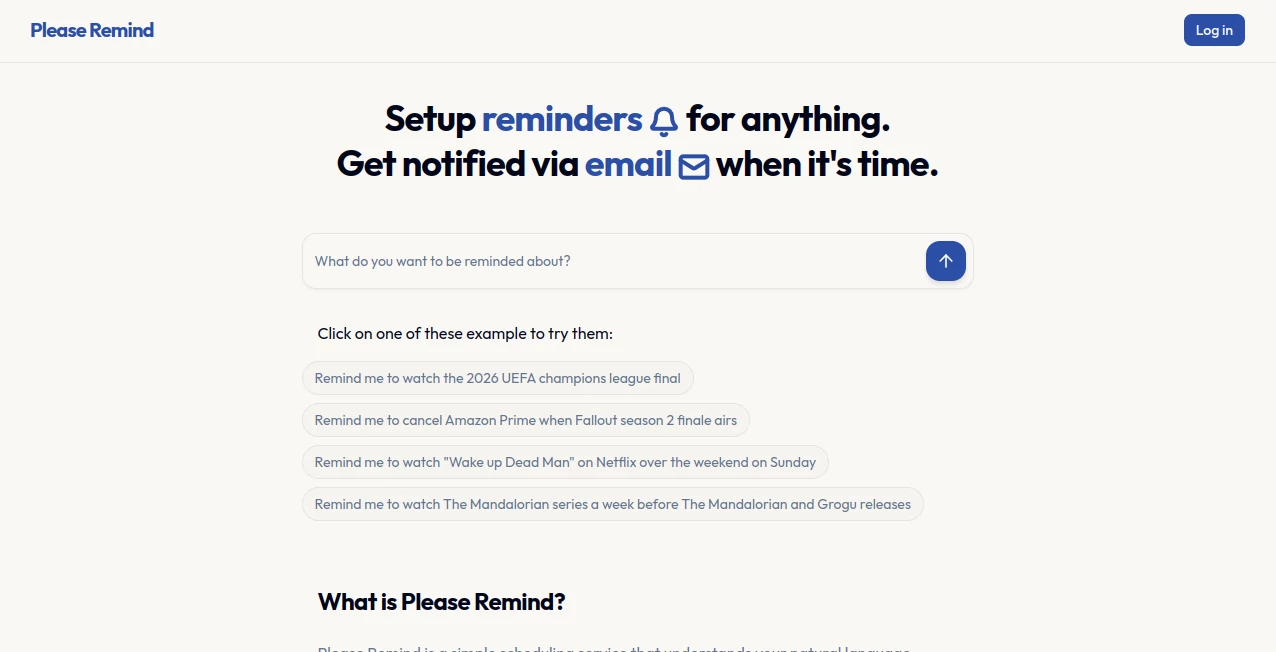
The homepage greets you with ready examples you can tweak and send, a simple box for your own words, and clear previews of what it understood before committing. Editing dates or titles is a breeze if needed, and calendar adds for Google or Outlook happen in one click. It's uncluttered and inviting, the sort of place where you pop in for a quick note and leave feeling organized.
Accuracy & Performance
It shines at pulling dates from casual phrases, even linking to events like show airings or sports finals with impressive reliability. Setups confirm fast, and notifications land precisely, drawing on solid event knowledge to avoid guesses. From tries with upcoming releases, it nailed the timings spot-on, delivering that quiet confidence you crave in a reminder buddy.
Capabilities
Anything goes—subscriptions to cancel, follow-ups to send, birthdays or big games to catch—with email alerts and easy calendar syncs across major providers. It handles context-rich requests, like timing around media drops, turning vague ideas into sharp schedules that stick.
Security & Privacy
Reminders tie to your email for notifications, with no extra data hoarding mentioned, keeping things focused and private. It's reassuring for personal nudges, knowing your plans stay between you and the ping.
Use Cases
Busy folks set alerts to cancel trials right after a binge ends, avoiding extra charges without thinking twice. Sports fans get heads-ups for finals or matches, never missing the action. Parents track kid milestones or family events tied to releases, while pros flag follow-ups linked to news drops. It's those clever ties to real-world happenings that make forgetting a thing of the past.
Pros and Cons
Pros:
- Natural chat feels effortless, no rigid date pickers needed.
- Smart event links catch timings you might miss.
- Seamless calendar adds save extra steps.
- Reliable emails ensure you stay in the loop.
Cons:
- Free cap at ten might nudge upgrades for heavy users.
- Relies on email delivery, so spam filters could play spoiler rarely.
Pricing Plans
Start free with up to ten reminders to feel the flow, then go unlimited for a modest five bucks monthly—fair for the peace it brings, with no hidden catches.
How to Use Please Remind
Type your wish in the box, like linking a reminder to a show finale, review the parsed date and title (edit if off), confirm, and relax. Add to calendar with a tap if wanted, and await the email nudge. It's that quick loop that fits busy moments perfectly.
Comparison with Similar Tools
Standard calendars demand manual dates, but this one's natural parse and event smarts handle the fuzzy stuff better, especially for media-tied alerts. It's lighter than full task managers, focusing on that one job exceptionally well for folks who just need reliable pings without the bloat.
Conclusion
This service quietly tames the chaos of scattered to-dos, turning casual notes into dependable anchors that keep life on track. It's a small joy in a busy world, catching those fleeting must-dos so you can focus elsewhere. If overlooked reminders have bitten you before, this one's worth the simple try—it just might become your silent guardian for what matters.
Frequently Asked Questions (FAQ)
What kinds of reminders work best?
Anything with a clear time or event tie, from shows to subscriptions.
How do notifications arrive?
Straight to your email, simple and sure.
Can I sync to my calendar?
Yes, one-click for Google, Outlook, and more.
Is it really free to start?
Ten reminders no charge, unlimited for a small fee.
What if it misreads my request?
Easy edits before confirm keep things accurate.
AI Life Assistant , AI Productivity Tools , AI Task Management , AI Scheduling .
These classifications represent its core capabilities and areas of application. For related tools, explore the linked categories above.
Please Remind details
This tool is no longer available on submitaitools.org; find alternatives on Alternative to Please Remind.
Pricing
- Free
Apps
- Web Tools
Categories

Please Remind Alternatives Product

GenPPT AI

AnyToURL

Your Own AI

Linkflare

AiZolo

Meet-Ting

Lime Social

HelloDay.ai

Romantic AI
