
🧠 AI Quiz
Think you really understand Artificial Intelligence?
Test yourself and see how well you know the world of AI.
Answer AI-related questions, compete with other users, and prove that
you’re among the best when it comes to AI knowledge.
Reach the top of our leaderboard.


















Qrblox

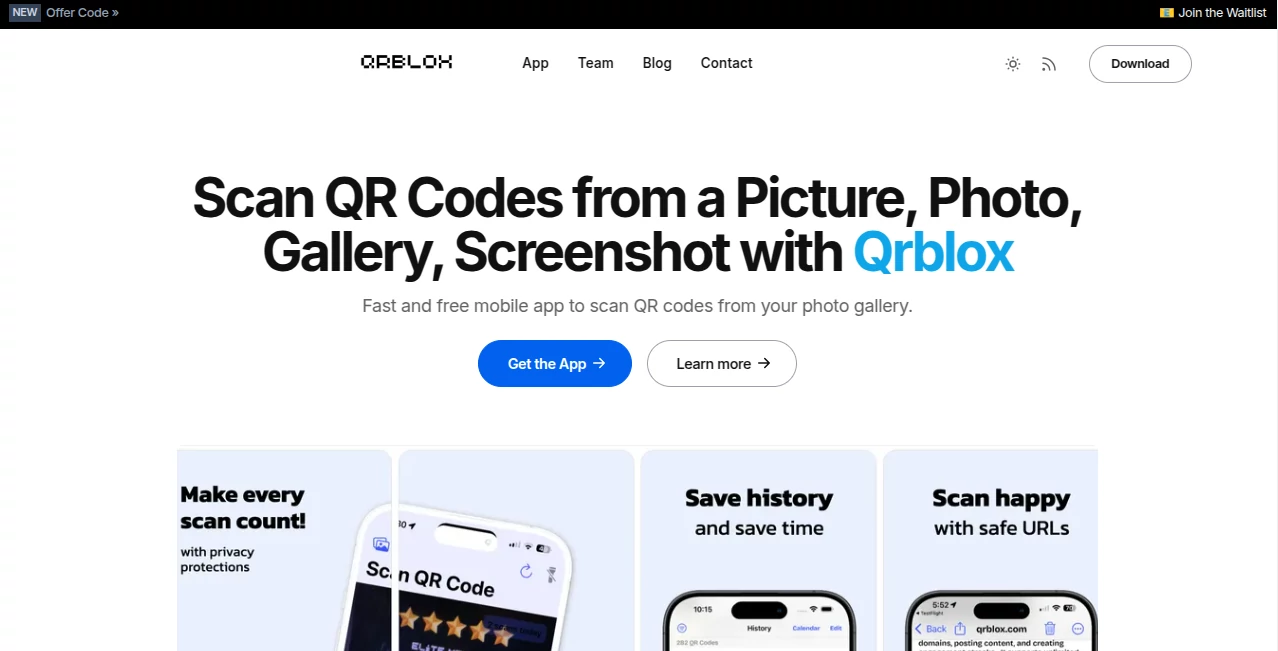
What is Qrblox?
There's something oddly satisfying about snapping a QR code from a screenshot or gallery photo and instantly getting a clear, AI-enhanced breakdown of what it leads to—without ever having to hunt for the camera app. This little gem of an app turns those everyday QR encounters into a smooth, smart experience, complete with summaries, chat options, and even voice readouts. I've caught myself using it for everything from restaurant menus to event tickets, and it always feels like a small win when the app just gets it right, no fuss.
Introduction
In a world where QR codes are everywhere—from coffee shop loyalty cards to museum exhibits—it's easy to miss out on the good stuff if your phone's camera is acting up or the lighting is terrible. This app steps in with a clever twist: it scans codes directly from photos or screenshots, then layers on AI smarts to summarize websites, let you chat with them, or even read content aloud. What started as a handy reader has grown into a full companion that tracks your scans, maps where you've been, and adds fun elements like leaderboards and daily prizes. It's the kind of tool that quietly makes life a bit easier, especially when you're juggling a busy day and need quick access to info without the hassle.
Key Features
User Interface
The app keeps things dead simple: open it, tap to add an image from your gallery, and the magic happens right away. No cluttered menus or confusing settings—just a clean view that shows your scan history, calendar, and stats at a glance. I love how it feels like a personal assistant rather than a tool; everything loads fast, and the chat window for websites pops up naturally when you need more details.
Accuracy & Performance
It picks up codes reliably even from tricky angles or low-res screenshots, then delivers AI summaries that actually make sense—concise, accurate, and helpful. The performance is snappy; no waiting around while it processes. In my tests, it handled everything from faded event posters to shiny business cards without a hiccup, and the URL inspection feature gives that extra peace of mind before clicking through.
Capabilities
Beyond basic scanning, it lets you chat with the website behind the code, get audio readouts, or even set up callbacks for direct contact. The history and calendar views keep everything organized, while the stats map shows where you've scanned from—fun for seeing your own patterns. Plus, there's a built-in QR generator for creating your own codes, making it a complete package for both consuming and creating.
Security & Privacy
With a focus on safe browsing, it inspects URLs to flag potential phishing risks before you visit, and everything stays on-device where possible. No creepy data collection or ads cluttering the experience—it's built with trust in mind, which is refreshing in this space.
Use Cases
Travelers snap codes from brochures or hotel signs, then chat with the site for instant translations or details. Marketers track engagement by scanning competitor codes and analyzing what works. Students build a library of class resources or event tickets, pulling them up anytime without digging through photos. Even casual users love the daily scan prizes and leaderboard—it's turned a mundane task into something a bit more engaging and rewarding.
Pros and Cons
Pros:
- Scans from photos flawlessly, saving the day when the camera won't cooperate.
- AI summaries and chat features add real value beyond just opening links.
- Tracks and organizes scans in a way that's actually useful and fun.
- Completely free with no ads or paywalls blocking core features.
Cons:
- Relies on good image quality for perfect scans—blurry shots can still trip it up.
- Desktop generator is separate, which might feel a bit disjointed.
Pricing Plans
It's refreshingly free—no subscriptions, no hidden fees, no premium tiers locking away features. Everything from scanning and AI summaries to the built-in generator is available at no cost, making it an easy recommendation for anyone who deals with QR codes regularly.
How to Use Qrblox
Download the app, open it, and tap the add image button to pick a photo or screenshot from your gallery. The app scans automatically, then shows you the link with options to summarize, chat, or read aloud. Save scans to your history, check the calendar for past ones, or view stats to see where you've been scanning. For creating codes, head to the generator section and customize as needed—it's all straightforward and quick.
Comparison with Similar Tools
While basic QR scanners just open links, this one layers on AI smarts like summaries and chat, plus tracking features that make it more than a one-trick pony. Other apps might offer generation but lack the photo-scan convenience or social elements like leaderboards. It strikes a nice balance: powerful without being overwhelming, and free without feeling limited.
Conclusion
This app quietly solves a problem most of us didn't realize we had—making QR codes more useful and fun to interact with. It's the kind of tool that once you start using, you wonder how you managed without it. Whether you're organizing daily scans or just want smarter ways to explore links, it's a delightful addition that feels genuinely helpful and thoughtfully made.
Frequently Asked Questions (FAQ)
Does it work with blurry or low-quality images?
It handles most shots well, but sharper images give the best results.
Can I create my own QR codes?
Yes, there's a free generator built right in for quick custom codes.
Is there any cost or subscription?
Completely free—no ads or hidden fees.
Does it save my scan history?
Absolutely, with calendar and stats views to keep track.
Can it read codes from screenshots?
Yes, that's one of its strongest features—perfect for online or saved images.
Other .
These classifications represent its core capabilities and areas of application. For related tools, explore the linked categories above.
Qrblox details
This tool is no longer available on submitaitools.org; find alternatives on Alternative to Qrblox.
Pricing
- Free
Apps
- Web Tools
Categories

Qrblox Alternatives Product

Geekflare AI
X-Installer

Suno list

Tea Checker

MCP DXT Serv…

Devil Hunter…

steam worksh…

Suno top

Bulletin
