🧠 AI Quiz
Think you really understand Artificial Intelligence?
Test yourself and see how well you know the world of AI.
Answer AI-related questions, compete with other users, and prove that
you’re among the best when it comes to AI knowledge.
Reach the top of our leaderboard.


















QuickLRC

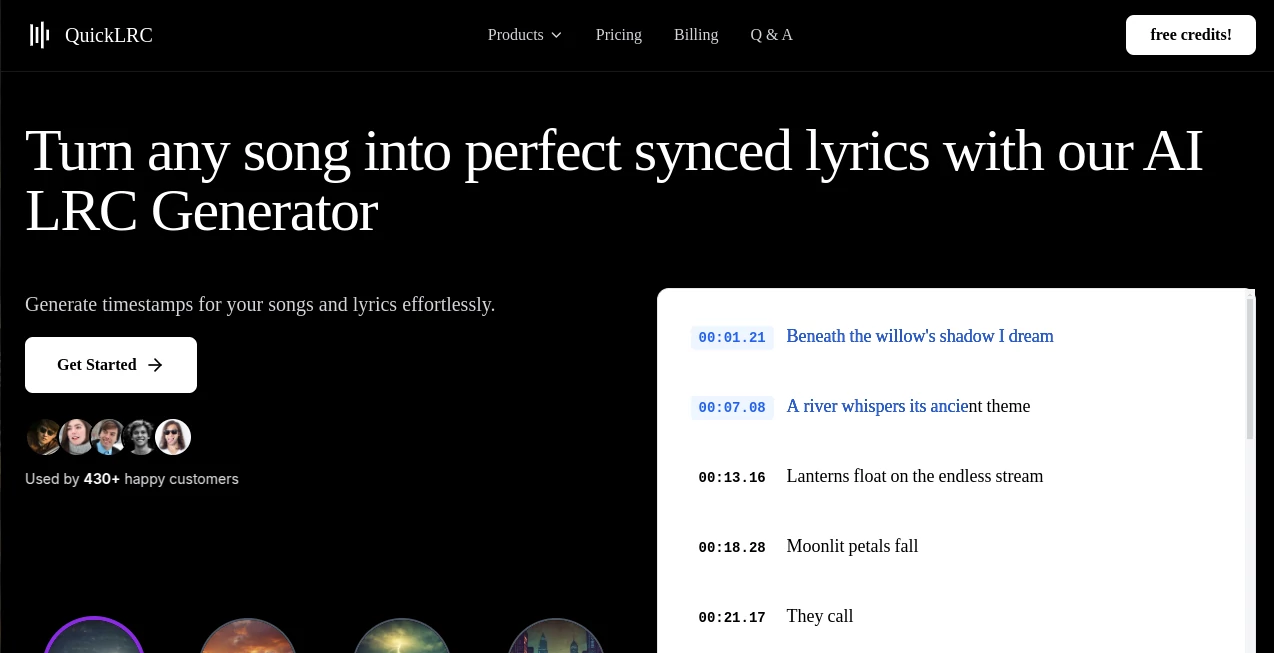
What is QuickLRC?
There's something almost magical about seeing lyrics dance perfectly in time with a song, whether it's on a karaoke screen or in the background of a music video. This tool makes that happen so effortlessly that you wonder how we ever managed without it. Upload a track, let the AI listen and figure out every beat, and in moments you have crisp, synchronized lyrics ready to export in whatever format you need. It's the kind of thing that saves hours of tedious clicking while delivering results that feel genuinely professional.
Introduction
For musicians, video creators, karaoke enthusiasts, and language teachers, getting lyrics to sync just right has always been a bit of a chore. This platform changes that by using smart AI to analyze audio and build timed files automatically. What started as a handy helper for busy creators has become a favorite across communities—people share how they now release polished music videos or karaoke tracks in a fraction of the time. The AI doesn't just slap timestamps on; it understands song structure, adds section labels like [Verse 1] or [Chorus], and even handles word-level precision for those karaoke moments where every syllable needs to light up at the exact right second. It's reliable, fast, and surprisingly accurate across dozens of languages.
Key Features
User Interface
The layout is clean and welcoming—big upload buttons, clear options for what you want to create, and a live preview that shows your progress without any clutter. You can drag in an audio file or paste a YouTube link, choose your format, and watch the AI work. Editing is straightforward too; if something's slightly off, the built-in tools let you nudge timestamps with ease. It's designed so even someone new to lyrics files can get a great result on the first try.
Accuracy & Performance
The AI listens deeply, catching nuances in vocals and rhythm that most tools miss. Timestamps land precisely, and word-level sync feels natural, not robotic. Processing is quick—often just a few minutes even for longer tracks—and the output is clean, ready for any player or platform. Users often mention how it cuts their workflow down dramatically, with results that rival manual work done by pros.
Capabilities
Beyond basic line sync, it offers enhanced formats with word-by-word timing, perfect for karaoke or language learning. You can extract lyrics from audio or video, add section labels automatically, and export to LRC, SRT, WebVTT, ASS, and more. It handles 57 languages, so whether your song is in English, Spanish, or something less common, it adapts smoothly. For creators who need subtitles for music videos or professional karaoke files, it's a one-stop solution that saves time and delivers quality.
Security & Privacy
Your files are processed securely and not stored longer than needed. The platform follows strong privacy standards, giving you confidence when uploading original tracks or client work. It's reassuring to know your content stays private, especially for independent artists protecting unreleased material.
Use Cases
Independent musicians quickly prepare lyrics for releases, adding synced files that make streaming or downloads feel more engaging. Content creators on YouTube or TikTok generate ready-to-use subtitles for music videos, boosting accessibility and viewer retention. Karaoke hosts build custom collections with precise timing for every song. Language teachers create interactive lessons where lyrics highlight word by word, helping students follow along naturally.
Pros and Cons
Pros:
- AI handles timing with impressive accuracy, saving hours of manual work.
- Supports a wide range of export formats for any platform.
- Word-level sync opens up possibilities for karaoke and education.
- Fast processing and easy editing make it practical for everyday use.
Cons:
- Free tier has limits, so heavy users will need a subscription.
- Occasionally needs minor tweaks for tricky audio.
Pricing Plans
Start with a free trial to test the waters—no commitment required. Monthly or yearly subscriptions unlock unlimited generations and premium features, with yearly saving you a nice chunk. It's straightforward pricing that matches the value, especially for creators who rely on it regularly.
How to Use QuickLRC
Upload your audio file or paste a YouTube link, choose the type of sync you want, and let the AI do its thing. Review the generated lyrics and timestamps in the editor—make small adjustments if needed—then export in your preferred format. For enhanced files, enable word-level sync and add any custom labels. The whole process is quick and intuitive, so you can go from raw track to finished file in minutes.
Comparison with Similar Tools
Other generators often require manual timing or struggle with accuracy, but this one stands out with its smart AI that handles structure and word sync automatically. It's faster and more reliable for professional results, especially when you need exports in multiple formats or word-level precision.
Conclusion
If you create, share, or teach with music, having perfectly timed lyrics makes a huge difference—and this tool makes it effortless. It's a real time-saver that delivers high-quality results every time, letting you focus on the creative side instead of technical fiddling. Whether you're a musician releasing tracks or a creator making videos, it's the kind of reliable partner that quietly transforms your workflow.
Frequently Asked Questions (FAQ)
How accurate is the sync?
It delivers near-perfect timing, with word-level precision that rivals manual work.
What formats can I export?
LRC, enhanced LRC, SRT, WebVTT, ASS, TTML, and plain text.
Does it support many languages?
Yes, it works with 57 languages for lyrics and sync.
Is there a free version?
There's a trial to get started, with paid plans for unlimited use.
Can I edit the output?
Absolutely—the built-in editor makes tweaks simple.
AI Lyrics Generator , AI Audio Enhancer , AI Music Generator , AI Transcription .
These classifications represent its core capabilities and areas of application. For related tools, explore the linked categories above.
QuickLRC details
This tool is no longer available on submitaitools.org; find alternatives on Alternative to QuickLRC.
Pricing
- Free
Apps
- Web Tools
Categories

QuickLRC Alternatives Product

MakeBestMusic

Song Lyrics …

Maestra

AI Song Maker

Adobe Podcast
AI Makes Song

ModelsLab
Lyria 3 AI M…

TyTyAi