🧠 AI Quiz
Think you really understand Artificial Intelligence?
Test yourself and see how well you know the world of AI.
Answer AI-related questions, compete with other users, and prove that
you’re among the best when it comes to AI knowledge.
Reach the top of our leaderboard.


















Raydian

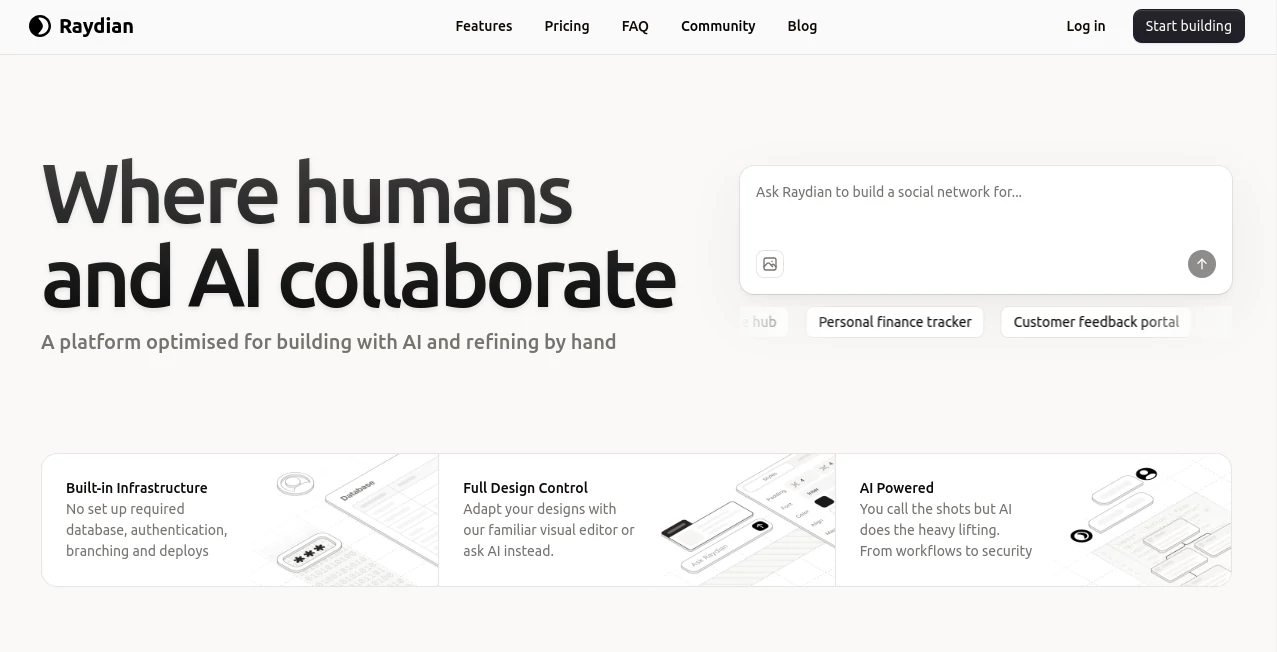
What is Raydian?
Raydian slips into the developer's toolkit like a trusty co-pilot, using clever algorithms to smooth out the rough edges of coding and design. This platform takes the tedium out of repetitive tasks, suggesting fixes and layouts that feel intuitive, helping teams push projects forward without the usual roadblocks. Builders who've tapped it often recount how it turned chaotic sprints into steady strides, making the path from sketch to ship feel less like a marathon and more like a well-paced jog.
Introduction
Raydian came together a short while ago, pieced by a group of coders who'd grown weary of tools that promised speed but piled on complexity. They set out to craft something that truly lightened the load, starting with core aids for front-end tweaks and branching into broader workflow wins. It gained quiet traction among indie devs and small squads, with shared screens of before-and-afters showing cleaner codebases and quicker turnarounds. What draws folks in is its knack for blending human insight with machine precision, evolving from a simple suggester to a full-fledged partner that anticipates the next move, keeping the creative fire burning bright amid the grind.
Key Features
User Interface
The dashboard opens with a welcoming overview, tabs for projects lined up neatly without overwhelming the eye, and a sidebar that pops suggestions as you type or drag elements. It's built for flow, with live previews that update on the fly and keyboard shortcuts that feel natural after a few runs. Even when juggling multiple views, it stays uncluttered, like a shared whiteboard that erases the mess as you go, making sessions productive without the pull of extra panels.
Accuracy & Performance
Suggestions land with a reliability that builds trust, sifting through patterns to propose changes that align closely with best practices and your style. It handles heavy loads without stuttering, processing batches of files in moments and keeping responsiveness high during peak pushes. Devs highlight how it spots subtle bugs or style slips that slip past tired eyes, delivering outputs that compile clean and run smooth right out of the gate.
Capabilities
From auto-generating boilerplate for new setups to refining responsive layouts with one-click adjustments, it covers the spectrum of build basics with room for custom extensions. It integrates seamlessly with popular stacks, offering hints for optimization or even mock data for testing, all while learning from your tweaks to sharpen future nudges. The depth allows for everything from quick prototypes to polished productions, bridging gaps in design and deploy without skipping steps.
Security & Privacy
Projects remain tucked away in encrypted workspaces, with access controls that let you dial in who sees what, from full views to read-only peeks. It processes locally where possible, minimizing data dips to the cloud, and follows tight standards for handling code snippets or configs. Teams value that layer of calm, knowing sensitive branches or experimental branches stay shielded during collaborative crafts.
Use Cases
Solo devs whip up landing pages overnight, leaning on layout hints to nail mobile fits without endless resizing. Agencies batch-refine client mocks, speeding feedback loops from days to hours with shared previews. Startup crews prototype features, using code suggestions to test waters fast before full commits. Even educators incorporate it into workshops, guiding students through real builds with gentle, on-demand guidance.
Pros and Cons
Pros:
- Cuts corner-cutting time on routine repeats, freeing focus for fun parts.
- Adapts to your voice, making tips feel like old friends.
- Plays nice with stacks, no forced rewires needed.
- Live checks catch slips early, saving debug dances.
Cons:
- Shines on standard setups; oddball frameworks might need manual merges.
- Full suite waits behind subs for casual coders.
- Learning its lingo takes a session or two for peak pulls.
Pricing Plans
Entry comes free with core aids for light lifts, perfect for poking around personal projects. Monthly core at around twenty unlocks unlimited runs and team ties, stepping to pro at fifty for advanced analytics and priority pings. Annual options shave a slice off the stack, and a trial period lets you test the full flow without upfront outlay, easing the ease-in.
How to Use Raydian
Sign up swift, link your repo or start a fresh canvas, then describe your goal in plain speak—say, a dashboard with charts. Watch it propose pieces, drag to arrange, and hit preview to polish. Commit changes with a click, iterate on feedback, and export when it sings. Bookmark patterns for repeats, turning one-off wins into workflow wonders.
Comparison with Similar Tools
Against bulkier builders that bundle too much, Raydian keeps it lean and laser-focused, though those might offer more out-of-box templates. Next to pure code completers, it layers in design smarts for fuller fronts, but could lag in raw syntax speed for script-heavy shops. It strikes a sweet spot for balanced builds, where speed meets sensibility without the surplus.
Conclusion
Raydian redefines the rhythm of making, weaving AI into the weave of work to lift the lift without losing the lead. It empowers builders to bound ahead, turning tangled tasks into triumphs that taste of true craft. As dev demands keep climbing, this ally stays steps ahead, nurturing notions into realities that resonate.
Frequently Asked Questions (FAQ)
Does it work with my current setup?
It hooks into most major frameworks, with plugins for the popular picks.
How hands-off is the help?
As much or little as you like—full autos or gentle guides.
Can teams tweak together?
Yes, shared spaces let edits echo in real time.
What about custom rules?
Train it on your style for suggestions that sing your song.
Offline options?
Core functions run local, with cloud for the heavy lifts.
AI Website Builder , AI Code Assistant , AI Developer Tools , AI Design Assistant .
These classifications represent its core capabilities and areas of application. For related tools, explore the linked categories above.
Raydian details
This tool is no longer available on submitaitools.org; find alternatives on Alternative to Raydian.
Pricing
- Free
Apps
- Web Tools
Categories

Raydian Alternatives Product

Klyra AI

Devplan

Geekflare AI

JSON to TOON…

vivgrid

Kimi K2.5

Website Clon…

Project Mela

Sourcetable