
🧠 AI Quiz
Think you really understand Artificial Intelligence?
Test yourself and see how well you know the world of AI.
Answer AI-related questions, compete with other users, and prove that
you’re among the best when it comes to AI knowledge.
Reach the top of our leaderboard.


















ReelMate AI

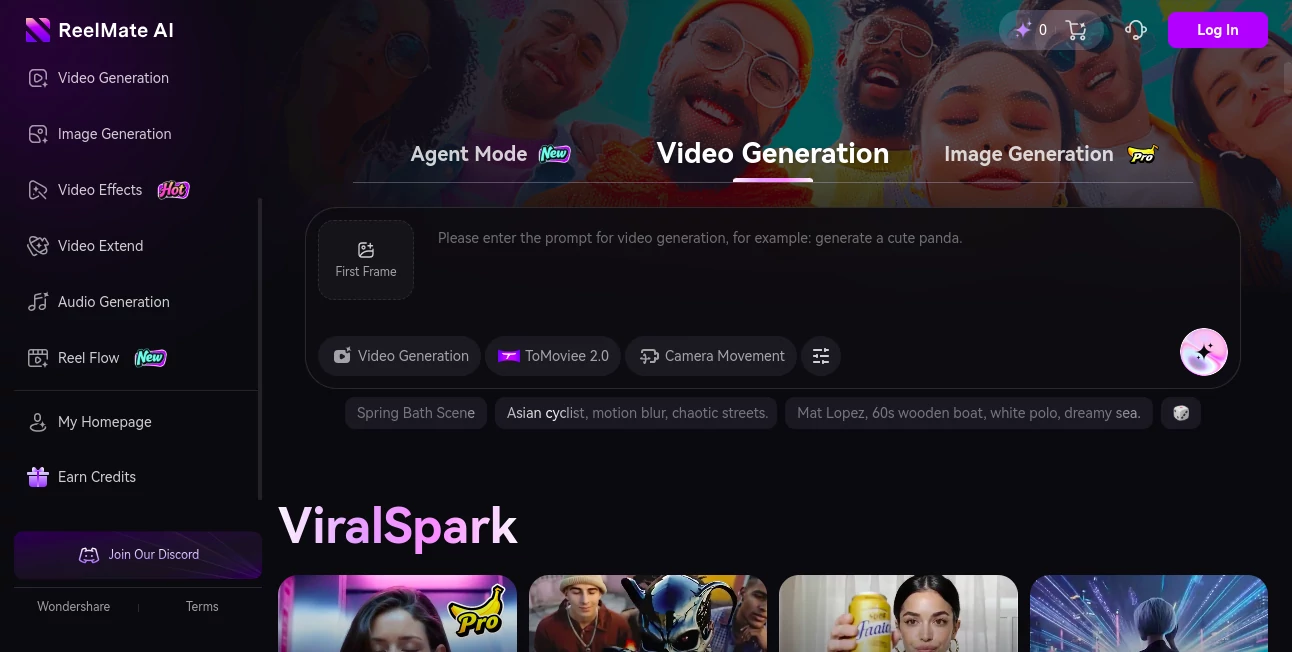
What is ReelMate AI?
ReelMate slips into the workflow of content creators like a trusted co-pilot, handling the heavy lift of turning ideas into ready-to-roll clips with minimal fuss. This platform lets you feed it a rough outline or even a voice note, and it spins out full scripts, visuals, and edits that capture the essence without losing your personal touch. Many who've dipped in talk about how it frees up headspace for the fun parts, like brainstorming the next big hook, turning what used to be all-nighters into afternoon achievements.
Introduction
ReelMate came together a short while ago, sparked by a group of filmmakers and marketers who'd grown weary of piecing together videos from scattered notes and endless takes. They set out to craft something that bridged the gap between spark and screen, and it resonated quick with solopreneurs juggling scripts and shots solo. Stories circulate in creator circles about how a single prompt led to a polished promo that landed clients, highlighting its knack for distilling chaos into compelling narratives. Over time, it's refined its approach based on real-world rhythms, becoming a staple for those who want pro-level output without the production crew.
Key Features
User Interface
The dashboard opens with a welcoming prompt bar that feels more like a chat than a command center, where you jot your concept and watch suggestions unfold in a sidebar. Clips build in a timeline view that's drag-friendly, with thumbnails that preview changes on the fly, keeping everything within a single pane. It's the kind of setup that clicks after a couple tries, blending simplicity with enough depth to handle layered projects without overwhelming the eyes.
Accuracy & Performance
When you outline a sequence, it aligns the beats with a precision that keeps pacing tight and transitions smooth, rarely straying from the core message you laid out. Renders roll out in under five minutes for most shorts, holding steady even on devices with modest specs, so you can iterate without the drag. Users often point to how it captures tone shifts—like shifting from upbeat to reflective—spot on, making revisions feel like fine-tuning rather than full rewrites.
Capabilities
From scripting dialogues that sound natural to layering stock footage with custom voiceovers, it covers the full arc of short-form magic, even suggesting cuts based on viewer flow data. You can weave in your own clips or tweak styles to match brand vibes, and it handles multiples like social series or ad batches with ease. The agent-driven core means it learns from your past runs, offering tailored tweaks that evolve with your style.
Security & Privacy
Your raw files and drafts get processed in isolated sessions, cleared after export unless you opt to archive, with straightforward controls for who peeks if you're teaming up. It sticks to basic best practices for data handling, letting you export without watermarks or worries about lingering traces. Creators value that straightforward shield, allowing bold experiments without the backend buzzkill.
Use Cases
Social media managers crank out weekly reels that sync with trends, pulling in hooks that boost engagement overnight. Small business owners mock up product teases from bullet points, seeing polished pitches ready for platforms in a snap. Podcasters extend audio episodes into visual snippets, adding graphics that draw eyes to their feeds. Even event planners storyboard highlight reels ahead of time, ensuring the big moments land just right without post-event panic.
Pros and Cons
Pros:
- Speeds up the idea-to-upload cycle dramatically for busy builders.
- Keeps outputs true to your voice, avoiding generic gloss.
- Handles short bursts brilliantly, perfect for platform feeds.
- Built-in learning makes each run sharper than the last.
Cons:
- Best on concise concepts; sprawling epics might need chunking.
- Custom voice options lean limited without extra uploads.
- Peak-hour queues can nudge waits for heavy users.
Pricing Plans
It starts with a free layer for trial runs, capping at a few exports to whet the appetite. Core access hits around fifteen monthly for unlimited basics and quick queues, stepping to pro at thirty-five for team shares and advanced agents. Yearly commitments clip the cost by a bit, and a no-risk week lets you test the full flow before settling in.
How to Use ReelMate
Log in and hit the new project button, then spill your story in the prompt—be it a script stub or theme tease. Let the agent suggest a structure, drag elements to rearrange, and preview the build as it brews. Tweak timings or tones with sliders, export in your platform's flavor, and schedule posts right from the hub. Revisit saved agents for recurring series, streamlining the repeat game.
Comparison with Similar Tools
Where manual editors demand drag-and-drop devotion, ReelMate's agent smarts skip the slog, though those might edge for hands-on heroes. Against broader suites, it hones in on shorts with laser focus, trading bells for brevity but perhaps pinching on long-form flair. It stands out for creators craving quick, clever clips over comprehensive canvases.
Conclusion
ReelMate reimagines the reel-making rush, blending brains with brevity to birth videos that vibe and convert. It empowers the everyday storyteller to shine without the studio strife, turning fleeting fancies into feed favorites. As content keeps crowding the calendar, this ally stays ahead, scripting successes one seamless sequence at a time.
Frequently Asked Questions (FAQ)
What lengths does it handle best?
Shorts under two minutes fly fastest, though it scales to fives with ease.
Can I add my own footage?
Yes, upload and let it weave in seamlessly with the generated bits.
How customizable are the voices?
A solid range of tones, with options to mimic yours via samples.
Is it for teams or just solos?
Both—pro tiers unlock shares for collaborative clips.
What platforms does it export to?
Tailored files for TikTok, Insta, YouTube, and more, ready to roll.
AI Script Writing , AI Video Editor , AI Text to Video , AI Video Generator .
These classifications represent its core capabilities and areas of application. For related tools, explore the linked categories above.
ReelMate AI details
This tool is no longer available on submitaitools.org; find alternatives on Alternative to ReelMate AI.
Pricing
- Free
Apps
- Web Tools
Categories

ReelMate AI Alternatives Product

Seedance 2.0…

seedance 2

Veo4

Fast Wan

wan2-6.org

AI Baby Video

FinalLayer

Nano Banana …

Voe4 AI Video
