
🧠 AI Quiz
Think you really understand Artificial Intelligence?
Test yourself and see how well you know the world of AI.
Answer AI-related questions, compete with other users, and prove that
you’re among the best when it comes to AI knowledge.
Reach the top of our leaderboard.


















remove bg video
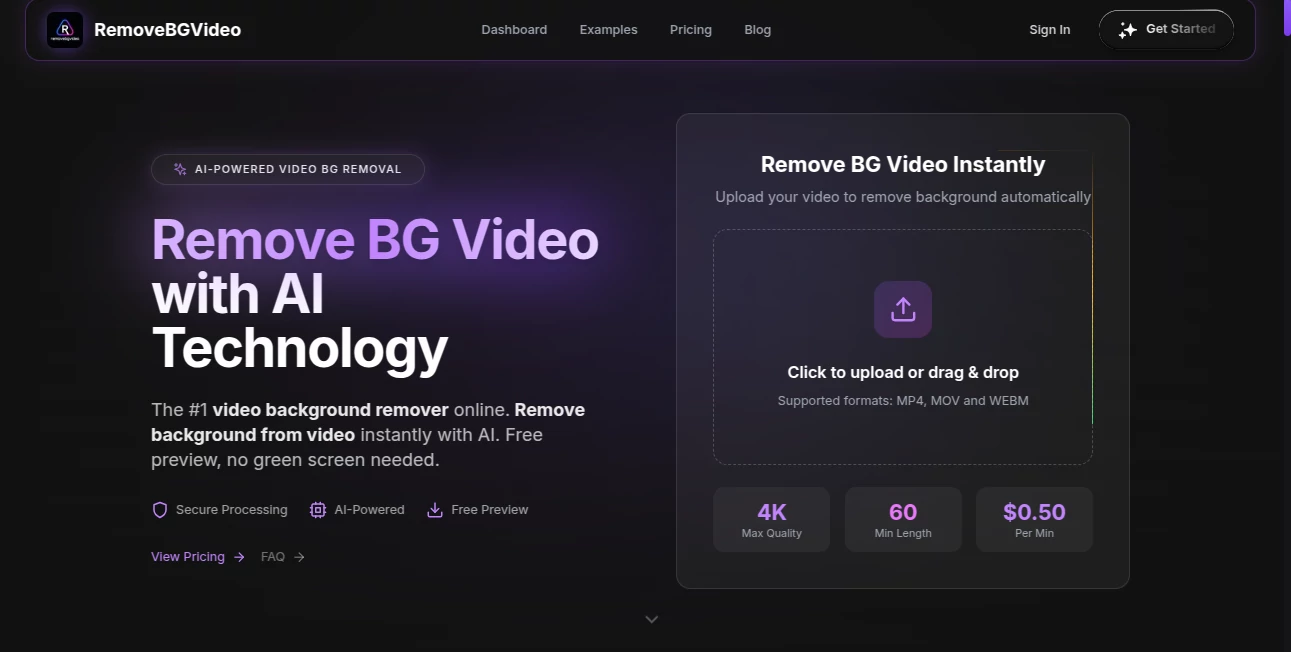
What is remove bg video?
Picture this: you shoot a quick talking-head video in your living room, but the messy bookshelf behind you steals the show. Or you film a product demo outdoors and the wind keeps blowing leaves into frame. Normally you’d spend hours in editing software masking frame by frame. This tool changes that completely. Upload your clip, wait a short while, and download a version where the background simply disappears—leaving clean, sharp edges around your subject. The results look surprisingly natural, even with hair, moving clothes, or fast motion. I’ve used it to salvage footage I thought was unusable, and the difference between “good enough” and “professional” was night and day.
Introduction
Video background removal used to mean expensive software, green screens, or tedious manual rotoscoping. This platform brings that power to anyone with a browser—no studio, no steep learning curve, no long render times. It handles everything from simple vlogs to product demos to dance clips, separating subjects from backgrounds with edge awareness that feels almost human. For creators who want polished results without a big production budget, it’s become a quiet essential. The speed and quality mean you can experiment freely: try different backgrounds, create composites, or just clean up shots that would otherwise never see the light of day.
Key Features
User Interface
The experience is refreshingly straightforward. Drag your video in (or click to upload), wait a moment while it processes, then preview the result with a simple toggle between original and transparent background. Download options appear right below—MP4 with alpha channel, transparent WebM, or even GIF for short loops. No account forced for basic use, no complicated timeline scrubbing. It’s designed so you spend time creating, not configuring.
Accuracy & Performance
It tracks subjects frame-by-frame with impressive consistency—even when people turn, move quickly, or have loose hair. Edges stay clean without the usual halo or flickering you see in cheaper tools. Processing speed is surprisingly fast for video: short clips finish in under a minute, longer ones in just a few. It handles 1080p and even 4K inputs smoothly, and the output quality holds up under scrutiny on both light and dark backgrounds.
Capabilities
Removes backgrounds from any video (people, products, animals, objects), preserves motion blur and transparency, supports common formats (MP4, MOV, WebM), outputs with alpha channel for compositing, and works without green screen. It’s strong on human subjects (hair, clothing detail) but also handles product shots, pets, and simple animations. You can preview results at different quality levels and choose the balance between speed and precision that fits your project.
Security & Privacy
Uploads are processed temporarily and deleted from servers shortly after you download. No forced account creation for basic use means no profile is built around your content. For creators handling client footage, personal videos, or sensitive material, that transient handling provides real peace of mind—no lingering copies, no data mining.
Use Cases
A YouTuber removes cluttered room backgrounds from talking-head videos, making every episode look like it was shot in a clean studio. An e-commerce seller films products on a messy desk, then instantly gets clean cutouts for white-background listings. A dancer records practice clips in a living room and composites them over scenic or stage backgrounds. A small marketing team creates quick product explainer videos without booking a studio. Wherever the background distracts from the subject, this tool quietly fixes it.
Pros and Cons
Pros:
- Edge detection is excellent—hair, fingers, clothing edges stay natural.
- Fast processing even on longer clips, so you stay in creative flow.
- Outputs with true alpha channel—perfect for After Effects, Premiere, DaVinci, etc.
- No green screen or special lighting required—works on everyday footage.
- Free tier is generous enough for short clips and testing.
Cons:
- Very fast motion or complex overlapping elements can occasionally show minor artifacts.
- Longer videos (several minutes) push processing time and cost more credits.
- Free tier includes small watermark; paid removes it completely.
Pricing Plans
Free plan gives several minutes of processing per day—perfect for short clips, social posts, or testing. Paid plans scale affordably: more minutes, higher priority queue, no watermark, and batch processing for multiple videos at once. Pricing feels reasonable for the time it saves—many creators say one month covers what they used to spend on freelance editors or stock footage just to avoid shooting in messy spaces.
How to Use Remove Background from Video
Drag your video file into the upload area (MP4, MOV, WebM all work). Wait while it analyzes and processes—short clips finish in seconds, longer ones a few minutes. Preview the result with the toggle to check edges and transparency. Choose your output format (video with alpha or transparent WebM) and download. For best results use good lighting and avoid very busy or moving backgrounds. That’s it—clean subject, transparent background, ready to composite.
Comparison with Similar Tools
Many free background removers struggle with hair, motion blur, or semi-transparent objects, leaving halos or flickering. This one handles those edge cases noticeably better, especially on human subjects. Where others require green screens or produce low-quality alpha, the output here is clean enough for professional compositing. Speed, edge quality, and ease of use put it ahead of most browser-based options.
Conclusion
Video is powerful, but backgrounds can ruin even the best performance. This tool quietly removes that obstacle, letting your subject—your message, your product, your movement—stand alone without distraction. It turns “I wish I had a clean background” into “here it is, ready to use” in minutes. For creators, marketers, educators, or anyone who wants polished video without a full studio, it’s a small investment that delivers big presence. Clean footage shouldn’t be hard to get—and now it isn’t.
Frequently Asked Questions (FAQ)
How long can my video be?
Free tier handles short clips; paid plans support several minutes per upload.
Does it work without green screen?
Yes—works on any background, though cleaner, contrasting backgrounds give the best edges.
What output formats are available?
MP4 with alpha channel, transparent WebM, and sometimes GIF for short loops.
Is my video stored anywhere?
No—processed temporarily and deleted after download.
Can I use it for commercial projects?
Yes—paid plans include full commercial rights with no watermark.
AI Background Remover , AI Video Editor , AI Video Enhancer .
These classifications represent its core capabilities and areas of application. For related tools, explore the linked categories above.
remove bg video details
Pricing
- Free
Apps
- Web Tools
Categories

remove bg video Alternatives Product

AI Image Edi…

AI Motion Co…

Shoorts AI

LatentSync

FinalLayer

Riverside.fm

Sora Waterma…

CapCut

Picnana
