
🧠 AI Quiz
Think you really understand Artificial Intelligence?
Test yourself and see how well you know the world of AI.
Answer AI-related questions, compete with other users, and prove that
you’re among the best when it comes to AI knowledge.
Reach the top of our leaderboard.


















Reply Champion

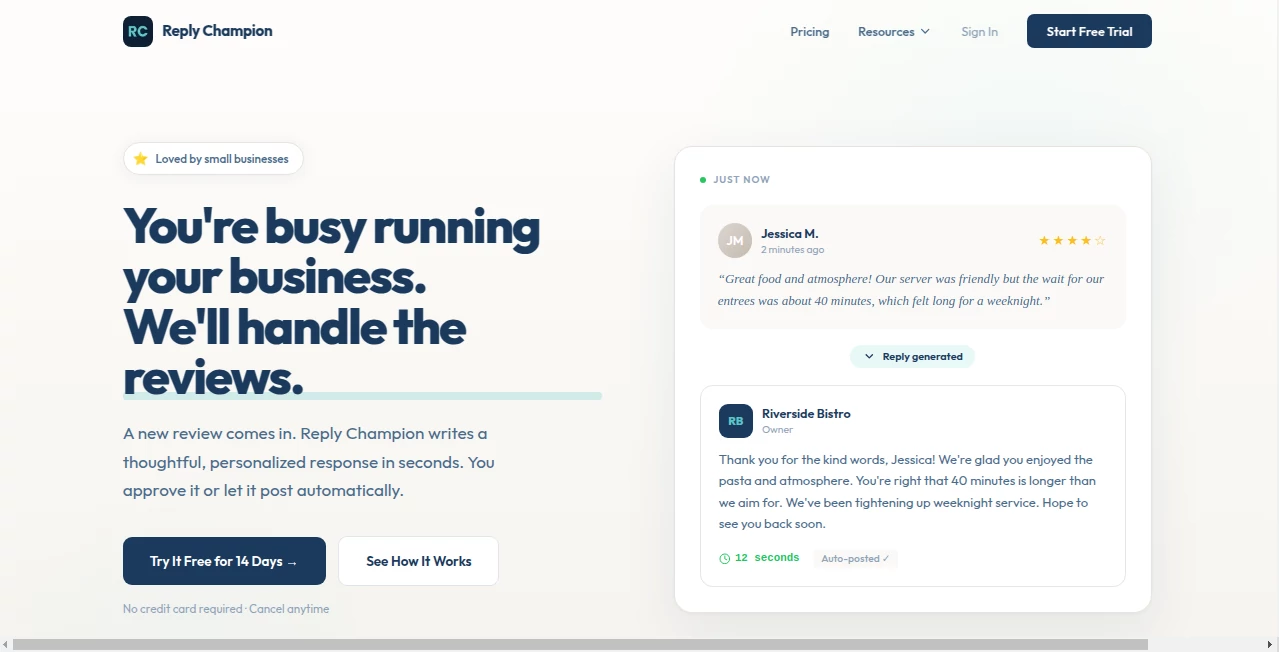
What is Reply Champion?
Replying to messages, comments, DMs, reviews—it's the part of running an online presence that eats hours and still often feels flat. This tool changes that completely. You paste the incoming message (or let it pull from your inbox), pick the tone you're going for, and seconds later you get 3–5 thoughtful, natural-sounding replies that sound like you wrote them on your best day. I've seen solopreneurs go from spending 45 minutes agonizing over one customer reply to firing off five polished responses in under two minutes. The difference isn't just speed—it's the quality: warmer, more persuasive, and far less generic than most AI drafts.
Introduction
Customer messages, social comments, sales inquiries, negative reviews—every one is a tiny moment of truth. Get it right and you build loyalty; get it wrong and you lose people. Most of us wing it or copy-paste the same tired lines. This platform turns that daily grind into something almost enjoyable. It understands context, tone, and intent so well that the suggestions feel like they came from a very sharp version of yourself. Founders, creators, support teams, and agency owners use it daily because it saves time while actually improving how they come across. The moment you see your own replies get noticeably better (and the responses from customers improve), you realize how much small communication tweaks move the needle.
Key Features
User Interface
The screen is clean and focused: paste the message (or connect your inbox), choose tone (friendly, professional, witty, empathetic, etc.), adjust length if you want, and hit generate. Suggestions appear instantly in a neat column with one-click copy. You can regenerate, tweak the prompt mid-flow, or save favorite tones for later. It never feels cluttered—everything you need is right there, and nothing you don't.
Accuracy & Performance
It reads nuance shockingly well—picks up sarcasm in a complaint, urgency in a sales question, excitement in a compliment—and crafts replies that match the energy. Tone control is precise: "friendly but firm" actually lands that way. Generation is near-instant, even for longer threads. In real use, 80–90% of first suggestions are usable with zero edits, which is unusually high for this kind of tool.
Capabilities
Handles DMs, comments, emails, reviews, support tickets, sales chats—pretty much any text conversation. Tone presets (dozens available) plus custom instructions let you match your brand voice perfectly. It suggests upsell lines, objection handlers, empathetic recoveries, witty comebacks, and professional closes. Bulk mode processes multiple messages at once. Outputs include short replies, longer thoughtful ones, and threaded responses when context is provided.
Security & Privacy
No full inbox access required—paste what you want, nothing more. Messages are processed ephemerally and not stored or used for training. Paid plans offer end-to-end encryption for connected accounts. For anyone handling customer data or private conversations, that boundary feels important and well-respected.
Use Cases
A Shopify store owner turns angry "where's my order" messages into calm, proactive replies that reduce refunds and build loyalty. A creator responds to every YouTube comment with personality instead of generic thanks—engagement climbs noticeably. A SaaS founder handles inbound sales DMs with confident, value-focused answers that close deals faster. An agency manages client feedback across ten accounts without sounding robotic. Wherever timely, human-sounding replies matter, it quietly lifts performance.
Pros and Cons
Pros:
- Replies feel genuinely like you—brand voice preserved, not overwritten.
- Saves 70–90% of reply-writing time without sacrificing quality.
- Tone and context awareness far better than generic AI chatbots.
- Bulk mode turns hours of inbox work into minutes.
- Free tier generous enough to feel the difference immediately.
Cons:
- Best results come when you give clear tone/brand instructions.
- Very long or multi-person threads can occasionally need splitting.
- Unlimited bulk and advanced integrations sit behind paid plans.
Pricing Plans
Free plan gives enough daily generations to handle a small inbox or test thoroughly. Starter unlocks more replies and basic bulk. Pro adds unlimited generations, priority processing, inbox integrations, custom tone training, and team seats. Enterprise brings white-label options and dedicated support. Pricing feels fair—many users say it pays for itself after one good week of customer interactions or sales wins.
How to Use ReplyChampion
Paste the incoming message (comment, DM, email, review). Choose tone or type custom instructions ("friendly but professional, upsell gently"). Hit generate—review 3–5 options, pick the best, copy-paste into your platform. For recurring styles, save a custom tone preset. Bulk mode lets you paste multiple messages at once and get tailored replies for each. The loop is fast: read, generate, reply, repeat. Most people cut reply time in half on day one.
Comparison with Similar Tools
Generic AI chatbots spit out safe, bland replies that sound like robots trying to be human. This one is trained specifically on high-conversion, brand-aligned customer communication—results feel warmer, sharper, and more persuasive. Where others require heavy prompt engineering, tone presets and context understanding here make quality replies almost instant. It's less "AI assistant" and more "your best communicator on demand."
Conclusion
Every reply is a tiny relationship moment. Get them right consistently and your audience feels seen, valued, heard. This tool makes that consistency achievable even when you're swamped. It doesn't replace your voice—it amplifies it. When your messages start converting better, your inbox feels lighter, and your customers respond more warmly, you realize how much thoughtful communication actually drives growth. For anyone who communicates online for a living, that's worth having on your side.
Frequently Asked Questions (FAQ)
How many free replies do I get?
Enough daily to handle a small-to-medium inbox—plenty to feel the difference right away.
Can it match my brand voice?
Yes—give it examples or custom instructions once and save as a preset; it adapts remarkably well.
Does it work for negative reviews?
Especially well—suggests empathetic, solution-focused replies that often turn complainers into fans.
Can I connect my actual inbox?
Paid plans offer integrations with Gmail, Helpdesk tools, social DMs—optional, not required.
Is my message data safe?
Processed ephemerally, never stored or used for training—privacy-first by design.
AI Reply Assistant , AI Email Assistant , AI Customer Service Assistant , AI Response Generator .
These classifications represent its core capabilities and areas of application. For related tools, explore the linked categories above.
Reply Champion details
This tool is no longer available on submitaitools.org; find alternatives on Alternative to Reply Champion.
Pricing
- Free
Apps
- Web Tools
Categories

Reply Champion Alternatives Product

HealCycle

Leado.co

Jasper

Meet Lea

FeatureShark

Hi AI Reply

Supawazap

Linkedora

InspiroBot
