🧠 AI Quiz
Think you really understand Artificial Intelligence?
Test yourself and see how well you know the world of AI.
Answer AI-related questions, compete with other users, and prove that
you’re among the best when it comes to AI knowledge.
Reach the top of our leaderboard.

















ResumeFreePro
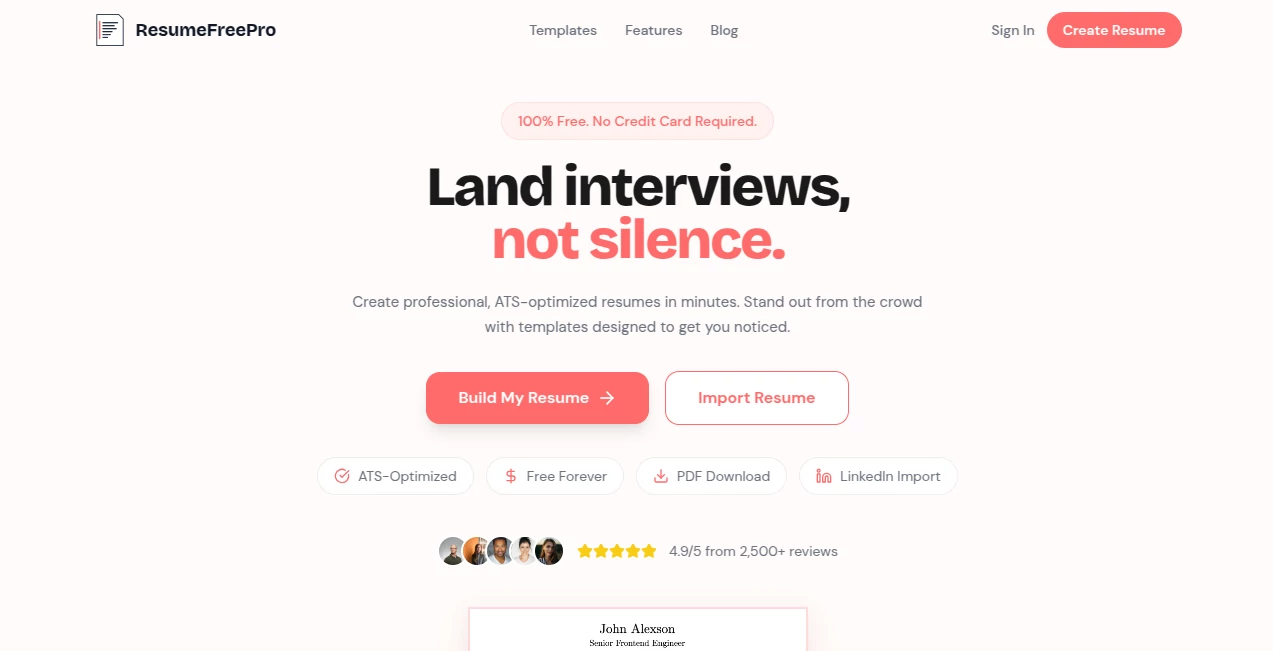
What is ResumeFreePro?
Landing an interview often comes down to whether your resume makes it past the first scan. Too many good candidates get overlooked because their resume looks messy, uses the wrong format, or fails to speak the language recruiters and applicant tracking systems expect. This tool solves that problem in a refreshingly straightforward way. You get clean, modern templates, smart suggestions, and an easy builder that helps you create a resume that actually gets read—without paying for premium features most people never use.
Introduction
Writing a resume is stressful. You know your experience matters, but turning it into something that stands out while still passing automated filters feels like walking a tightrope. ResumeFreePro removes much of that stress. It’s built for real job seekers who want professional results fast, whether you’re a recent graduate, career changer, or experienced professional. The templates are designed to look sharp on both screens and printed pages, while staying optimized for ATS systems that scan thousands of applications daily. What users appreciate most is how it feels supportive rather than overwhelming—you focus on your achievements, and the tool handles the presentation.
Key Features
User Interface
The builder is intuitive and clean. You start by choosing a template, then simply fill in your information section by section. Real-time preview shows exactly how your resume will look as you type. No clunky menus or hidden settings—just straightforward fields and helpful tips along the way. It works beautifully on both desktop and mobile, so you can polish your resume during a lunch break or commute. The interface stays out of your way so you can focus on telling your story clearly.
Accuracy & Performance
The templates are genuinely ATS-friendly, using standard fonts, proper headings, and logical structure that most systems parse without issues. Suggestions for bullet points and phrasing help you highlight achievements instead of just listing duties. Export options (PDF, Word) are clean and consistent. Users frequently mention that after switching to resumes built here, they started getting more interview calls—often because the document finally looked as strong as their actual experience.
Capabilities
It offers a wide selection of professional templates suitable for different industries and experience levels. You can easily add, rearrange, or remove sections, customize colors and fonts within ATS-safe limits, and get smart content suggestions based on your role. It handles everything from entry-level resumes to executive profiles, with space for projects, certifications, volunteer work, and skills. The export quality is excellent, preserving formatting across different devices and software.
Security & Privacy
Your data stays private. The platform doesn’t sell or share your information, and you can delete your resume data anytime. No aggressive data collection beyond what’s needed to build the document. For job seekers sharing sensitive career details, that respectful approach builds real trust.
Use Cases
A recent graduate builds their first professional resume and lands interviews at companies that previously ignored them. A mid-career professional switching industries rewrites their experience in a way that highlights transferable skills. Someone returning to work after a gap creates a clean, confident document that focuses on strengths rather than chronology. Freelancers and consultants use it to create polished profiles that win better clients. In every case, the common result is more responses and less frustration.
Pros and Cons
Pros:
- Completely free core features with no forced paywall for basic professional resumes.
- ATS-optimized templates that actually work in real hiring systems.
- Clean, modern designs that look expensive without costing anything.
- Fast and easy to use—even for people who dislike writing resumes.
- Real-time preview and export options that preserve formatting.
Cons:
- Some advanced customization (extra templates or premium designs) requires upgrade.
- No built-in cover letter generator in the free version (though basic support exists).
Pricing Plans
The free plan is genuinely useful and covers everything most job seekers need: multiple templates, full editing, ATS optimization, and PDF export. Premium plans add more design options, advanced features, and priority support for those who want extras or build resumes frequently. Many users find the free version more than sufficient, which makes the whole experience feel fair and user-friendly rather than pushy.
How to Use ResumeFreePro
Start by choosing a template that matches your industry and style. Fill in your contact info, work experience, education, and skills—use the suggestions to strengthen bullet points. Preview as you go to see how it looks. Make adjustments until it feels right, then download the PDF. You can save multiple versions for different applications and come back anytime to update. The whole process usually takes 15–40 minutes, depending on how much you want to refine.
Comparison with Similar Tools
Many resume builders either look dated, hide basic features behind expensive subscriptions, or create ATS-unfriendly designs. This one stands out by offering genuinely professional, clean templates for free while still focusing on what actually matters: getting interviews. It’s less about flashy extras and more about delivering a strong, effective resume that helps real people move forward in their careers.
Conclusion
Your experience and skills deserve to be presented clearly and professionally. This tool makes that possible without turning resume writing into another expensive or frustrating chore. It respects your time, understands modern hiring systems, and helps you put your best foot forward. In a competitive job market, having a resume that looks sharp and reads well can make all the difference. For anyone updating their career documents, it’s one of the smartest and most practical choices available right now.
Frequently Asked Questions (FAQ)
Is it really free?
Yes—the core resume builder and many templates are completely free.
Are the templates ATS friendly?
Yes, they’re specifically designed to pass most applicant tracking systems while still looking modern.
Can I download as PDF?
Absolutely—clean, professional PDFs that preserve formatting.
Do I need to create an account?
You can start building without one, though an account lets you save and return to your resumes later.
Is it good for career changers?
Very effective—many users successfully highlight transferable skills across industries.
AI Cover Letter Generator , AI Resume Builder , AI Documents Assistant , AI Writing Assistants .
These classifications represent its core capabilities and areas of application. For related tools, explore the linked categories above.
ResumeFreePro details
Pricing
- Free
Apps
- Web Tools
Categories

ResumeFreePro Alternatives Product

Certificate …

GPTZero

Rename files…

Nav Ai

GLM-OCR Onli…

Markdown to …

Document Chat
RewriteBar

Read PDF Alo…