🧠 AI Quiz
Think you really understand Artificial Intelligence?
Test yourself and see how well you know the world of AI.
Answer AI-related questions, compete with other users, and prove that
you’re among the best when it comes to AI knowledge.
Reach the top of our leaderboard.


















roomdesignai

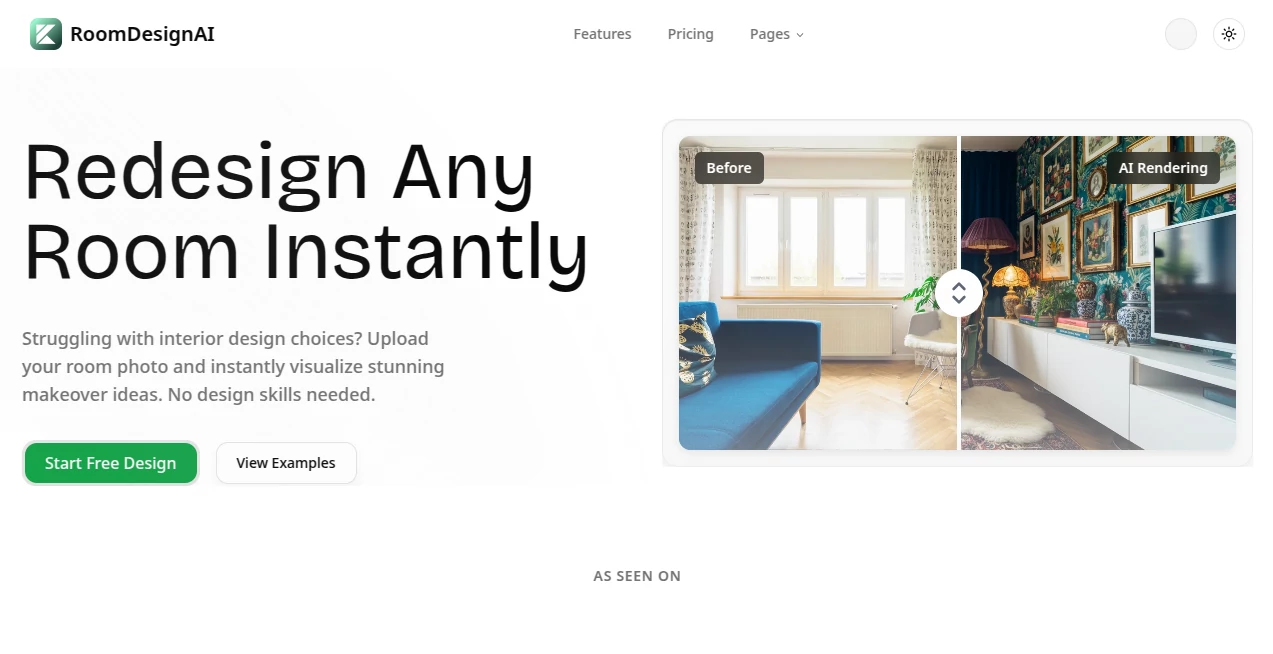
What is roomdesignai?
There's something truly satisfying about snapping a photo of a tired old room and watching it transform into a fresh, inviting space right before your eyes. This tool makes that happen with ease, pulling together professional-looking redesigns that respect your existing layout while sprinkling in new ideas. I tried it with a cluttered living room shot from my apartment, and the suggestions—soft neutrals one time, bold accents the next—gave me real inspiration without feeling overwhelming. It's the kind of practical help that turns "someday" projects into weekend wins.
Introduction
Redecorating can feel daunting, especially when you're staring at blank walls or outdated furniture, wondering where to start. This platform changes that by letting you upload any room photo and getting back realistic makeover options in seconds, tailored to styles from sleek modern to cozy traditional. It's built for everyone—homeowners testing paint colors, renters dreaming big without permanent changes, even pros scouting quick concepts for clients. What stands out is how it reads the room's bones: lighting, proportions, existing pieces, and builds on them thoughtfully. Over ten thousand designs created already, with thousands of users smiling at the results—it's proof that smart tech can make beautiful spaces accessible, no fancy degree required.
Key Features
User Interface
From the moment you land, it's all about getting started fast: a big, forgiving upload area where you click or drag your photo, then a straightforward button to kick off the magic. Results pop up clean, with the original beside the new for easy comparison, and a gallery of examples to spark ideas if you're browsing first. My experience was smooth—no confusing menus, just upload, wait a beat, and explore options that load crisp and quick, even on a phone during a lunch break.
Accuracy & Performance
The AI digs into details like natural light and room shape, delivering renderings that look convincingly real, with furniture scaled right and colors that play nice together. Generations fly—often under half a minute—and hold their quality in high res, ready for downloading or sharing. In my trials, it rarely missed the mark on layout, keeping doors and windows where they belong while swapping in fresh vibes that felt doable, not dreamy fantasies.
Capabilities
It handles bedrooms, kitchens, living areas, you name it, spinning multiple concepts per upload in styles that range wide—minimalist calm to classic warmth. Outputs come high-resolution for printing or showing contractors, and the realism extends to practical touches like decor that fits the space. It's especially handy for visualizing big changes without commitment, bridging that gap between imagination and action.
Security & Privacy
Uploads get processed securely and don't linger longer than needed, keeping your personal spaces private. It's a straightforward approach that builds trust, especially when you're sharing home photos—no fuss about data trails, just focus on the fun of redesigning.
Use Cases
Homeowners preview full refreshes, spotting how new palettes lift a dull den or modern fixtures update a kitchen. Renters experiment with movable pieces and temporary tweaks, avoiding deposit risks while planning cozy nests. Designers whip up client options fast, freeing time for the finer details. Even real estate folks stage vacant spots virtually, helping buyers see potential and move listings quicker.
Pros and Cons
Pros:
- Lightning-quick results that spark real ideas without the wait.
- Realistic visuals that respect your room's reality, making plans practical.
- Broad style range to match any taste or trend.
- High-res downloads perfect for sharing or executing.
Cons:
- Best with clear, well-lit photos—dim or cluttered ones might need a redo.
- Credit-based for generations, so heavy users top up.
Pricing Plans
Dive in free with basic access that lets you test makeovers without pulling out a card—ideal for casual tweaks or first tastes. Generations run on credits, keeping things flexible as you go heavier, with no rigid subscriptions locking you in. It's an approachable model that grows with your projects, from one-off inspirations to full-home overhauls.
How to Use RoomDesignAI
Grab a decent photo of your space—straight-on works best—then drop it into the upload zone. Choose a style if you have one in mind, or let it surprise you, and watch the concepts roll in shortly after. Flip through the options, compare to your original, and download favorites in sharp detail for mood boards or contractor chats. I started with my bedroom corner, generated a few rounds, and ended up with a plan I'm actually excited to tackle this spring.
Comparison with Similar Tools
Plenty of apps promise room revamps, but this one nails the balance of speed and realism, building faithfully on your photo without wild overhauls that ignore walls or windows. Where some spit generic overlays, it feels more attuned to actual spaces, delivering usable ideas over flashy but impractical ones. For everyday folks wanting grounded inspiration, it edges ahead with its thoughtful, high-quality touch.
Conclusion
Redesigning shouldn't feel like a gamble or a grind—this tool turns it into an enjoyable what-if game with outcomes you can trust. It opens up possibilities for spaces that feel stuck, reminding us that a fresh look is often closer than we think. Whether you're refreshing one corner or dreaming up a whole home shift, it's the gentle push that makes change exciting again.
Frequently Asked Questions (FAQ)
What rooms work best?
Any living space—bedrooms, kitchens, living rooms, even rentals with limits.
How many styles are there?
From modern minimalist to classic traditional, with room for surprises.
Are the designs realistic?
Very—lighting, scale, and details all considered for implementable ideas.
Can I download the results?
High-res files ready for sharing, printing, or planning.
Is it really free to try?
Yes, start without cost and see the makeovers unfold.
Photo & Image Editor , AI Art Generator , AI Design Generator , AI Interior & Room Design .
These classifications represent its core capabilities and areas of application. For related tools, explore the linked categories above.
roomdesignai details
This tool is no longer available on submitaitools.org; find alternatives on Alternative to roomdesignai.
Pricing
- Free
Apps
- Web Tools
Categories

roomdesignai Alternatives Product

Uni-1

Wplace Live

Lensgo

AniFlow AI

AIGAZOU

AI Photo Edi…

seedream 6

Best AI SVG …

Banana Pro