🧠 AI Quiz
Think you really understand Artificial Intelligence?
Test yourself and see how well you know the world of AI.
Answer AI-related questions, compete with other users, and prove that
you’re among the best when it comes to AI knowledge.
Reach the top of our leaderboard.


















Screenshot to Code
What is Screenshot to Code?
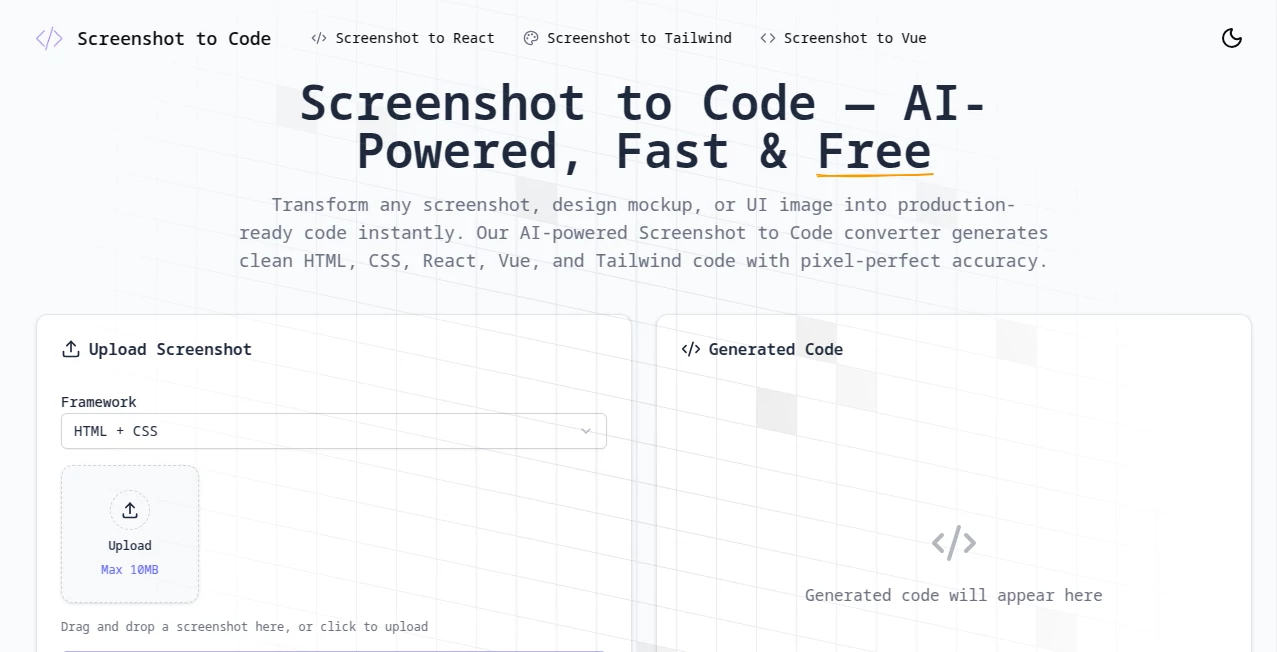
Ever stared at a beautiful design mockup and thought, “I wish I could just copy this into code”? This tool does exactly that—and does it brilliantly. You drop in a screenshot of a website, app screen, or even a Figma design, and in seconds it hands you production-ready code that looks and works almost exactly like the original. I’ve used it on late-night projects when my brain was fried, and it saved me hours of pixel-pushing and guesswork. It’s one of those rare tools that feels like a cheat code for frontend developers.
Introduction
This platform was born out of pure developer frustration: the endless back-and-forth between design and code. Instead of spending hours recreating layouts from scratch, you can now upload a screenshot and let the AI do the heavy lifting. It’s not just about speed—it’s about accuracy. The results are clean, semantic, and surprisingly close to what a human would write. Whether you’re building a landing page, prototyping a mobile app, or just trying to understand someone else’s UI, this tool turns “I wish” into “done” faster than you can brew coffee.
Key Features
User Interface
The whole experience is refreshingly simple. You land on a page with one big upload area. Drag your screenshot in, pick your framework (React, Vue, Tailwind, etc.), and hit go. That’s it. No sign-up traps, no confusing menus. The preview shows you the rendered result side-by-side with the code, so you can instantly see how close it got. It’s the kind of interface that makes you feel smart just for using it.
Accuracy & Performance
This is where it really shines. The AI doesn’t just throw together a mess of divs—it understands layout structure, spacing, colors, fonts, and even responsive behavior. I’ve thrown in everything from pixel-perfect landing pages to messy mobile screenshots, and the output is consistently impressive. It’s fast too—usually under 20 seconds, even for complex designs. The code is clean, uses modern CSS (flexbox, grid), and is easy to tweak.
Capabilities
You can generate code for React, Vue, Svelte, or plain HTML+CSS+JS. It supports Tailwind, Bootstrap, and custom frameworks. You can also ask it to make the code responsive, add animations, or convert between frameworks. The tool even handles dark mode, hover effects, and interactive elements surprisingly well. It’s not just static—it understands interactivity and structure.
Security & Privacy
Your screenshots are processed and deleted immediately after generation. No storage, no logs, no funny business. For teams working on confidential designs, this is a huge relief. It’s one of the few tools in this space that actually takes privacy seriously.
Use Cases
Freelancers use it to quickly prototype client designs or match existing sites. Agencies speed up their handoff process by generating code from Figma mocks. Indie hackers turn inspiration screenshots into landing pages overnight. Even designers use it to test how their mockups would look in real code without asking a developer. It’s become a staple in many workflows.
Pros and Cons
Pros:
- Insanely fast and accurate for most designs
- Clean, modern, maintainable code
- Multiple framework support
- Free tier is generous
- Privacy-focused
Cons:
- Complex interactive apps can still need manual cleanup
- Free tier has generation limits
Pricing Plans
The free plan gives you 10 generations per month—enough to get a feel for it. The Pro plan at $19/month unlocks unlimited generations, priority processing, and access to the latest models. There’s also a one-time lifetime deal that’s been popular among heavy users. For most people, the free tier is surprisingly usable, and the paid plan feels like a no-brainer once you start relying on it.
How to Use Screenshot to Code
1. Take a screenshot of the design you want to recreate (or export from Figma).
2. Drag it into the upload area on the homepage.
3. Choose your preferred framework and styling library.
4. Click “Generate” and wait a few seconds.
5. Review the preview, copy the code, and paste it into your project.
6. Tweak as needed—most of the time it’s 80-90% there.
Comparison with Similar Tools
While other tools can generate code from images, this one consistently produces cleaner, more semantic HTML and better Tailwind usage. It also handles responsiveness and interactivity better than most competitors. The privacy policy is stronger, and the free tier is more generous. For anyone serious about frontend, it’s become the clear winner in this niche.
Conclusion
This tool has quietly become one of the most powerful weapons in a modern developer’s arsenal. It doesn’t replace the need for good judgment or manual tweaks, but it removes so much of the grunt work that you’re left with more time for the creative parts. Whether you’re a solo builder, part of a team, or just prototyping for fun, it’s hard to imagine going back to hand-coding everything from scratch.
Frequently Asked Questions (FAQ)
How accurate is it really?
For landing pages, dashboards, and mobile screens, it’s often 85–95% there. Complex apps need more cleanup, but it’s still a massive time-saver.
Can it generate React with hooks and state?
Yes, it understands component structure and can generate functional components with useState/useEffect.
Is the code production-ready?
Usually yes for static sites and prototypes. For full apps, it’s a great starting point that saves hours.
What if I need to change the framework later?
You can regenerate the same screenshot in a different framework with one click.
Do you own the code you generate?
100%. It’s yours to use, sell, or modify however you like.
AI Landing Page Builder , AI No-Code & Low-Code , AI Code Generator , AI Developer Tools .
These classifications represent its core capabilities and areas of application. For related tools, explore the linked categories above.
Screenshot to Code details
Pricing
- Free
Apps
- Web Tools
Categories

Screenshot to Code Alternatives Product

ShipAhead

DiRe-RAPIDS

Kimi K2.5

Jujutsu Zero…

Devplan

Tate-A-Tate

Workik

Emergent
OhNoCode