
🧠 AI Quiz
Think you really understand Artificial Intelligence?
Test yourself and see how well you know the world of AI.
Answer AI-related questions, compete with other users, and prove that
you’re among the best when it comes to AI knowledge.
Reach the top of our leaderboard.


















S2LIfe AI
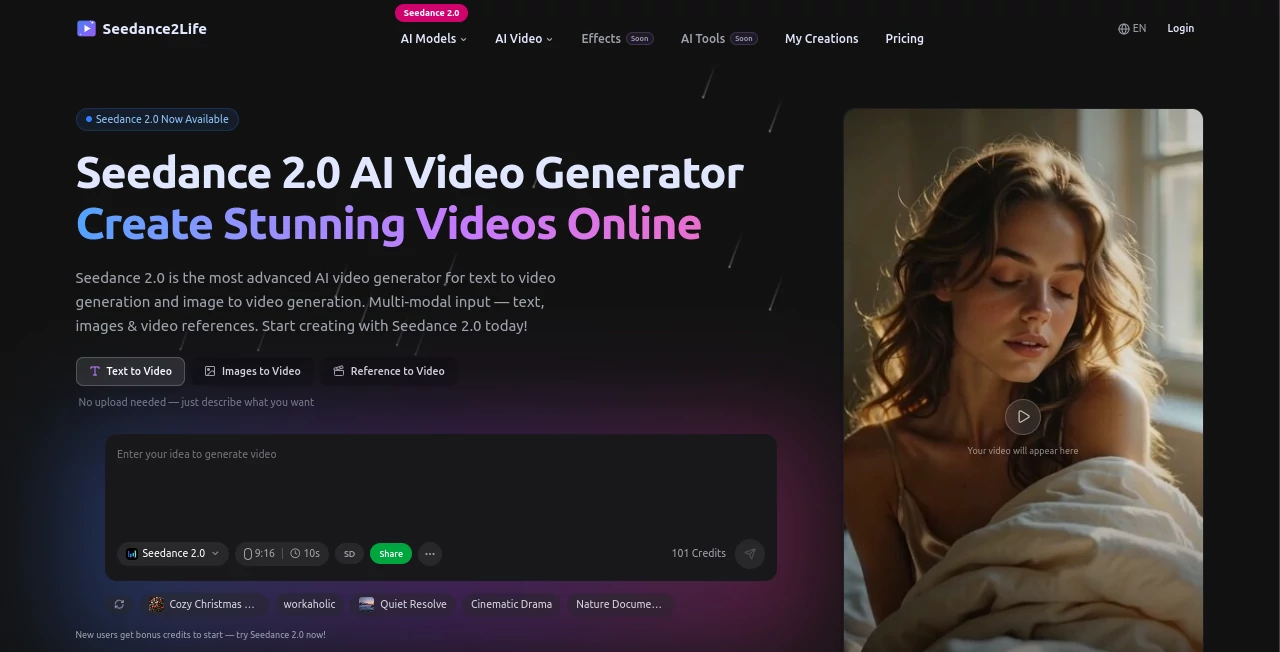
What is S2LIfe AI?
There’s something special about typing a scene and watching it come to life with real camera movement, consistent characters, and even synced audio that actually matches the mood. This tool delivers that experience in a way that still feels a little magical. You can start with just text, drop in reference images or short clips, add audio, and get back a polished, multi-shot video that feels directed rather than randomly generated. I’ve seen creators turn simple ideas into mini-films that look like they took days to produce, all in under a minute. The consistency and cinematic quality make it stand out in a crowded field.
Introduction
Most AI video tools still struggle with basic things like keeping a face the same across shots or making motion feel natural. Seedance 2 changes the conversation. Built as a true multi-modal system, it understands text, images, video clips, and audio together, letting you guide the output with director-level control. Whether you’re making a quick social ad, a story teaser, or testing a film concept, it produces results with smooth transitions, believable physics, and native sound that feels intentional. It’s become a favorite for people who want cinematic output without the traditional production headache—fast enough to spark ideas, strong enough to use in real projects.
Key Features
User Interface
The workspace is clean and intuitive. You have a generous prompt area, separate upload zones for images, video clips, and audio, plus simple controls for duration, aspect ratio, and style. Everything is laid out so you can combine multiple references without confusion. Previews load reasonably fast, letting you iterate quickly. It never feels overwhelming—even first-time users can create something watchable in minutes, while experienced creators appreciate the precise control options tucked neatly away.
Accuracy & Performance
Character consistency is excellent across shots, even with complex camera moves. Motion feels natural, lighting and shadows behave realistically, and audio sync (when provided) lands on point. Generation times stay practical for creative work, and the model handles multi-shot narratives without the usual jarring cuts or drifting details. It’s one of those tools where the output regularly surprises you with how coherent and film-like it looks on the first or second try.
Capabilities
It supports text-to-video, image-to-video, video reference, audio input for native sync, and full multi-modal combinations. You can guide camera movements, character actions, lighting, and scene transitions using natural language. Multi-shot storytelling, different aspect ratios, and strong reference control make it versatile for ads, short films, music videos, product reveals, and creative experiments. The results are cinematic enough to use in professional workflows while remaining fast enough for daily ideation.
Security & Privacy
Your prompts, reference files, and generated videos are handled with care. The platform focuses on secure processing without unnecessary data retention. For creators working with client material or personal projects, this respectful approach to privacy adds real confidence when experimenting with ideas.
Use Cases
A small brand creates a stylish product reveal video from one hero image and a short script. An indie filmmaker mocks up emotional scenes to test tone before full production. A musician generates a visualizer that syncs perfectly with their track. A social creator builds consistent character-driven Reels without daily filming. Teachers turn lesson concepts into engaging animated explainers. Wherever you need moving visuals that tell a story convincingly, this tool delivers with speed and quality.
Pros and Cons
Pros:
- Strong multi-shot coherence and cinematic camera work.
- Excellent character and style consistency across frames.
- Native audio sync when you provide reference sound.
- Hybrid control (text + image + video + audio) gives real creative power.
- Fast enough to support genuine iteration and experimentation.
Cons:
- Clip lengths are still best suited for short-form content.
- Very complex or contradictory prompts can occasionally need refinement.
- Higher resolutions and unlimited use require paid access.
Pricing Plans
Free daily credits let you test the quality and create several clips without commitment. Paid plans unlock higher resolutions, longer generations, faster queues, and unlimited creations. The pricing feels fair for the leap in output quality—many creators find it pays for itself quickly when replacing stock footage or short production work.
How to Use Seedance 2
Start with a clear prompt describing your scene and desired mood. Upload reference images for style or characters, short video clips for motion guidance, or audio for sync. Choose your aspect ratio and length, then generate. Review the preview, tweak the prompt or references if needed, and download. For longer stories, create individual shots and combine them in your editor. The workflow is fast and flexible enough to refine ideas in real time.
Comparison with Similar Tools
While many AI video generators still produce noticeable inconsistencies or unnatural motion, this one prioritizes cinematic flow, character stability, and multi-modal control. It feels closer to real directing than pure generation, especially when using references. The balance of quality, speed, and creative steering puts it ahead of most current alternatives for anyone who wants results that look intentionally made.
Conclusion
Turning ideas into moving pictures used to require time, equipment, or a team. This tool shrinks that gap dramatically while keeping the output at a level that feels cinematic and intentional. It doesn’t replace human creativity—it gives it wings. For creators, marketers, filmmakers, and storytellers who want to see their vision move quickly and convincingly, it’s one of the most exciting developments in AI video right now. The future of storytelling just got a lot more accessible.
Frequently Asked Questions (FAQ)
How long can videos be?
Best results come in 5–15 second clips; longer narratives work well by generating multiple connected shots.
Do I need reference files?
Text-only works great, but adding images, video, or audio dramatically improves consistency and control.
What resolutions are available?
Up to 1080p with strong detail; higher options on paid plans.
Can I use it for commercial projects?
Yes—paid plans include commercial rights for the generated content.
Is there a watermark on free generations?
Free clips may include a small watermark; paid generations are clean.
AI Animated Video , AI Image to Video , AI Video Generator , AI Text to Video .
These classifications represent its core capabilities and areas of application. For related tools, explore the linked categories above.
S2LIfe AI details
Pricing
- Free
Apps
- Web Tools
Categories

S2LIfe AI Alternatives Product

SocialRails

WonderShare …

Seedance 2 V…

Wan AI

Seedance 2.0

Seedance 2.0…

CinemaDrop

Veo4
SkyReels-V4
