🧠 AI Quiz
Think you really understand Artificial Intelligence?
Test yourself and see how well you know the world of AI.
Answer AI-related questions, compete with other users, and prove that
you’re among the best when it comes to AI knowledge.
Reach the top of our leaderboard.


















Seedance 2.0
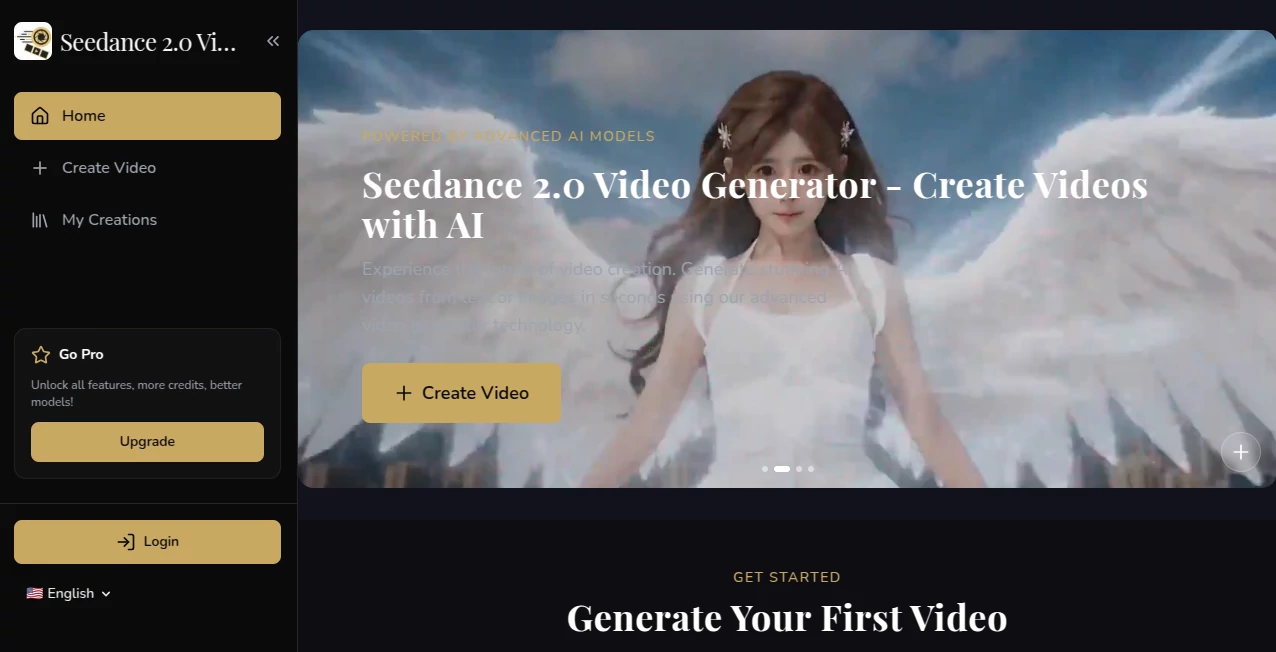
What is Seedance 2.0?
You sit down with a half-formed idea—maybe a quiet scene of someone walking through rain-lit streets, or a product slowly turning in golden light—and a few minutes later there's a short clip that actually looks directed. The motion has weight, the lighting feels motivated, the cuts breathe. It's one of those rare tools where the output makes you pause and watch again because it doesn't scream “AI made this”; it just quietly feels right. Friends I've shown it to keep asking “wait, you didn't shoot that?” and that's when you know the model is doing something special.
Introduction
Video is still the most demanding creative medium—story, timing, framing, color, sound, all have to align. Most AI generators throw frames together and call it done. This one takes a different path: it thinks about sequence, about how one shot leads to the next, about emotional continuity. Start with plain text, add a reference image or clip if you want tighter control, and get something that carries mood from beginning to end. Early users started posting their first attempts and the reactions were consistent: “this actually looks like a real short film.” For creators who want cinematic quality without a crew or a six-figure budget, that kind of result is quietly life-changing.
Key Features
User Interface
Everything is stripped down to what matters. A generous prompt field, an optional image upload, quick toggles for aspect ratio and duration, one big generate button. No labyrinth of settings. Previews arrive fast enough that you can adjust wording or reference strength and try again without losing momentum. It respects your time—beginners finish their first clip in under three minutes, seasoned creators appreciate how little gets in the way of iteration.
Accuracy & Performance
Characters stay the same person from wide to close-up. Lighting holds across cuts. Motion follows real-world rules—hair moves naturally, fabric catches air, objects interact believably. Generation times stay in the sweet spot: usually 30–90 seconds for short clips, so you're not left staring at a spinner while the idea cools off. When it misses, it's almost always because the prompt was ambiguous, not because the model hallucinated. That level of reliability lets you actually trust the output and focus on refining the story.
Capabilities
Text-to-video, image-to-video, hybrid guidance (combine both), multi-shot storytelling with smooth transitions, native support for dialogue sync, music-reactive visuals, and multiple aspect ratios (vertical, horizontal, square). It handles emotional beats, subtle camera language (push-ins, gentle pans, motivated zooms), and keeps visual identity intact across scenes. The hybrid mode in particular gives you director-like control: use a photo to lock in style or character, text to guide action and mood. The results often feel closer to short-film quality than typical AI clips.
Security & Privacy
Your prompts, images, and generated clips are processed temporarily—nothing is kept long-term or used for training unless you explicitly opt in. No mandatory account linking for basic use. For anyone working with client mockups, personal projects, or brand-sensitive content, that clean, contained approach is a genuine comfort.
Use Cases
A skincare founder turns one product still into a short serum-application spot that feels like real advertising. A musician makes a lyric video that actually follows the emotional curve of the track. A short-form creator builds consistent character Reels without reshooting every day. A filmmaker sketches pivotal story moments to test tone and pacing before full production. The common thread is speed married to quality—getting something watchable, shareable, and emotionally resonant without weeks of work.
Pros and Cons
Pros:
- Outstanding character and style consistency across shots—rare at this level.
- Cinematic motion and lighting choices that give real mood and flow.
- Hybrid (text + image) guidance for precise creative steering.
- Generation speed that actually supports experimentation and iteration.
Cons:
- Clip length still modest (5–10 seconds typical), though multi-shot workflows extend storytelling.
- Extremely abstract or conflicting prompts can confuse it (same as most models).
- Higher resolutions, longer clips, and priority queues require paid access.
Pricing Plans
Free daily credits give you meaningful access—no card needed to experience the quality. Paid plans unlock higher resolutions, longer durations, faster queues, and unlimited generations. The pricing feels balanced for the fidelity jump; many creators find that one month covers what they used to spend on stock footage or freelance editors for a single social campaign.
How to Use Seedance 2 Video
Start with a focused prompt describing the scene, mood, and any camera intent. Upload a reference image or short clip if you want stronger grounding (highly recommended for character or style consistency). Choose aspect ratio and duration, then generate. Review the preview—adjust wording, add more detail, or change reference strength—and regenerate if needed. Download or create variations. For longer narratives, generate individual shots and stitch in your editor. The loop is fast enough to refine several versions in one sitting.
Comparison with Similar Tools
Many models still produce visible drift, lighting jumps, or character changes between shots. This one prioritizes narrative coherence and cinematic intent, often delivering clips that feel closer to human-directed work. The hybrid input mode stands out—combining text, images, and sometimes audio gives creators more director-like control than most alternatives currently offer.
Conclusion
Video creation has always been expensive in time, money, or both. Tools like this quietly lower that barrier so more people can tell visual stories without compromise. It doesn't erase the need for taste or vision—it amplifies them. When the distance between an idea in your head and a watchable clip shrinks to minutes, something fundamental shifts. For anyone who thinks in motion, that's a quiet revolution worth experiencing.
Frequently Asked Questions (FAQ)
How long are generated clips?
Typically 5–10 seconds per generation; longer narratives come from combining multiple shots.
Do I need a reference image?
No—text-only works well—but adding one dramatically improves consistency.
What resolutions are available?
Up to 1080p on paid plans; free tier offers preview-quality.
Can I use outputs commercially?
Yes—paid plans include full commercial rights.
Watermark on free generations?
Small watermark on free clips; paid removes it completely.
AI Animated Video , AI Image to Video , AI Text to Video , AI Video Generator .
These classifications represent its core capabilities and areas of application. For related tools, explore the linked categories above.
Seedance 2.0 details
Pricing
- Free
Apps
- Web Tools
Categories

Seedance 2.0 Alternatives Product

Seedance 2.0…

Veo 3.2

HypeClip

VidiOne

Kling Motion

seedance2

Free Sora Ge…

Overlap

Vidmix