
🧠 AI Quiz
Think you really understand Artificial Intelligence?
Test yourself and see how well you know the world of AI.
Answer AI-related questions, compete with other users, and prove that
you’re among the best when it comes to AI knowledge.
Reach the top of our leaderboard.


















Seedance 2.5
What is Seedance 2.5?
There’s a special kind of excitement when you describe a scene in plain words and watch it come to life with real cinematic feel—smooth camera moves, consistent characters, and lighting that actually sets the mood. This tool captures that excitement better than most. You type a prompt, add a reference image if you want more control, and it returns short video clips that feel directed rather than randomly generated. I’ve shown these to fellow creators who usually roll their eyes at AI video, and their reaction is almost always the same: “Wait, that actually looks good.” It’s the kind of result that makes you want to keep experimenting because the output finally feels close to what you imagined.
Introduction
Making video is still hard. Even short clips demand planning, consistency, and a sense of rhythm that most AI tools struggle to deliver. Seedance 2.5 quietly raises the bar by focusing on cinematic quality: smoother motion, stronger scene continuity, and better adherence to your visual references. Whether you start with text alone or guide it with images (and even audio cues), the results show clear improvement in stability and storytelling flow. It’s especially useful for people who need quick but polished video drafts—ads, social content, product stories, or early previsualization. The tool doesn’t promise Hollywood overnight, but it gives you something watchable and shareable much faster than traditional methods, while keeping the creative spark intact.
Key Features
User Interface
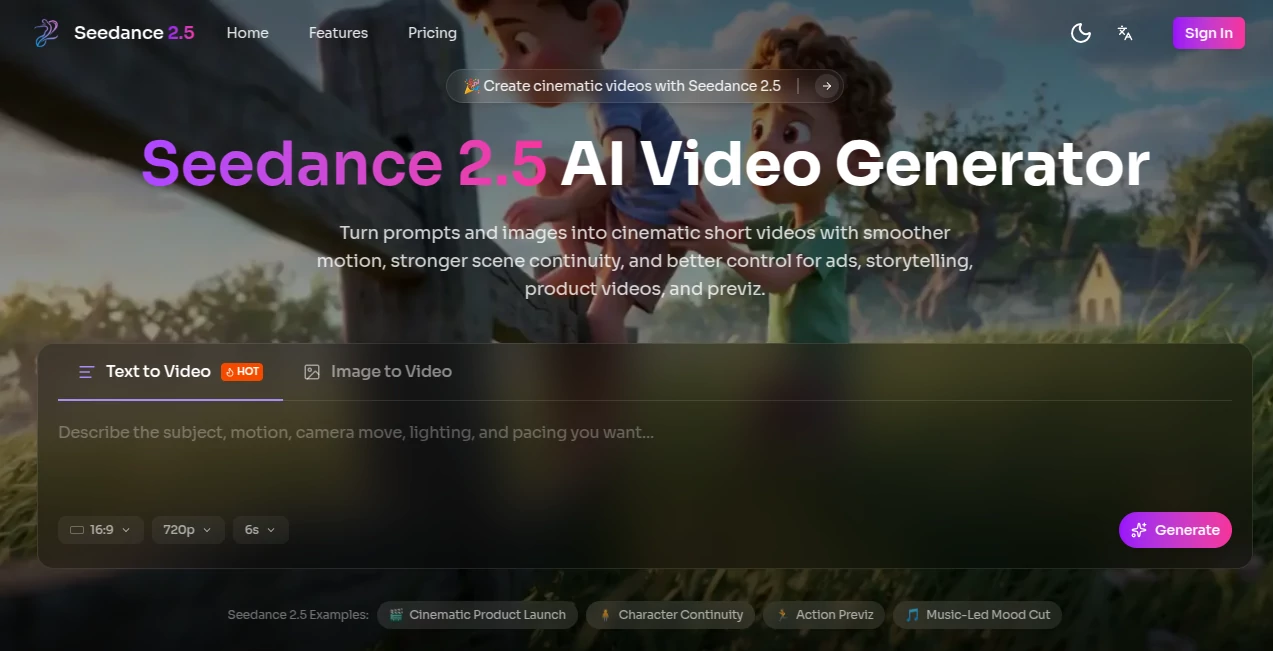
The workspace is clean and inviting. A prominent prompt box lets you describe your scene, with an easy upload area for reference images or clips. Simple settings for aspect ratio, duration, and generation mode sit nearby without clutter. Previews load reasonably fast, so you can tweak and regenerate without losing momentum. It feels designed by people who actually make things rather than just engineers—intuitive enough for beginners yet flexible for those who know what they want.
Accuracy & Performance
One of the standout qualities is how well it maintains consistency. Characters keep their look across shots, lighting stays coherent, and motion feels more natural with fewer glitches or flickering textures. It handles complex prompts involving camera movement and multiple elements better than many current tools. Generation times are practical for short clips, letting you iterate quickly instead of waiting endlessly. The improvement in “norm stability” (less broken textures or unstable faces) is noticeable, especially in demanding scenes.
Capabilities
It supports text-to-video, image-to-video, and hybrid multimodal inputs (text + image + audio cues + reference clips). You can create short cinematic sequences for ads, storytelling, product videos, or previsualization. Features like reference-driven generation help preserve costumes, style, and scene details across shots. It offers customizable aspect ratios and modes tailored for social clips, e-commerce, or concept reels. The focus on cleaner transitions and cinematic camera motion makes the output feel more like a directed piece than a random animation.
Security & Privacy
Your prompts and uploaded references are handled responsibly during generation. The platform emphasizes user control and doesn’t make a big deal out of storing your creative work long-term unless you choose to save outputs. For creators working on client projects or personal ideas, this respectful approach to data adds a welcome layer of comfort.
Use Cases
A small brand creates quick lifestyle product videos from a single hero shot, adding motion and mood without a full shoot. An indie musician generates concept visuals that sync with their track for teasers or lyric videos. A filmmaker uses it to test blocking and camera ideas before committing to expensive pre-production. Social creators build consistent character-driven Reels that stand out in the feed. Game developers prototype character or environment reels while keeping visual style locked in. It shines wherever you need fast, coherent video drafts that feel cinematic rather than experimental.
Pros and Cons
Pros:
- Strong focus on consistency and cinematic quality sets it apart from many AI video tools.
- Hybrid reference system (text + image + clips) gives meaningful creative control.
- Smoother motion and cleaner transitions make the clips more watchable and professional.
- Fast enough iteration to keep the creative process enjoyable.
Cons:
- Clip length is still best suited for short-form content (social, ads, teasers).
- Very abstract or highly complex scenes may need clearer prompting and multiple tries.
- Advanced features and higher usage likely require paid access.
Pricing Plans
The platform offers a free tier with daily generations so you can test the quality without commitment. Paid plans unlock higher limits, faster processing, better resolutions, and more advanced options. Pricing is positioned as accessible for creators who find real value in reliable cinematic output rather than experimental gimmicks.
How to Use Seedance 2.5
Start by writing a clear scene description in the prompt box—include subject, action, mood, and camera direction if you have something specific in mind. Upload a reference image or clip to guide style and consistency. Choose your aspect ratio and preferred generation mode (e.g., storytelling or product video). Hit generate, review the preview, and regenerate with small prompt tweaks if needed. Once satisfied, download the clip. For longer narratives, create multiple connected shots and stitch them together in your favorite editor. The workflow stays simple while giving you room to refine.
Comparison with Similar Tools
Many AI video generators still suffer from flickering, character drift, or unnatural motion. This one stands out by prioritizing continuity, reference control, and cinematic camera language. While some tools focus purely on length or raw spectacle, Seedance 2.5 aims for polished, usable short clips that feel closer to human-directed work. The hybrid input approach gives creators more precise steering than text-only or basic image-to-video alternatives.
Conclusion
Creating video that actually feels good to watch is still challenging, but tools like this are making it noticeably easier. It doesn’t pretend to replace directors or full production teams—it simply gives solo creators and small teams a faster, higher-quality way to bring ideas to life. When your prompt turns into a clip that makes you pause and smile, you remember why you started creating in the first place. For anyone who wants cinematic video without the usual headaches, this is a tool worth trying.
Frequently Asked Questions (FAQ)
How long are the generated videos?
Best suited for short clips (typically a few seconds to around 10 seconds), ideal for social media, ads, and concept testing. Longer stories can be built by combining multiple shots.
Do I need a reference image?
Not required—text prompts work well on their own—but adding an image or clip significantly improves consistency in characters, style, and scene details.
What kind of content works best?
It excels at storytelling, product videos, music visuals, previsualization, and short-form social content where mood and continuity matter.
Can I use the videos commercially?
Check the specific plan terms, but paid usage generally supports commercial projects.
Is there a free way to try it?
Yes, daily free generations are available so you can experience the quality before deciding on a paid plan.
AI Animated Video , AI Image to Video , AI Video Generator , AI Text to Video .
These classifications represent its core capabilities and areas of application. For related tools, explore the linked categories above.
Seedance 2.5 details
Pricing
- Free
Apps
- Web Tools
Categories

Seedance 2.5 Alternatives Product

HypeClip

Veo3 AI

WonderShare …

Seedance 2

Kling 3.0

hailuo03

Sora2 AI Vid…

Sora 2 AI

Seedance2 Vi…
