
🧠 AI Quiz
Think you really understand Artificial Intelligence?
Test yourself and see how well you know the world of AI.
Answer AI-related questions, compete with other users, and prove that
you’re among the best when it comes to AI knowledge.
Reach the top of our leaderboard.


















Seedance 2 AI Video Generator
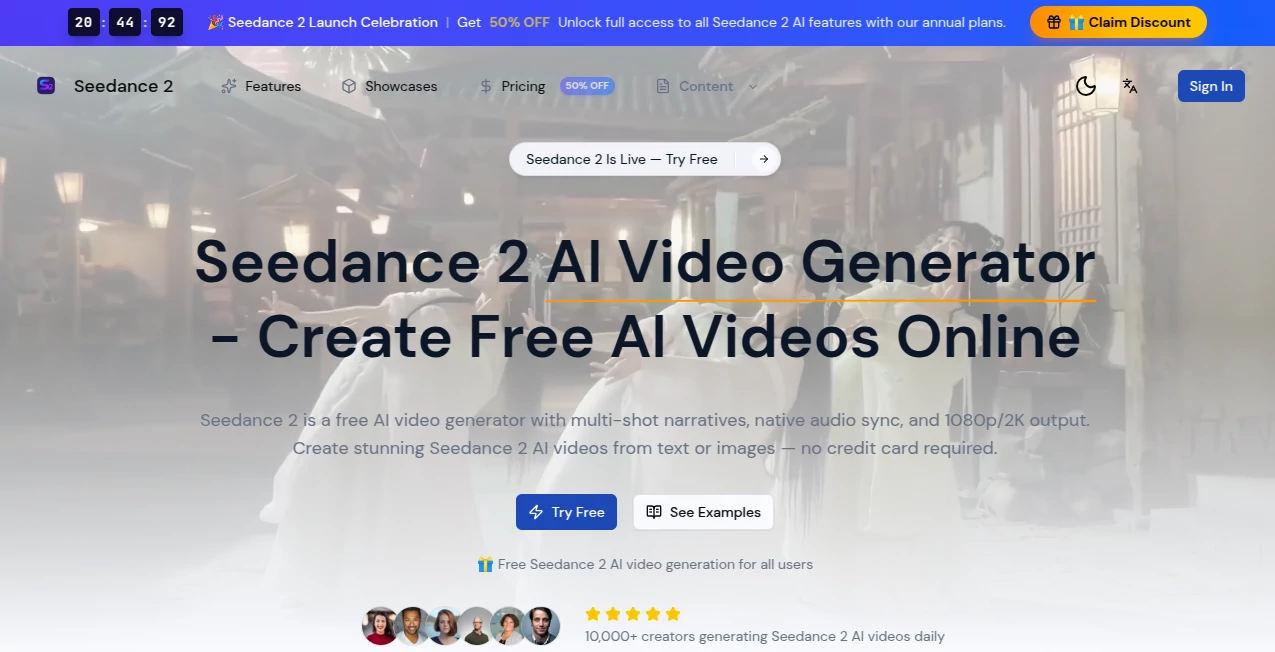
What is Seedance 2 AI Video Generator?
You type one sentence. Sixty seconds later a smooth, story-driven clip is playing—camera gliding through golden-hour streets, characters moving with real weight, lighting that actually feels cinematic. That moment still surprises me every time I see it happen. This isn’t another clip generator throwing random effects at your words; it’s closer to having a small, very talented film crew that listens carefully and executes fast. The jump in quality from earlier models is impossible to miss once you compare side by side.
Introduction
Most text-to-video tools still feel experimental—jerky motion, faces that morph, scenes that forget what happened two seconds ago. This one arrived and quietly raised the bar. It thinks in shots, not frames. It remembers character appearance across cuts. It understands basic film grammar: when to push in, when to pull back, how to let a moment breathe. People who’ve used it for client work say the same thing: “I finally stopped apologizing for AI footage.” Whether you’re mocking up a brand film, visualizing a music video concept, or just messing around on a Sunday afternoon, the output carries weight and intention that make it usable right away.
Key Features
User Interface
The screen is calm and focused. Big prompt box at the top, a few sensible toggles below (duration, aspect ratio, motion intensity), and a clean preview area that updates as you type refinements. No twenty sliders fighting for attention. Negative prompt field is right there when you need it, and style references can be dropped in with one click. It never feels like you’re configuring a spaceship—just talking to someone who already knows how to make movies.
Accuracy & Performance
Prompt adherence is unusually strong. Ask for “a lone samurai walking through cherry blossoms at dusk, slow dolly shot, contemplative mood” and you actually get that mood, that pacing, that lighting. Motion is coherent—hands don’t turn into claws mid-gesture, eyes stay focused. Generation times sit between 60–180 seconds depending on length and complexity, which feels fast when the result doesn’t need half an hour of fixes in post.
Capabilities
It handles up to 10-second clips natively (longer through stitching), supports image-to-video for style or character consistency, and understands camera language well enough that terms like “crane up,” “handheld tracking,” or “Dutch angle” actually influence the result. Multi-subject scenes stay stable. Lighting, depth of field, and color grade feel directed rather than accidental. For short narrative pieces, ads, lyric visuals, or concept teasers, it consistently delivers usable, often beautiful material.
Security & Privacy
Your prompts and generated clips remain private by default. No automatic sharing to feeds or galleries. Commercial use is explicitly allowed on paid plans, which matters if you’re delivering to clients. The team has been transparent about training data and safety filters, which builds confidence when working with brand-sensitive content.
Use Cases
A musician sketches a lyric video idea in one line and gets a moody visualizer that matches the tempo and tone. A startup founder creates a 10-second explainer teaser for pitch decks without hiring a motion designer. A content creator turns weekly story hooks into scroll-stopping intros that keep retention high. Small agencies use it to mock up client campaigns in hours instead of days. The speed-to-quality ratio makes it feel like cheating—in the best possible way.
Pros and Cons
Pros:
- Motion and character consistency far ahead of most competitors right now.
- Understands cinematic language, so direction actually works.
- Short generation times let you iterate quickly instead of waiting overnight.
- Commercial rights included on paid tiers—no nasty surprises later.
Cons:
- Maximum length still modest (10 s native), though stitching helps.
- Occasional minor artifacts in very fast or chaotic motion.
- Free tier is taste-only; serious use requires credits.
Pricing Plans
Free daily credits let you explore and fall in love with the quality. Paid plans start at a very approachable monthly rate and scale sensibly with credit bundles that suit freelancers, small teams, or heavier creators. Higher tiers bring faster queues, higher resolution options, and priority access to new model updates. It’s priced like a tool you’ll actually use every week, not a luxury experiment.
How to Use It
Log in, type (or paste) your prompt—be as descriptive as you like about camera, mood, lighting, pacing. Choose aspect ratio and duration. Optionally upload an image for style or character reference. Hit generate. While it renders, you can queue another idea. Once done, preview, download, or generate variations with small tweaks to the prompt. For longer pieces, create scenes separately and stitch in editing software. It rewards clear direction but forgives a lot even when you’re vague.
Comparison with Similar Tools
Many generators still struggle with coherence across shots or produce motion that feels floaty and artificial. This one stands apart because it treats the prompt like a director treats a script—there’s intention behind every move. Where others give you a nice still with some wobble, this delivers actual cinematic flow. For short narrative or branded content, it currently sits noticeably ahead of the pack in polish and reliability.
Conclusion
Video creation used to demand either deep pockets or deep patience. This tool carves out a third path: fast, cinematic, and genuinely creative without feeling gimmicky. It doesn’t replace human storytellers—it amplifies them. If you’ve ever wanted to see your ideas move with real emotion and craft, but didn’t have the time or budget for full production, this is the closest thing to magic I’ve seen in the space so far. Give it one honest prompt. You’ll probably smile at the result.
Frequently Asked Questions (FAQ)
How long can videos be?
Up to 10 seconds natively; longer clips are possible by generating scenes and stitching them.
Can I use my own image as reference?
Yes—upload for style transfer or character consistency.
What resolution do I get?
480p–1080p depending on plan; higher tiers unlock the best quality.
Is commercial use allowed?
Yes on paid plans; free tier is for personal / testing use.
How fast is generation?
Usually 60–180 seconds per clip, depending on length and queue.
AI Animated Video , AI Image to Video , AI Text to Video , AI Video Generator .
These classifications represent its core capabilities and areas of application. For related tools, explore the linked categories above.
Seedance 2 AI Video Generator details
Pricing
- Free
Apps
- Web Tools
Categories

Seedance 2 AI Video Generator Alternatives Product

UniVideo

Seedance AI …

ai seedance …
Video to GIF…

Kling Motion

Sora 2 Video

soro2

AudioVideoGe…

BananaFrame
