🧠 AI Quiz
Think you really understand Artificial Intelligence?
Test yourself and see how well you know the world of AI.
Answer AI-related questions, compete with other users, and prove that
you’re among the best when it comes to AI knowledge.
Reach the top of our leaderboard.


















Seedance 2.0
What is Seedance 2.0?
There’s something deeply satisfying about typing a single sentence and watching a full cinematic sequence unfold—smooth camera moves, perfect lighting, consistent characters, and actual emotional weight in the performances. This tool makes that moment feel almost too easy. You describe a scene, maybe drop in a reference image or audio, and seconds later you’re looking at footage that looks like it came from a real production set. I’ve seen creators go from “I wish I could show this idea” to posting polished clips that get real engagement, all in the time it takes to make coffee. That speed combined with genuine visual quality is what keeps pulling people back.
Introduction
Most video generators still feel like clever toys—fun for memes, but not something you’d trust with a serious story or brand message. This one quietly crossed that line. It understands narrative flow, keeps faces and outfits coherent across shots, handles complex prompts without falling apart, and delivers motion that actually feels directed rather than random. Creators who’ve used it for trailers, ads, social content, or even short films talk about the same thing: the first time they saw their own words turned into something cinematic, they felt a genuine “wait, this is actually good” moment. It’s not about replacing filmmakers; it’s about giving anyone the ability to visualize ideas at a level that used to require big budgets and big teams.
Key Features
User Interface
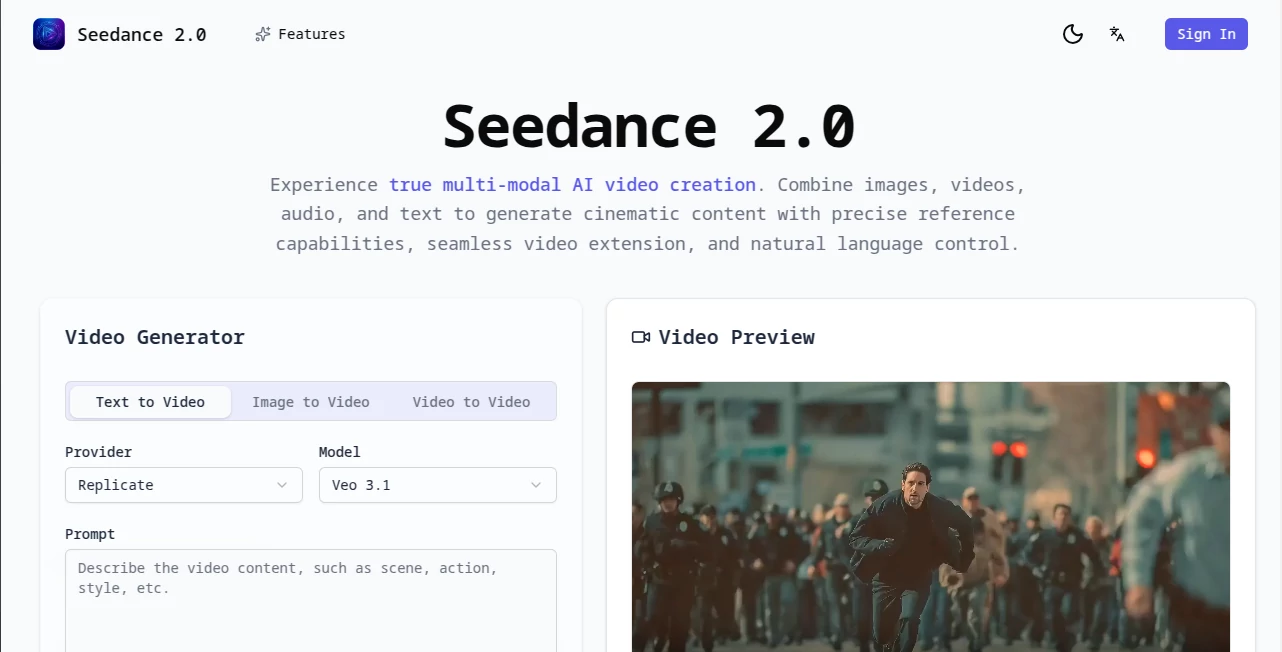
The layout is clean and focused. You type (or paste) your prompt, optionally attach an image or audio reference, choose aspect ratio and style strength, then hit generate. Previews load quickly enough that you can iterate fast. There’s no visual overload—just the tools you actually need, right where your eyes naturally go. It respects your time.
Accuracy & Performance
Character consistency is unusually strong here—even across multiple shots with different angles and lighting. Motion feels intentional rather than jittery, camera work follows real cinematic grammar, and the overall coherence holds up surprisingly well on longer generations. Speed is impressive too; complex scenes often finish faster than you expect. The model clearly understands both visual style and storytelling logic, which is rare.
Capabilities
It handles text-to-video, image-to-video, video extension, and even audio-driven animation. You can guide style with reference images, control camera movement with plain language, generate up to 10 seconds natively (and extend further), and produce at resolutions suitable for social, ads, or even lightweight film work. The ability to maintain subject identity while changing scenes or moods is where it really stands out.
Security & Privacy
Your prompts, references, and generated clips stay private. No automatic sharing, no public gallery unless you choose it. For creators working on client projects, personal stories, or brand content, that matters. The system is built with responsible use in mind from the ground up.
Use Cases
A musician visualizes a lyric video with consistent character appearances across changing environments. A marketer creates product teasers that feel like mini-movies instead of static slideshows. An indie filmmaker mocks up key emotional beats before shooting the real thing. A content creator turns weekly story ideas into short narrative hooks that stop scrolls. The range is wide because the output quality is high enough to use seriously.
Pros and Cons
Pros:
- Exceptional character and style consistency across shots.
- Cinematic camera language and motion that feels directed.
- Fast enough to iterate creatively without losing momentum.
- Reference control (image + audio) gives precise creative direction.
Cons:
- Longer than ~10-second generations require extension (which is excellent, but still an extra step).
- Very abstract or contradictory prompts can occasionally confuse it (like most models).
Pricing Plans
It offers a generous free tier so anyone can experience the quality firsthand. Paid plans unlock higher resolutions, faster queues, longer clips, more concurrent generations, and watermark removal. Pricing feels fair for the leap in quality and speed—many creators say they recoup the cost after just one good video that lands well.
How to Use Seedance 2 Video
Type a clear, vivid prompt describing the scene, action, camera movement, and mood. Optionally upload a character reference image and/or audio for lip-sync or beat-matching. Choose aspect ratio and how strongly to follow the reference. Generate, review the preview, tweak prompt or settings if needed, then render. Download or extend the clip for longer sequences. The loop is fast and forgiving—small wording changes often make big differences.
Comparison with Similar Tools
Many video models still struggle with character consistency or produce floaty, unrealistic motion. This one delivers noticeably better coherence, more cinematic framing, and stronger reference following. It’s less about raw length and more about usable, high-quality storytelling in short form—which is exactly what most creators need right now.
Conclusion
Turning ideas into moving pictures used to mean months of work or big budgets. Now it can happen in minutes with results that genuinely surprise people. This tool doesn’t just generate video—it gives storytellers the ability to visualize exactly what’s in their head, fast enough to keep the creative fire alive. If you’ve ever wanted to see your words move with real cinematic feeling, this is one of the most exciting steps forward in a long time.
Frequently Asked Questions (FAQ)
How long can clips be?
Up to 10 seconds natively, with excellent extension tools for longer sequences.
Does it keep characters consistent?
Yes—one of its strongest points. Faces, outfits, and style hold up across shots.
Can I use my own audio?
Absolutely—upload tracks for beat-sync or lip-sync guidance.
What resolutions are available?
Up to high-quality 1080p depending on plan; great for social and web.
Is there a free way to try it?
Yes—generous free access lets you feel the quality before upgrading.
AI Animated Video , AI Image to Video , AI Text to Video , AI Video Generator .
These classifications represent its core capabilities and areas of application. For related tools, explore the linked categories above.
Seedance 2.0 details
Pricing
- Free
Apps
- Web Tools
Categories

Seedance 2.0 Alternatives Product

Seedance Art

Seedance 2.0

Seedance 2.0…

Sora 2 AI
hailuo03
Seedance 2.0

Sora by Open…

ReelsBuilder…

MuseCraft.AI