
🧠 AI Quiz
Think you really understand Artificial Intelligence?
Test yourself and see how well you know the world of AI.
Answer AI-related questions, compete with other users, and prove that
you’re among the best when it comes to AI knowledge.
Reach the top of our leaderboard.


















Slab Wise

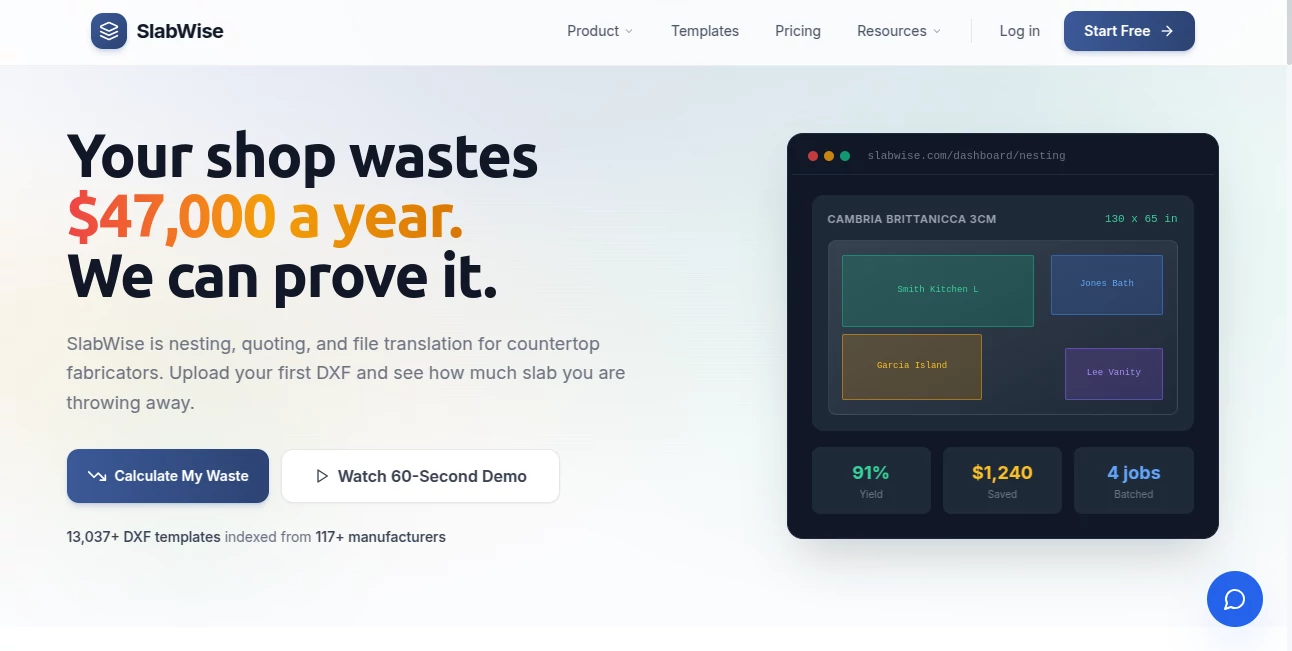
What is Slab Wise?
There’s a moment in every kitchen or bath project when the client sees “their” slab in the actual space and suddenly the decision feels effortless. That’s the quiet power this tool unlocks. Upload a photo of the room, select a stone from thousands of real slabs, and watch it wrap realistically onto counters, islands, backsplashes—complete with accurate reflections, shadows, and edge profiles. I’ve seen designers go from endless back-and-forth with samples to closing the sale in one confident presentation. It turns “let me show you some options” into “here’s exactly what your kitchen will look like”—and clients love it.
Introduction
Choosing stone is emotional and expensive. Clients want to visualize the final look without committing to samples that might not match under their lighting. Traditional renderings take time and money; stock photos never quite fit. This platform bridges that gap beautifully. It uses real slab imagery from leading quarries and fabricators, applies AI-driven perspective matching and material-aware rendering, and delivers photorealistic previews in seconds. What began as a way to help fabricators close more jobs has become indispensable for designers, remodelers, and showrooms who want to give clients certainty and speed. The results are so convincing that people often ask, “Did you actually install it already?” That’s when you know the tool is doing something special.
Key Features
User Interface
The workspace feels modern and focused: drag in a room photo (or shoot one with your phone), select from a vast library of real slabs organized by type and color family, and watch it apply instantly. Edge profiles, thickness, veining direction, and lighting adjustments are just a click away. Before/after split views and zoom tools make comparisons effortless. It’s intuitive enough for a quick client demo on a tablet, yet precise enough for professional proposals.
Accuracy & Performance
It reads perspective, scale, and lighting in the source photo remarkably well—counters don’t float, veining follows realistic flow, reflections match the room’s environment. Slabs are photographed under controlled conditions, so color and pattern fidelity is high. Rendering happens in seconds, even on mobile, and the output looks consistent across devices. The realism comes from material-specific AI models that understand how granite, quartz, marble, and quartzite behave under different lights and angles.
Capabilities
Supports kitchens, bathrooms, fireplaces, bar tops, wall cladding—any flat or simple surface. Choose from thousands of real slabs (updated regularly by partnered suppliers), customize edge profiles (eased, mitered, ogee, etc.), adjust thickness, flip veining direction, and tweak lighting to match time-of-day or room ambiance. Export high-res images or 360° interactive views for proposals. It also offers side-by-side comparisons so clients can see multiple options in the same space without reshooting.
Security & Privacy
Room photos are processed temporarily and never stored on servers after your session unless you explicitly save the project. No account is required for one-off use, and paid plans give you private project storage with end-to-end encryption. For showrooms and designers handling client homes, that discretion is a big deal—no risk of images leaking or being reused.
Use Cases
A kitchen designer photographs a client’s existing space, tries five different marbles in minutes, and the client picks their favorite on the spot—no waiting for samples or mock-ups. A stone fabricator shows homeowners realistic previews during the first consultation, closing more sales because doubt disappears. A remodeler tests quartz vs granite vs porcelain in the same bathroom photo, helping the client make a confident choice without multiple showroom trips. It turns indecision into decisions and uncertainty into excitement.
Pros and Cons
Pros:
- Photorealistic previews that look like real installations, not renders.
- Huge, constantly updated library of actual slabs from real suppliers.
- Fast enough for live client meetings on a tablet or phone.
- Accurate edge profiles, thickness, and veining direction control.
- Privacy-first approach—no permanent storage of client photos by default.
Cons:
- Very complex rooms (lots of cabinets, angles, reflections) may need minor manual cleanup.
- Full commercial use and unlimited projects require a paid plan.
- Requires decent room photos for best results (blurry or poorly lit shots reduce accuracy).
Pricing Plans
Free tier lets you experiment with basic slabs and low-res previews—enough to feel the power. Paid plans unlock the full slab library, high-res exports, commercial licensing, unlimited projects, and priority processing. Pricing is reasonable for the time and sales it saves—many fabricators and designers say it pays for itself after closing just one extra job.
How to Use Slabwise
Upload a clear photo of the countertop area (good lighting helps). Select a stone from the library or search by color/type. Adjust edge style, thickness, and veining direction. Tweak lighting and perspective if needed. Preview the result, compare multiple stones side-by-side, then download high-res images or interactive views for the client. For repeat clients, save the room template to swap stones instantly on future visits. The whole process can take under five minutes once you’re familiar.
Comparison with Similar Tools
Many visualizers rely on generic 3D models or limited stock materials, leading to results that feel “close but not quite.” This one uses real photographed slabs and advanced AI perspective matching, so the final preview looks far more like the actual installed stone. Speed, library size, and ease of use put it ahead of most competitors—especially for fabricators and designers who need fast, trustworthy client presentations.
Conclusion
Choosing stone is one of the most emotional decisions in a remodel or new build. When clients can see their dream slab in their actual space—accurately, beautifully, instantly—hesitation melts away. This tool turns uncertainty into confidence, indecision into decisions, and consultations into closed sales. For anyone selling, specifying, or living with stone, it’s not just a visualizer—it’s a trust-builder that quietly makes every project feel more certain and more exciting.
Frequently Asked Questions (FAQ)
How realistic are the previews?
Very—real slab photos + AI perspective matching make it look like a real installation in most cases.
Do I need perfect lighting in my room photo?
Good natural light helps, but the tool adjusts intelligently; very dark shots may need a retake.
Can I use this for client presentations?
Yes—high-res exports and interactive views are perfect for proposals and showroom demos.
What types of stone are available?
Thousands of real slabs—granite, marble, quartz, quartzite, porcelain, and more—updated regularly.
Is my client’s photo safe?
Yes—processed temporarily and deleted after your session unless you save the project.
Photo & Image Editor , AI Design Generator , AI Image to Image , AI Interior & Room Design .
These classifications represent its core capabilities and areas of application. For related tools, explore the linked categories above.
Slab Wise details
This tool is no longer available on submitaitools.org; find alternatives on Alternative to Slab Wise.
Pricing
- Free
Apps
- Web Tools
Categories

Slab Wise Alternatives Product

GTA AI

picremake

Lensgo

string art g…

Banana 2

CozAIPhoto

gpt image

ChatGPT Imag…

Better Image
