
🧠 AI Quiz
Think you really understand Artificial Intelligence?
Test yourself and see how well you know the world of AI.
Answer AI-related questions, compete with other users, and prove that
you’re among the best when it comes to AI knowledge.
Reach the top of our leaderboard.


















sleek.design
Design Mobile Apps in Minutes

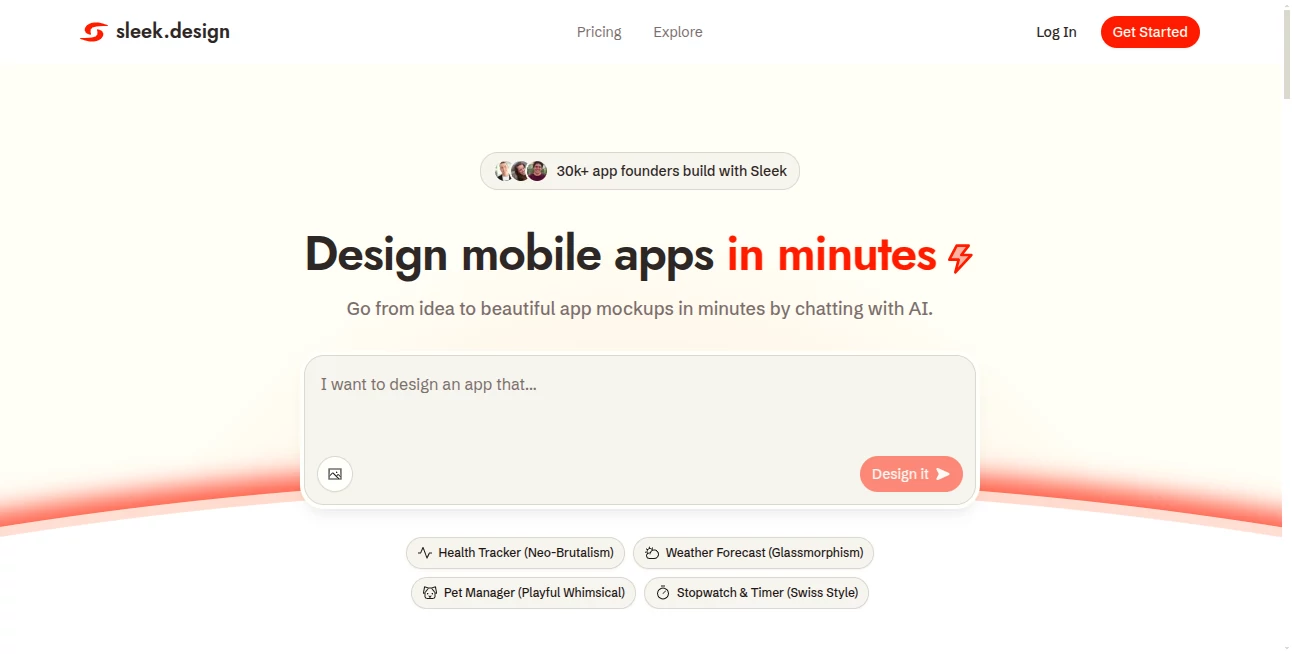
What is sleek.design?
Sleek opens the door to app creation for anyone with a spark of an idea, letting you chat your way to polished mockups that capture the essence of your vision. This platform feels like having a design whiz on speed dial, turning vague notions into screens that look ready for the store shelf. Folks who've dipped in often come away buzzing about how it cuts through the usual roadblocks, handing over control to dreamers who never picked up a stylus.
Introduction
Sleek sprang up from the frustrations of builders who'd stare at blank canvases, wishing for a shortcut past the endless tutorials and tool overloads. It hit the ground running a short while back, drawing in a crowd of solo starters and team leads who shared stories of prototypes that wowed backers in days, not drawn-out months. What started as a quiet experiment has grown into a haven for over thirty thousand creators, each one tweaking templates or tweaking AI chats to birth apps that feel personal yet pro. At its heart, it's about reclaiming the joy in making, where the focus shifts from fiddly fixes to the thrill of seeing your brainwave take shape on a screen.
Key Features
User Interface
The layout greets you with a welcoming chat bubble that invites your first idea, flowing into a visual playground where screens stack like storyboards waiting for your touch. Drag to rearrange, tap to tweak colors or layouts, and everything updates on the spot without a lag or a lecture—it's like sketching on glass that guesses your next stroke. Even on a phone, the pieces fit snug, keeping the magic mobile for those brainstorming on the go.
Accuracy & Performance
When you spill a rough sketch of screens or moods, it mirrors back something that nails the intent, blending elements with a finesse that surprises even picky eyes. Turnarounds feel snappy, often wrapping a full set in under five minutes, so your momentum doesn't miss a beat. Users nod at how it dodges the off-kilter outputs that kill the vibe, delivering drafts that hold up under real scrutiny right from the jump.
Capabilities
From spinning fitness trackers with goal charts to meditation flows that soothe the scroll, it crafts a range of ready starters you can bend to your will, layering in custom icons or text that ties back to your tale. Chat deeper for refinements, like swapping a button's glow or easing a transition's pace, and it all exports clean to spots where code or collab picks up the thread. The real charm lies in that seamless shift from words to wireframes, opening doors to apps that feel alive from the first glance.
Security & Privacy
Your early sketches stay tucked away in private sessions, with no automatic shares or lingering logs unless you hit send. It handles the basics like encrypted handoffs for exports, giving you the reins on who peeks at your progress. That understated care lets you experiment freely, knowing half-baked builds won't bounce into the wrong inbox by mistake.
Use Cases
Solo starters mock up calorie counters that track bites and burns, testing tweaks with friends before the first line of code drops. Startup crews whip wellness journals, complete with serene screens that seal investor nods. Freelance fixers prototype timers for busy days, blending minimalist dials with daily digs. Even educators sketch learning loops, turning dry lessons into swipeable stories that stick with students.
Pros and Cons
Pros:
- Shrinks design drags from weeks to whim, freeing focus for the fun.
- Welcomes word-weavers without a design degree in sight.
- Templates tempt with tried paths, yet twist easy to your tune.
- Exports bridge to builders, smoothing the handoff to hackers.
Cons:
- Shines on starters; deep custom dives might need extra elbow.
- Chat quirks can chase clarity on fuzzy first asks.
- No offline mode, so spotty signals snag the spark.
Pricing Plans
It eases in with a free flight that covers core chats and a handful of hands-on tweaks, perfect for poking around prototypes. From there, plans likely ladder up to unlock unlimited undos or team shares, though the entry stays light to match the maker's mood. That flexible footing keeps the barrier low, letting you scale as your app ambitions grow without a sudden sticker shock.
How to Use Sleek
Dive in by signing up swift, then fire off a chat with your app's heartbeat—like "a cozy sleep log with moonlit moods." Watch screens sprout, swap a template if it sings, and nudge bits with drags or drops till it hums right. Preview on mock devices, then snag the files for Figma or code, carrying your creation forward one seamless step at a time.
Comparison with Similar Tools
Where hefty editors like Figma flood you with features that feel like a firehose, Sleek sips simple, trading toolkits for talk that suits the uninitiated—though those might muster more for the meticulous mapper. Against freelance finds, it skips the schedules and spends, but could bow to bespoke brushes for one-of-a-kind quirks. It fits folks craving quick quartz over quarried depths, blending breeze with bite.
Conclusion
Sleek wraps the whirlwind of app dreaming into a whisper of effort, handing builders a bridge from brainstorm to breakthrough. It turns the solo sigh into a shared spark, proving that polished panes needn't pinch the pocket or the patience. As more makers chase mobile magic, this one's poised to keep the conversation flowing, one clever chat at a time.
Frequently Asked Questions (FAQ)
Do I need design chops to chat up creations?
Not a whit—plain words paint the picture, with AI filling the frames.
What app flavors can it flavor up?
From fitness flows to calm counters, it covers common cravings with custom kicks.
How fast to first mockup?
Minutes from murmur to mock, with tweaks that trim the time.
Exports to my editor of choice?
Slides into Figma or code crates, ready for the next nudge.
Team tweaks on the same thread?
Higher hops open shared spaces for group grooves.
AI App Builder , AI Design Generator , AI Design Assistant , AI Website Designer .
These classifications represent its core capabilities and areas of application. For related tools, explore the linked categories above.
sleek.design details
This tool is no longer available on submitaitools.org; find alternatives on Alternative to sleek.design.
Pricing
- Free
Apps
- Web Tools
Categories

sleek.design Alternatives Product

Square Image

Consistent C…

PicLumen AI …

Image Text E…

Free AI Kiss…

ShipAhead

Tate-A-Tate

Lovable APP

Touchpoint
