
🧠 AI Quiz
Think you really understand Artificial Intelligence?
Test yourself and see how well you know the world of AI.
Answer AI-related questions, compete with other users, and prove that
you’re among the best when it comes to AI knowledge.
Reach the top of our leaderboard.


















Sprite Studio

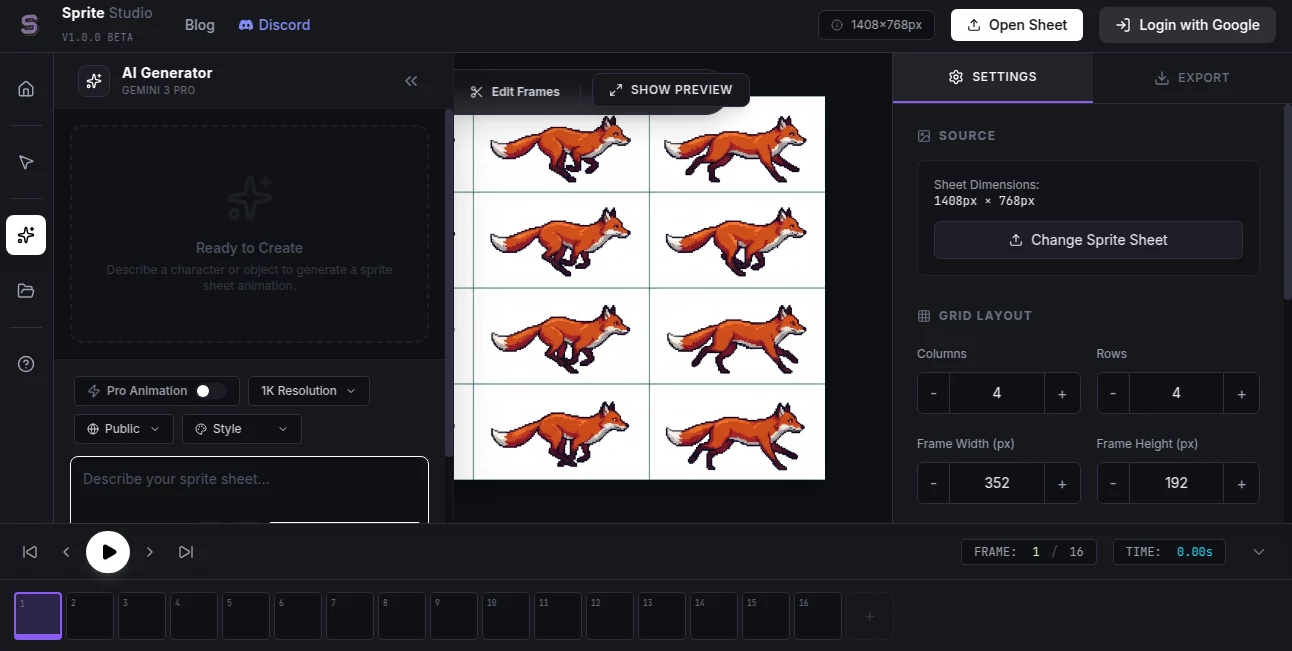
What is Sprite Studio?
Pixel art has this special charm—clean lines, bold colors, instant nostalgia—but making sprites and smooth animations by hand takes patience most people simply don’t have. This tool changes that equation. You describe what you want (or upload a rough sketch), choose a style, and seconds later you get a crisp sprite sheet or a ready-to-use animation loop that looks like it came from a seasoned pixel artist. I’ve seen solo game devs go from “I’ll just use placeholders” to having a full character set with idle, run, jump, and attack cycles in one afternoon. The results feel hand-crafted, not machine-stamped, and that’s what keeps people hooked.
Introduction
Retro and pixel-art games are everywhere, but creating assets at that level is still a time sink. Traditional tools demand pixel-by-pixel precision; most AI generators spit out blurry or inconsistent results. This platform bridges the gap beautifully. It understands pixel-art conventions—limited palettes, crisp edges, consistent proportions—and delivers sprites and animations that slot straight into Godot, Unity, GameMaker, or any engine. Indie creators, hobbyists, and even small studios are using it to prototype faster, iterate more freely, and ship games that look polished without burning out on asset creation. It’s the kind of tool that makes you wonder why it didn’t exist sooner.
Key Features
User Interface
The workspace is clean and focused: a prominent prompt box, style presets (classic 8-bit, 16-bit, modern pixel, isometric, etc.), resolution and frame-count selectors, and a generate button that’s impossible to miss. Previews load quickly so you can tweak wording or style on the fly. The sprite-sheet view and animation timeline appear automatically—everything is visual and intuitive. It never feels like you’re wrestling with software; it just helps you get the sprite you pictured in your head.
Accuracy & Performance
It nails pixel-perfect edges—no blurry anti-aliasing creeping in, no floating pixels. Color palettes stay coherent and limited unless you ask for more. Character proportions and anatomy hold up even in dynamic poses. Generations are fast (5–20 seconds depending on complexity), and batch mode on paid plans lets you crank out multiple variations or entire sprite sets without waiting around. Consistency across frames and directions is one of its strongest points—run cycles actually look like the character is moving naturally.
Capabilities
Text-to-sprite, image-to-sprite refinement, full animation generation (idle, walk, run, attack, jump, etc.), multi-angle sheets (front, side, back, isometric), palette swapping, frame interpolation for smooth loops, transparent PNG export, and sprite-sheet packing. It handles characters, enemies, items, tiles, UI elements, and even simple effects. Styles range from NES-era chunky to HD pixel art. You can guide with reference images for stronger consistency or start from scratch with descriptive prompts.
Security & Privacy
Uploads and generated assets are processed ephemerally—nothing is stored long-term unless you explicitly save to your account. No mandatory sign-up for basic generations. For indie devs working on unreleased projects or client assets, that clean, no-retention approach is a real comfort.
Use Cases
A solo developer needs a full character set for a platformer—writes “cute fox adventurer, 16-bit style, run cycle, 8 directions” and gets a usable sprite sheet in minutes instead of days. An itch.io creator prototypes enemy designs rapidly, testing what feels fun in-engine before committing to hand-drawing. A retro-style YouTuber generates animated overlays and characters for videos that match their aesthetic perfectly. A game jam team turns quick ideas into polished assets overnight to meet a deadline. Wherever pixel-art speed and quality matter, it quietly saves enormous time.
Pros and Cons
Pros:
- Pixel-perfect results—no blur, no stray pixels, looks genuinely hand-crafted.
- Animation generation with smooth, natural loops—rare for AI tools.
- Multiple angles and consistent style across entire sprite sheets.
- Fast enough to support real iteration during design sprints.
- Free tier is usable—good for prototyping and small projects.
Cons:
- Very complex multi-character scenes or extreme poses can occasionally need prompt tweaks.
- Higher resolutions and batch processing live behind paid plans.
- Limited palette control compared to dedicated pixel-art software.
Pricing Plans
Free tier gives several high-quality generations per day—enough to build a small character set or test concepts. Paid plans unlock unlimited generations, higher resolutions, batch mode, priority queue, and commercial-use rights without attribution. Pricing is modest—many indie devs say one month costs less than hiring a freelance pixel artist for a single character.
How to Use Sprite Studio
Go to the generator page, type a clear description (“pixel art knight, 32×32, idle animation, 4 frames, metallic armor, side view”). Optionally upload a reference sketch or color palette. Select style, resolution, frame count, and angle(s). Hit generate—watch previews appear. Tweak prompt or settings if needed, then download the sprite sheet or individual frames as PNG. For animations, export as GIF or sprite sheet with timing data. Iterate until it feels right—usually takes 2–3 tries at most.
Comparison with Similar Tools
Many AI image generators produce “pixel art” that’s actually blurry or inconsistent when scaled down. This one is tuned specifically for sprite workflows—clean edges, proper proportions, animation-ready frames. Where others give single static images, this delivers full sheets and loops. It sits in a sweet spot: more reliable and game-ready than general-purpose AI, more automated than manual pixel tools.
Conclusion
Pixel art is timeless, but creating it shouldn’t take forever. This tool opens the door for anyone who has ideas but limited time or drawing skill. It turns “I wish I could make sprites” into “here’s my character set, ready for engine.” For indie devs, game jammers, YouTubers, and hobbyists, that speed and quality unlock projects that would otherwise stay in the sketch phase. When your game starts feeling real because the visuals finally match the vision, that’s when the fun really begins.
Frequently Asked Questions (FAQ)
How many frames can animations have?
Typically 4–12 frames per animation—enough for smooth idle, walk, attack cycles.
Do I need to draw perfect keyframes?
No—rough sketches or even text prompts work; the AI fills gaps intelligently.
Can I use these commercially?
Yes—paid plans grant full commercial rights; free tier allows personal & non-commercial use.
What resolutions are supported?
Common pixel sizes (16×16, 32×32, 64×64, etc.) up to higher-res for modern pixel art; paid unlocks more.
Does it support multi-directional sheets?
Yes—generate front, side, back, isometric, or custom angles in one go.
AI Game , Photo & Image Editor , AI Design Generator , AI Image to Image .
These classifications represent its core capabilities and areas of application. For related tools, explore the linked categories above.
Sprite Studio details
This tool is no longer available on submitaitools.org; find alternatives on Alternative to Sprite Studio.
Pricing
- Free
Apps
- Web Tools
Categories

Sprite Studio Alternatives Product

AI Image Enh…

square face …

AI Thumbnail…

Beard Remover

Sora Waterma…

Consistent C…

FaceTo3D

Card Maker AI

LongCat Image
