
🧠 AI Quiz
Think you really understand Artificial Intelligence?
Test yourself and see how well you know the world of AI.
Answer AI-related questions, compete with other users, and prove that
you’re among the best when it comes to AI knowledge.
Reach the top of our leaderboard.


















SurgePix
What is SurgePix?
There are days when you have a clear vision in your head—a poster for an event, a clean product visual for your online store, or an eye-catching slide for a presentation—but turning that idea into something polished feels like it will take forever. SurgePix steps in and makes that process feel almost effortless. You describe what you want in plain words, and the AI not only generates the visual but also lets you refine it through natural conversation, all while working with smart, editable layers. I’ve seen marketers go from a rough concept scribbled on a napkin to a broadcast-ready graphic in under twenty minutes. It’s the kind of tool that makes you wonder how you ever managed without it.
Introduction
Most AI image generators stop at the first pretty picture. This one keeps going. It combines powerful text-to-image creation with a layer-based editor that feels surprisingly close to working in professional design software, except you talk to it instead of hunting for tools. Whether you’re a designer under deadline, a marketer needing fresh assets, or a storyteller building visual narratives, it adapts to your workflow. The Planner Agent figures out the best way to approach your idea, the Design Agent turns it into pixels, and then the real magic happens: you can chat to tweak colors, move elements, or change the mood without starting over. It’s built for people who create visuals for a living—or just want them to look good—without the usual frustration.
Key Features
User Interface
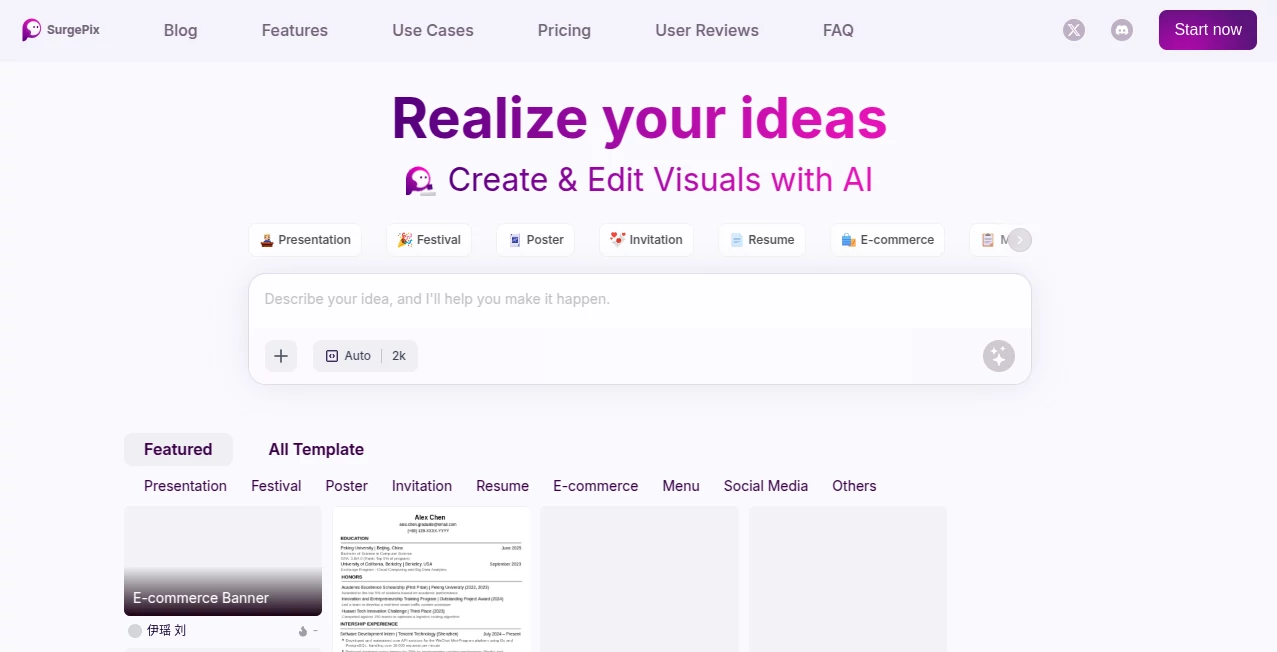
The workspace feels clean and inviting. You start with a prompt box that welcomes your ideas, and as soon as the image appears, smart layer separation kicks in automatically, isolating subjects, backgrounds, and text in one click. From there, editing happens through simple conversation—“make the background warmer” or “move the text lower and make it bolder.” No dense menus or hidden panels. Everything stays visible and responsive, so you stay in the creative zone rather than fighting the software.
Accuracy & Performance
The latest AI models deliver sharp, coherent results even on complex requests. The Planner Agent thinks ahead, breaking down ambitious ideas into logical steps so the final output matches what you actually meant. Generations are fast, and the layer system keeps everything organized and editable without quality loss. In practice, it handles everything from subtle product mockups to bold festival posters with impressive consistency and detail.
Capabilities
You can generate from text, refine existing images, or use reference photos for guided creation. The conversational editor lets you make precise changes—“change the dress to deep red” or “add soft lighting from the left”—and the layers make it easy to adjust individual parts without affecting the rest. It shines for presentations, social media graphics, e-commerce visuals, invitations, posters, and even long-form infographics that combine data with storytelling. High-resolution output and multiple export formats mean your visuals are ready for any use case, from print to digital.
Security & Privacy
Your projects stay under your control. The platform focuses on delivering the tools you need without unnecessary data collection or sharing. For freelancers and teams handling client work, that respectful approach to privacy builds confidence—you can experiment freely knowing your ideas aren’t being stored or repurposed without permission.
Use Cases
A small e-commerce brand uses it to create consistent product visuals and promotional banners that feel on-brand without hiring a designer for every launch. A content creator builds engaging social media graphics and short video overlays in minutes. An event planner designs beautiful invitations and posters that capture the right atmosphere. A marketer turns dry data into compelling infographics that actually get read. It’s especially powerful when you need to move fast but still want the work to look thoughtful and professional.
Pros and Cons
Pros:
- Conversational editing feels natural and saves huge amounts of time.
- Smart layer separation turns generated images into truly editable designs.
- Strong planning agent helps complex ideas come together coherently.
- High-quality output suitable for both casual and professional use.
- Unlimited projects across plans give you room to experiment.
Cons:
- Learning the best prompting style takes a short adjustment period.
- Very intricate or highly specific artistic visions may still need a few iterations.
- Advanced features and higher credit volumes come with paid plans.
Pricing Plans
You can start exploring for free to see how the workflow feels. The Basic plan at $9.90/month offers a solid number of generations and full access to core features. The Pro plan at $24.90/month (the most popular choice) significantly increases your monthly credits, giving you room for bigger projects and more frequent use. Both options include high-resolution output and priority support. Annual billing brings extra savings, making it easy to commit once you see the time it saves.
How to Use SurgePix
Start by typing your idea in the prompt box—be as descriptive as you like about mood, composition, or purpose. The Planner Agent will suggest an approach if your request is complex. Once the initial visual appears, review the automatically separated layers. Then simply chat to refine: “make the lighting warmer,” “move the product to the center,” or “add subtle text in elegant script.” Preview changes live, iterate until it feels right, and export in your preferred format. For repeated projects, save templates or styles to speed up future work even more.
Comparison with Similar Tools
Many AI image generators stop once they deliver the first picture, leaving you to export and edit elsewhere. Others offer layers but feel clunky or require technical know-how. SurgePix combines strong generation quality with genuinely useful conversational editing and smart layer handling in a way that feels balanced and approachable. It’s less about raw power and more about making the entire creative process smoother and more enjoyable.
Conclusion
Creating good visuals shouldn’t feel like a battle against your tools. SurgePix turns that battle into a conversation—literally—where your ideas get heard, refined, and brought to life with surprising speed and quality. Whether you’re a solo creator racing deadlines, a marketer building campaigns, or someone who simply wants their visuals to look better, it delivers results that feel personal and professional. Once you experience how quickly a rough idea becomes something share-worthy, it’s hard to go back to the old way of doing things.
Frequently Asked Questions (FAQ)
How detailed should my prompt be?
The more specific you are about mood, composition, or purpose, the better the first result. But the conversational editor makes it easy to fix anything afterward.
Can I edit individual parts of the image?
Yes—the automatic layer separation lets you adjust subjects, backgrounds, and text independently through simple chat commands.
Is it suitable for professional client work?
Absolutely. Many users rely on it for client deliverables, thanks to high-resolution output and precise control.
What if I don’t like the first generation?
Just continue the conversation—“make it brighter” or “try a different angle”—and the AI will iterate based on your feedback.
Do I need design experience to use it?
No. The conversational interface is designed so anyone can guide the process effectively, even without traditional design skills.
Photo & Image Editor , AI Art Generator , AI Design Generator , AI Image to Image .
These classifications represent its core capabilities and areas of application. For related tools, explore the linked categories above.
SurgePix details
Pricing
- Free
Apps
- Web Tools
Categories

SurgePix Alternatives Product

Sketchready

Sovibe AI

vio4 ai video

ImgUnblur

Nano Banana …

WatermarkZero

Editaimg

Pixora

Transform An…
