🧠 AI Quiz
Think you really understand Artificial Intelligence?
Test yourself and see how well you know the world of AI.
Answer AI-related questions, compete with other users, and prove that
you’re among the best when it comes to AI knowledge.
Reach the top of our leaderboard.


















Test-Lab.ai

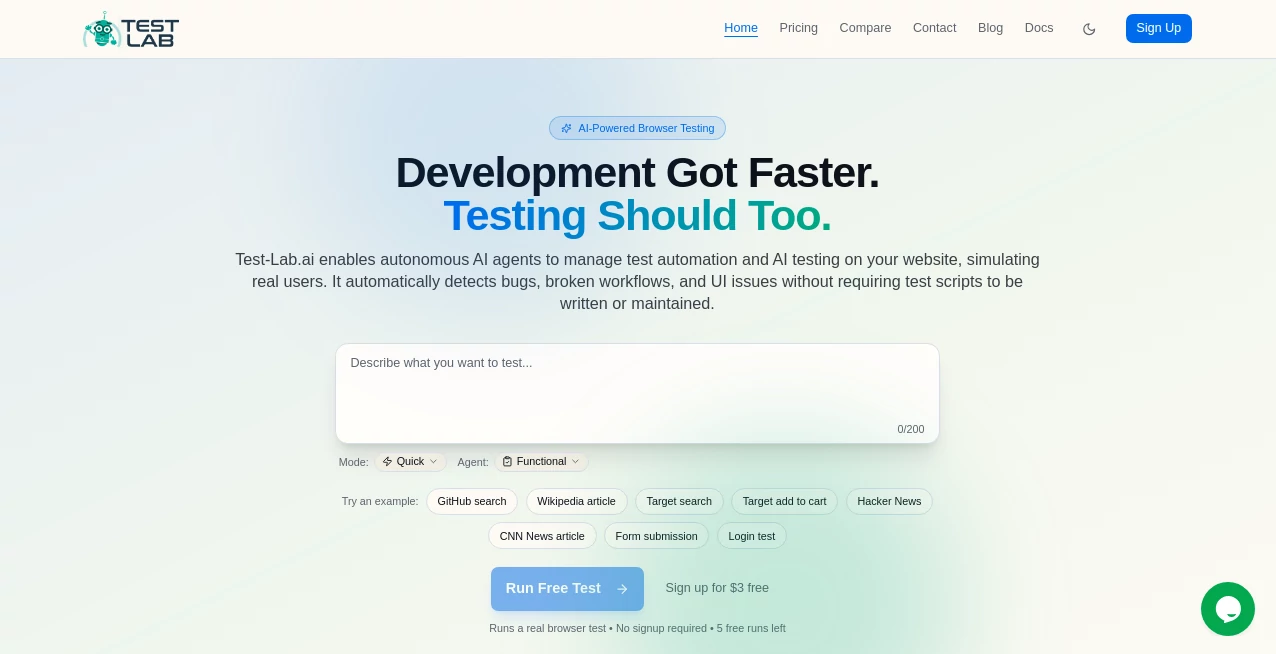
What is Test-Lab.ai?
Building something great is hard enough without spending half your sprint debugging flaky tests or manually clicking through the same flows again and again. This platform quietly takes that pain away. You give it access to your app (web, mobile, or API), describe what matters in plain English, and it starts writing, running, and maintaining tests that actually catch real bugs—not just pass when nothing changes. I’ve talked to devs who used to dread test week and now treat it like background noise because the tool keeps evolving with their codebase. That shift—from testing being a chore to being almost invisible—is what makes teams move faster and sleep better.
Introduction
Traditional test automation has always had a dirty secret: the maintenance cost often outweighs the benefit. Scripts break with every UI tweak, flakiness creeps in, and someone ends up babysitting them. This tool flips the script. It uses AI to understand intent (“user should be able to reset password”), generates robust tests, self-heals when selectors change, and reports failures with screenshots, logs, and repro steps that actually help fix things. It’s become a quiet favorite among startups and mid-size product teams who want reliable quality gates without hiring a dedicated QA army or drowning in brittle Cypress/Playwright scripts. The speed at which it learns your app and starts catching meaningful regressions is the part that still surprises people.
Key Features
User Interface
The dashboard feels alive but never overwhelming. Connect your app once (via browser extension or API key), give it a few natural-language scenarios, and watch tests appear as readable steps—not cryptic code. Results show up with visual diffs, annotated screenshots, and one-click repro. No need to dig through stack traces; everything points you straight to the problem. It’s designed so PMs, designers, and devs can all glance at it and understand what broke and why.
Accuracy & Performance
It catches real regressions—not just pixel shifts or false positives. Self-healing keeps tests green even after UI refactors. Execution is fast (parallel runs, smart prioritization), and failure analysis is precise: it groups similar errors, suggests fixes, and learns from past resolutions. Teams report dropping bug escape rates significantly while cutting test maintenance time by 70–90%. That’s not hype; it’s what happens when AI actually understands your product instead of just replaying recorded steps.
Capabilities
End-to-end testing for web, mobile (iOS/Android), and APIs; natural-language test authoring (“add item to cart, apply coupon, checkout as guest”), visual regression testing, accessibility checks, performance monitoring, cross-browser/device coverage, CI/CD integration (GitHub Actions, CircleCI, etc.), Slack/Jira notifications, and intelligent test flakiness detection & quarantine. It continuously learns from runs and user feedback, getting smarter at prioritizing what matters to your specific app.
Security & Privacy
Zero data retention after runs unless you explicitly save recordings for debugging. SOC 2 Type II compliant, end-to-end encryption, private execution environments, no training on customer apps or data. You control access scopes tightly—no blanket permissions. For teams handling sensitive user flows or IP, that level of care makes adoption feel safe from day one.
Use Cases
A SaaS startup runs full regression suites on every PR, catching UI breakages before they reach staging. An e-commerce team verifies checkout flows across devices after every redesign sprint. A mobile app developer catches iOS/Android inconsistencies without manual device farms. A fintech company ensures accessibility compliance and security flows pass before release. Wherever quality gates matter but QA bandwidth is tight, it quietly becomes indispensable.
Pros and Cons
Pros:
- Tests written in plain English—readable by the whole team, not just engineers.
- Self-healing & auto-maintenance slash long-term ownership cost.
- Deep failure insights (screenshots, DOM snapshots, repro steps) save debug time.
- Scales effortlessly from MVP to enterprise with parallel execution.
- Free trial generous enough to see real value before committing.
Cons:
- Still needs some initial guidance to understand complex domain logic perfectly.
- Advanced integrations (custom auth flows, API mocking) require paid tiers.
- Not ideal for purely unit/integration test suites (focuses on E2E & UI).
Pricing Plans
Free tier covers small projects with limited parallel runs and basic features—enough to validate real value. Starter plan unlocks unlimited tests, self-healing, and integrations for growing teams. Pro adds advanced reporting, accessibility/performance checks, and priority support. Enterprise brings custom SLAs, dedicated environments, and SSO. Pricing aligns with the time and bugs it saves—most teams see ROI in the first sprint.
How to Use Test Lab
Sign up (quick OAuth or email), connect your app via browser extension or API key. Describe 3–5 critical user flows in plain language (“user logs in, searches product, adds to cart, checks out”). Let it auto-generate initial tests or record a quick flow yourself. Run on demand or hook into CI. Review results—see failures with visual proof and repro steps. Approve good tests; the system learns and maintains them automatically. That’s the loop—describe once, trust forever.
Comparison with Similar Tools
Traditional frameworks (Cypress, Playwright, Appium) require constant maintenance and code ownership. Low-code tools often produce brittle or shallow tests. This one combines natural-language authoring, self-healing, and deep failure insights in a way few others do. It trades some granular control for massive time savings and team-wide readability—ideal when speed-to-confidence matters more than pixel-perfect test scripts.
Conclusion
Quality shouldn’t slow you down—it should let you move faster with confidence. This platform turns testing from a necessary evil into a background process that quietly protects your users and your velocity. When tests keep up with your code instead of holding it back, you ship more, break less, and spend your energy on building, not babysitting. For modern product teams, that’s not just nice—it’s essential.
Frequently Asked Questions (FAQ)
How much setup time is needed?
Most teams are running meaningful tests within 30–60 minutes of first login.
Does it work with single-page apps and complex auth?
Yes—handles React/Vue/Angular flows, OAuth, SSO, multi-factor, etc. very well.
Can non-technical people write tests?
Absolutely—natural language descriptions let PMs and designers contribute flows.
What if a test flakes?
Built-in flakiness detection quarantines and retries intelligently; learns from failures.
Is there a free trial?
Yes—generous free tier with full core functionality to prove value before upgrading.
AI Workflow Management , AI Testing & QA , AI Code Assistant , AI Developer Tools .
These classifications represent its core capabilities and areas of application. For related tools, explore the linked categories above.
Test-Lab.ai details
This tool is no longer available on submitaitools.org; find alternatives on Alternative to Test-Lab.ai.
Pricing
- Free
Apps
- Web Tools
Categories

Test-Lab.ai Alternatives Product

Website Clon…

Project Mela

Kimi K2.5

4ga Boards

Manifestly C…

langextract.…

vivgrid

Geekflare AI

Vibe Coding