
🧠 AI Quiz
Think you really understand Artificial Intelligence?
Test yourself and see how well you know the world of AI.
Answer AI-related questions, compete with other users, and prove that
you’re among the best when it comes to AI knowledge.
Reach the top of our leaderboard.

















Nano Banana AI
What is Nano Banana AI?
You know that feeling when you have a picture in your head but no way to bring it to life? A wild product concept, a scene from a story you’re writing, or just a fun visual you want to share with friends. Nano Banana takes that mental image and makes it real in seconds. Type a description, drop in a reference photo if you have one, and watch it create something sharp, colorful, and often better than you imagined. I’ve used it to mock up social media graphics that actually got engagement, and to help a friend visualize a book cover idea that had been stuck in her head for months. The best part? It feels less like using software and more like collaborating with a very talented friend who never gets tired.
Introduction
Most AI image generators promise the world but deliver either blurry results or images that look “AI-ish.” Nano Banana stands out because it focuses on making visuals that feel intentional and high-quality. Powered by advanced models (including Google’s latest), it excels at understanding your words, keeping characters consistent when you need them, rendering clear text inside images, and handling multiple reference photos at once. Whether you’re a marketer needing brand assets, a storyteller wanting to see your scenes, or just someone who likes making cool pictures, it removes the usual frustration and lets you iterate quickly. The results often have that polished, professional touch that makes people stop scrolling.
Key Features
User Interface
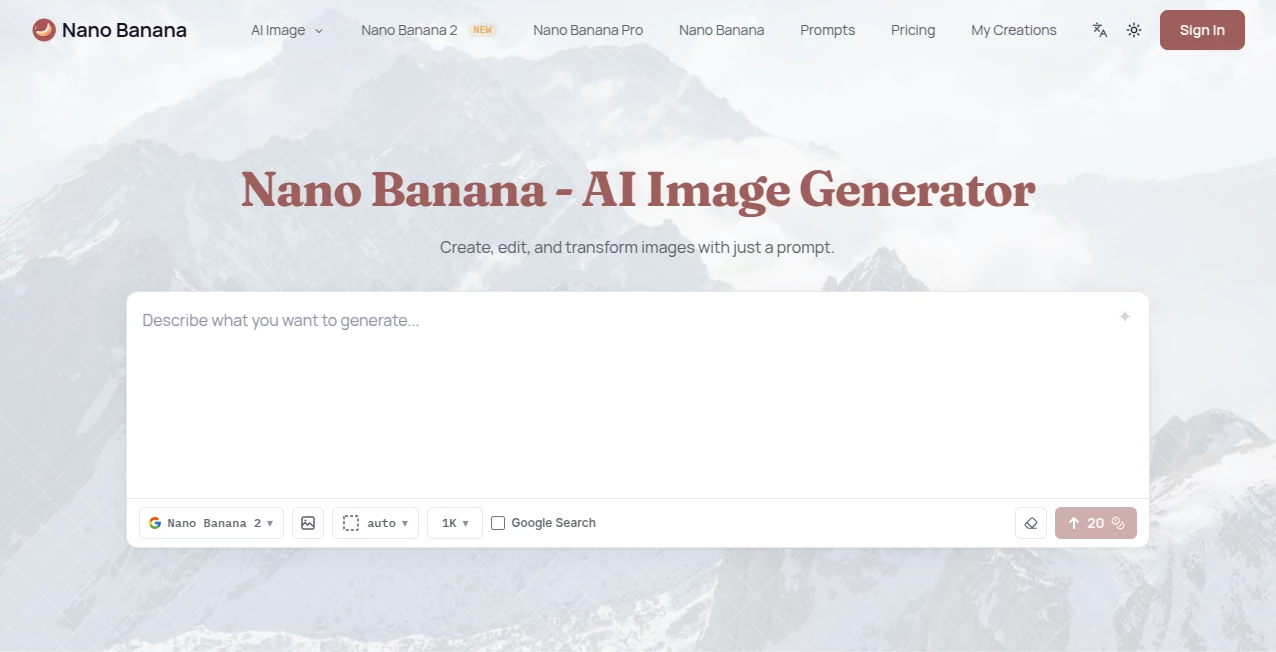
The interface is clean and welcoming. A big prompt box sits front and center, with an easy upload area for reference images right below. You can choose aspect ratios, select different AI models, and adjust a few simple settings without feeling overwhelmed. Previews load fast, and the whole experience stays in the browser—no downloads or complicated setups. It’s the kind of design that makes you want to keep playing with ideas rather than fighting the tool.
Accuracy & Performance
It shines at understanding what you actually mean. Prompt it for a photorealistic product shot and you get clean lighting and accurate details. Ask for a stylized illustration and it delivers with personality. Character consistency is particularly strong—you can keep the same person or object across multiple images without weird changes. Text inside images comes out readable, which is rare and incredibly useful. Generations are quick enough that you can try several variations without losing your creative flow.
Capabilities
You can generate from text alone, use one or multiple reference images (up to 14 in some cases), edit existing photos with natural language instructions, transfer styles, and create everything from cinematic scenes to clean product mockups, infographics, and character designs. It supports many aspect ratios and high-resolution outputs up to 4K. The combination of strong text rendering and multi-image understanding makes it especially good for branding, storytelling, and marketing visuals that need to look cohesive.
Security & Privacy
Your images and prompts are handled responsibly. The platform focuses on giving you control over your creations, with no unnecessary data retention for training purposes on user uploads. You can generate freely without feeling like your ideas are being stored or repurposed elsewhere.
Use Cases
A small business owner generates consistent product mockups with different backgrounds for their online store in minutes instead of hours. A writer visualizes key scenes from their novel to better describe them or share with beta readers. A social media manager creates eye-catching graphics and carousels that actually match their brand voice. A teacher turns lesson concepts into engaging visuals for students. Even hobbyists use it to bring silly ideas to life for friends or family. It fits anywhere you need visuals fast without hiring a designer.
Pros and Cons
Pros:
- Excellent character and style consistency across generations.
- Strong text rendering inside images for posters and explainers.
- Supports multiple reference images for more precise control.
- Fast iterations that keep your creative momentum going.
- High-resolution outputs suitable for professional use.
Cons:
- Free tier has limited credits, so heavy users will want to upgrade.
- Very complex or highly specific artistic styles sometimes need extra prompting.
- Best results still come from clear, well-written prompts.
Pricing Plans
You can start completely free with signup credits—no credit card required. This lets you test the quality on your own ideas right away. Paid plans give you more credits, higher resolution options, and full commercial rights for your creations. The pricing is straightforward and scales with how much you use it, making it accessible for casual creators and serious professionals alike.
How to Use Nano Banana
Head to the generator page and type your idea in the prompt box—be as descriptive as you like. Upload one or more reference images if you want to guide the style or subject. Choose your preferred aspect ratio and model if options are available. Hit generate and review the results. Like one but not quite perfect? Tweak the prompt or upload a different reference and try again. Download the winner in high resolution when you’re happy. The whole process is fast enough that you can explore several directions in one short session.
Comparison with Similar Tools
Many AI image generators struggle with keeping the same character consistent or rendering readable text. Nano Banana handles both noticeably better than most, especially when you feed it multiple references. While some tools feel slower or produce more generic results, this one delivers sharper, more intentional visuals with less frustration. It strikes a nice balance between creative freedom and reliable quality that many creators appreciate.
Conclusion
Turning ideas into visuals shouldn’t feel like a technical challenge. Nano Banana makes it feel like play again—quick, fun, and surprisingly effective. Whether you’re building a brand, telling a story, or just having fun with friends, it gives you the power to create images that look good and feel right. In a world full of average AI output, this one consistently delivers that extra spark of quality that makes you excited to create more. If you’ve been waiting for an image tool that actually understands what you want, this might be it.
Frequently Asked Questions (FAQ)
How many images can I generate for free?
You get free credits upon signup—enough to try several ideas and see the quality for yourself.
Can I use reference photos?
Yes, and it supports multiple references at once, which helps with consistency and style control.
Are the images good enough for commercial use?
Paid plans include full commercial rights with no attribution required.
Does it handle text inside images well?
Yes—one of its stronger points is creating readable, well-placed text compared to many other tools.
What if I don’t like the first result?
Just adjust your prompt or references and generate again. Fast iterations are one of its best features.
AI Photo & Image Generator , AI Image to Image , AI Art Generator , AI Design Generator .
These classifications represent its core capabilities and areas of application. For related tools, explore the linked categories above.
Nano Banana AI details
Pricing
- Free
Apps
- Web Tools
Categories

Nano Banana AI Alternatives Product

Banana Promp…

insMind

NanoEditor

Leonardo.ai
Pixfy AI
whisk ai

Nano Banana …
Nano Banana 2

Lexica AI
