
🧠 AI Quiz
Think you really understand Artificial Intelligence?
Test yourself and see how well you know the world of AI.
Answer AI-related questions, compete with other users, and prove that
you’re among the best when it comes to AI knowledge.
Reach the top of our leaderboard.


















TypingFirst
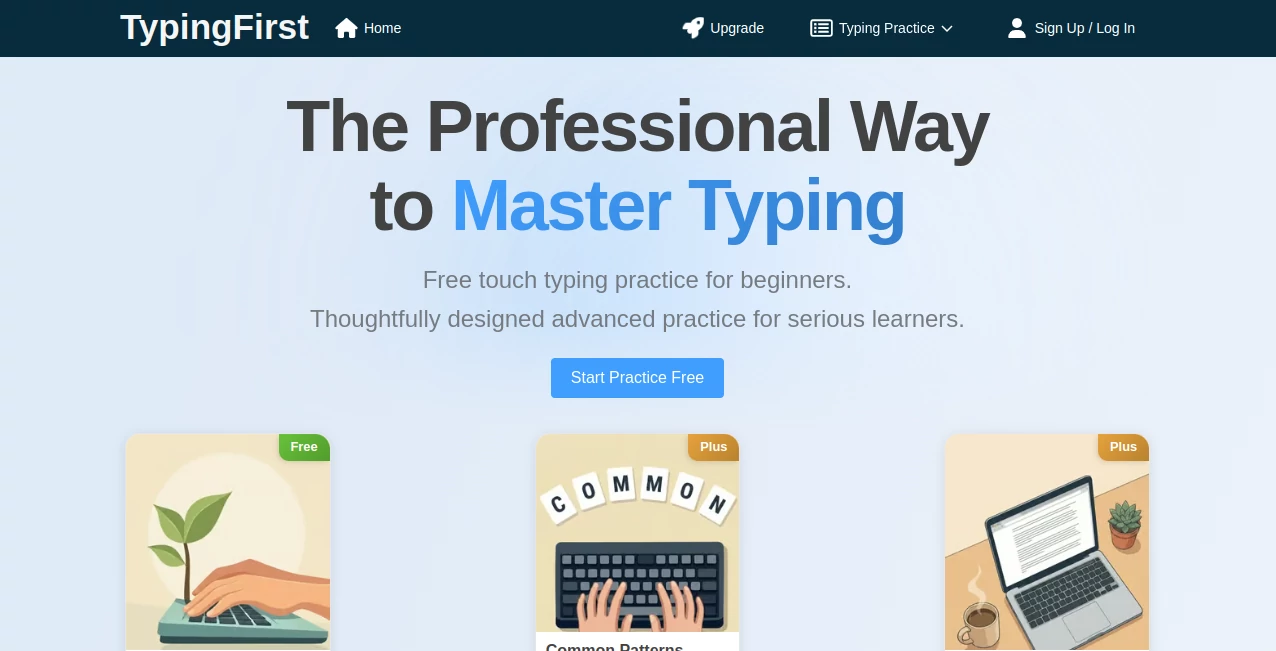
What is TypingFirst?
Remember the first time you tried typing without looking at the keyboard? It felt awkward, slow, and full of mistakes. TypingFirst takes that frustrating experience and turns it into something enjoyable and genuinely rewarding. Whether you’re a complete beginner hunting for the home row or someone chasing 100+ words per minute, this platform offers clear, progressive lessons that actually stick. I’ve seen colleagues go from two-finger pecking to smooth touch typing in weeks, and the difference in their daily workflow is night and day.
Introduction
In today’s world, typing is no longer optional—it’s essential. Yet most of us were never properly taught. We hunt and peck, glance down constantly, and accept mediocre speed. TypingFirst changes that by offering structured, professional-grade touch typing practice that builds real muscle memory. The lessons are thoughtfully designed, starting with fundamentals and gradually introducing speed drills, accuracy challenges, and even specialized symbol practice. It’s become a favorite for students, professionals, remote workers, and anyone tired of feeling limited by their keyboard skills. The best part? You can start seeing measurable improvement in days, not months.
Key Features
User Interface
The design is clean and distraction-free. Lessons load instantly with a clear keyboard visualization that highlights the next keys you should press. Real-time feedback shows your accuracy and speed as you type, with gentle corrections instead of harsh red marks. Progress tracking feels motivating rather than overwhelming. It works beautifully on both desktop and mobile, so you can practice during a commute or quick break. Nothing flashy—just focused, effective practice that respects your time.
Accuracy & Performance
The system is precise in tracking your habits. It identifies weak keys and builds custom exercises around them. Speed tests feel fair and well-calibrated, and the gradual difficulty curve keeps you challenged without frustration. Users consistently report noticeable gains in both accuracy and words-per-minute after regular sessions. The feedback is constructive, helping you build proper technique instead of just hammering keys faster.
Capabilities
It covers everything from basic home-row mastery to advanced speed drills, number rows, symbols, and even specialized practice for programmers or data entry roles. You get timed tests, progress reports, error analysis, and adaptive lessons that adjust to your current level. The platform supports multiple languages and keyboard layouts, making it accessible for international users. Whether you want casual daily practice or serious training to reach professional speeds, it has the depth to support your goals.
Security & Privacy
Your practice data stays private. No aggressive tracking or sharing of your progress. You can practice anonymously if you prefer, and there’s no pressure to create an account until you want to save your statistics. It’s a refreshing, low-pressure environment focused purely on helping you improve.
Use Cases
Students use it to build confidence before exams or assignments that require fast typing. Office workers improve their efficiency and reduce daily fatigue from bad posture and constant looking down. Remote professionals prepare for online interviews or meetings where quick responses matter. Writers and content creators increase their output by removing the mechanical barrier of slow typing. Even gamers sometimes use it to improve in-game chat speed. Basically, anyone who spends time on a keyboard benefits.
Pros and Cons
Pros:
- Progressive lessons that build proper technique instead of bad habits.
- Clear, motivating feedback that actually helps you improve.
- Works for absolute beginners and advanced typists alike.
- Free core features are genuinely useful—no heavy paywall to start.
- Clean, focused interface that keeps you practicing longer.
Cons:
- Advanced analytics and unlimited tests require a paid plan.
- Some specialized keyboard layouts have fewer practice texts.
Pricing Plans
The free version offers solid daily practice and core lessons—enough for most people to see real progress. Premium unlocks unlimited tests, detailed performance analytics, ad-free experience, and extra practice modes. It’s priced reasonably for the value, especially considering how much time better typing skills can save you over months and years.
How to Use TypingFirst
Visit the site and start with the beginner lessons if you’re new, or jump straight into speed tests if you already know the basics. Follow the on-screen prompts, keep your fingers on the home row, and try not to look down. Do short daily sessions rather than long infrequent ones. Review your accuracy reports regularly and focus on weak keys. Consistency beats intensity—ten focused minutes a day will take you further than sporadic marathon sessions.
Comparison with Similar Tools
Many typing tutors feel outdated or overly gamified with distracting animations. Others are too basic and stop being useful once you reach intermediate level. TypingFirst strikes an excellent balance: professional method, clean design, and enough depth to keep improving even after you’ve reached solid speeds. It focuses on real skill building rather than just high scores, which makes the improvement more sustainable and practical.
Conclusion
Good typing isn’t flashy, but it quietly transforms how much you can get done in a day. This platform makes mastering that skill approachable, effective, and even a little enjoyable. Whether you’re starting from scratch or trying to break through a speed plateau, it gives you the structure and feedback needed to improve with confidence. In a world where we spend so many hours at the keyboard, investing a bit of time here pays dividends every single day.
Frequently Asked Questions (FAQ)
How long until I see improvement?
Most people notice better accuracy and comfort within the first week of regular practice.
Do I need to create an account?
No—you can start practicing immediately. An account is optional for saving progress.
Is it suitable for complete beginners?
Yes—the lessons start from absolute basics and build up gradually.
Can I practice on mobile?
Yes, though desktop or laptop gives the best experience for building proper technique.
Does it support different keyboard layouts?
It supports major layouts including QWERTY, AZERTY, QWERTZ, and more.
These classifications represent its core capabilities and areas of application. For related tools, explore the linked categories above.

TypingFirst Alternatives Product

Jamy.ai | Au…

Linkflare

Zivy

ChatGPT

eesel AI

Flow Veo 3

GameClick.io
MeetAssist

ace.me
