
🧠 AI Quiz
Think you really understand Artificial Intelligence?
Test yourself and see how well you know the world of AI.
Answer AI-related questions, compete with other users, and prove that
you’re among the best when it comes to AI knowledge.
Reach the top of our leaderboard.


















UGCraft

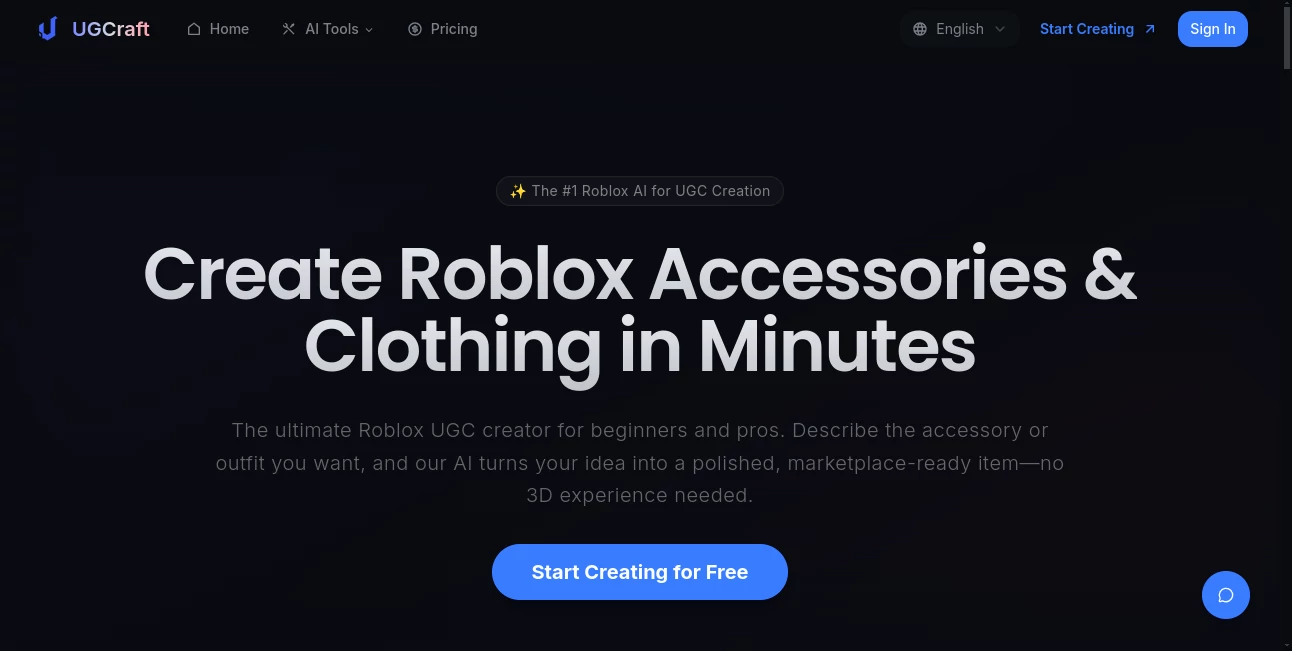
What is UGCraft?
UGCraft revolutionizes the Roblox universe by empowering creators of all levels to craft stunning accessories and outfits with effortless precision and speed. This groundbreaking platform transforms simple ideas into marketplace-ready 3D masterpieces, unlocking endless creative potential and turning passion projects into profitable ventures. Whether you're a newbie dreaming of your first hat or a seasoned designer chasing the next viral trend, UGCraft delivers professional results that feel magical, making it an absolute must-have for anyone serious about dominating Roblox UGC.
Introduction
In the vibrant world of Roblox, where imagination fuels fortunes, UGCraft stands tall as the ultimate game-changer for user-generated content. Launched to democratize high-quality design, it eliminates the steep learning curve of traditional 3D modeling, allowing anyone to describe a vision—like "gothic lolita dress with lace details"—and watch it spring to life in minutes. Creators rave about how it has skyrocketed their productivity, with stories of first-time sellers raking in Robux from items that once would have taken days to prototype. UGCraft isn't just a tool; it's a creative accelerator that blends cutting-edge AI with Roblox's spirit, fostering a community where bold ideas flourish and earnings follow suit.
Key Features
User Interface
UGCraft's interface is a breath of fresh air—clean, intuitive, and incredibly user-friendly, designed to feel like an extension of your imagination rather than a hurdle. Start with a simple text prompt or image upload, and the streamlined dashboard guides you through generation with zero clutter. Real-time previews let you tweak on the fly, while seamless export options ensure your creations are Roblox-ready in seconds. It's so polished that even absolute beginners feel like pros from the first click, praising its responsive design that works flawlessly on any device.
Accuracy & Performance
What truly sets UGCraft apart is its unmatched accuracy, producing models that nail proportions, textures, and details with laser-like precision every time. Generation times clock in under two minutes, even for intricate designs, thanks to optimized AI that handles complex requests without a hitch. Users consistently highlight its reliability—whether crafting cyberpunk horns or fluffy cat ears, outputs are consistently high-fidelity and compliant, slashing revision time and boosting confidence in every creation.
Capabilities
UGCraft's powerhouse capabilities span text-to-3D and image-to-3D generation, supporting everything from edgy accessories like bloody bone wings to elegant outfits like fire-shaped axes. With PBR texture support, unlimited exports in FBX and GLB formats, and access to all design styles—from gothic to mystical—it empowers endless variations and prototypes. Built-in compliance checks ensure seamless Roblox uploads, while commercial rights give you full ownership to monetize freely, making it a versatile dream for creators pushing boundaries.
Security & Privacy
UGCraft prioritizes your peace of mind with robust security, keeping all creations private and watermark-free from the start. End-to-end encryption protects your designs, and you retain complete commercial ownership, ensuring no one else can claim your genius. This commitment to privacy builds unbreakable trust, allowing creators to experiment boldly without fear, knowing their intellectual treasures remain safely yours alone.
Use Cases
Beginners use UGCraft to launch their Roblox journey, turning whimsical ideas into sellable hats or necklaces that earn Robux overnight. Professional designers accelerate trends, generating dozens of variations to flood the marketplace with must-have items like gothic necklaces or demon horns. Hobbyists recreate reference images for personalized avatars, while teams collaborate on themed outfits for games, all while enjoying the thrill of instant, high-quality results that captivate the community.
Pros and Cons
Pros:
- Blazing-fast generation—up to 100x quicker than manual modeling, freeing you for pure creativity.
- Stunning accuracy with Roblox-optimized outputs that upload flawlessly.
- Full commercial rights and unlimited exports, turning hobbies into revenue streams.
- Intuitive for all levels, unlocking pro results without any prior experience.
Cons:
- Credit-based system may require upgrades for heavy users, though plans are affordably flexible.
- Best with clear prompts, but even vague ideas yield impressive starting points.
- Focused on Roblox UGC, so general 3D needs might pair well with editing tools.
Pricing Plans
UGCraft offers flexible, value-packed plans starting with the Creator tier at just $12/month (billed annually), delivering 300 credits for 15 accessories, image-to-3D, and priority processing—ideal for starters. The Pro plan, at $24/month, unleashes 700 credits for 35 items, all styles unlocked, PBR textures, and top-tier support, making it the powerhouse choice for serious sellers. Both include unlimited exports and full rights, with a money-back guarantee ensuring risk-free exploration of this creative goldmine.
How to Use UGCraft
Getting started is a breeze: Sign up, describe your vision in the text prompt—like "cyberpunk demon horns with neon glow"—or upload a reference image. Hit generate, and in under two minutes, admire your polished 3D model with variations to choose from. Download in Roblox-friendly formats, upload directly to the marketplace, and watch the Robux roll in. Remix favorites for endless tweaks, and scale up with plans that match your ambition—it's that simple to go from concept to cash.
Comparison with Similar Tools
Unlike generic 3D generators that demand post-processing and lack Roblox compliance, UGCraft delivers upload-ready perfection out of the box, saving hours and headaches. While competitors like Blender require steep skills, UGCraft's AI democratizes design for true beginners, outperforming in speed and specificity. It's the clear leader for Roblox creators, blending ease, quality, and monetization in a way no other tool matches, making it the smartest investment for UGC success.
Conclusion
UGCraft isn't just an AI tool—it's a launchpad for Roblox dreams, blending innovation with accessibility to empower creators like never before. From sparking viral accessories to building sustainable income, its seamless magic elevates every user, turning "what if" into "watch this." If you're ready to craft, conquer, and cash in on Roblox's booming economy, UGCraft is your unbeatable ally—dive in and discover why it's hailed as the #1 choice for UGC excellence.
Frequently Asked Questions (FAQ)
Do I need 3D skills to use UGCraft?
Absolutely not—it's built for beginners, handling all technical details so you focus on fun ideas.
Can I sell my creations on Roblox Marketplace?
Yes, with full commercial rights, your items are yours to monetize and earn Robux from.
How fast does it generate models?
Under two minutes per item, with priority queues on paid plans for even quicker results.
What file formats are supported?
Unlimited exports in FBX and GLB, optimized for direct Roblox uploads and easy editing.
Is there a free trial?
Plans include a money-back guarantee, letting you test-drive the magic risk-free.
AI Design Generator , AI Game , AI 3D Model Generator , AI Text to 3D .
These classifications represent its core capabilities and areas of application. For related tools, explore the linked categories above.
UGCraft details
This tool is no longer available on submitaitools.org; find alternatives on Alternative to UGCraft.
Pricing
- Free
Apps
- Web Tools
Categories

UGCraft Alternatives Product

Logo Animati…
Project Genie
Ai logo maker

Luma AI

insMind

MakeMyOC

AIImageEdit

MuseCraft.AI

Freepik
